

Upgrade Your Drupal Skills
We trained 1,000+ Drupal Developers over the last decade.
See Advanced Courses NAH, I know EnoughIn the latest version of Site Studio, Acquia has introduced a game-changing feature that is sure to challenge Drupal Core's Layout Builder as the premier go-to tool for site builders. Site Studio already has a superb component building and editing experience, but now users can add and edit components live on the page.
In this post, we'll go in-depth on this new feature, plus other recent updates to Site Studio.
Visual Page Builder in Acquia Site Studio
On previous iterations of Site Studio, users could edit existing components on the page live via the Page Editor, but the components had to already exist in the layout canvas field. This operated in a similar fashion to other Drupal page builder elements such as panels, layout builder, paragraphs, etc., and only is accessible through contextual links. If a user wanted to add a brand new component to the page, they had to add it via the node edit form. But now, all of that changes.
While the layout canvas is still accessible via the node edit form, content editors can completely assemble a page from the front end, providing an entirely new meaning to the layout canvas field concept. Other than page creation or administrative settings, content editors may have little need to open the node edit form when adding page content. Of course, this all depends on how your site's content types have been architected. Here is a brief tour of the new page builder experience:
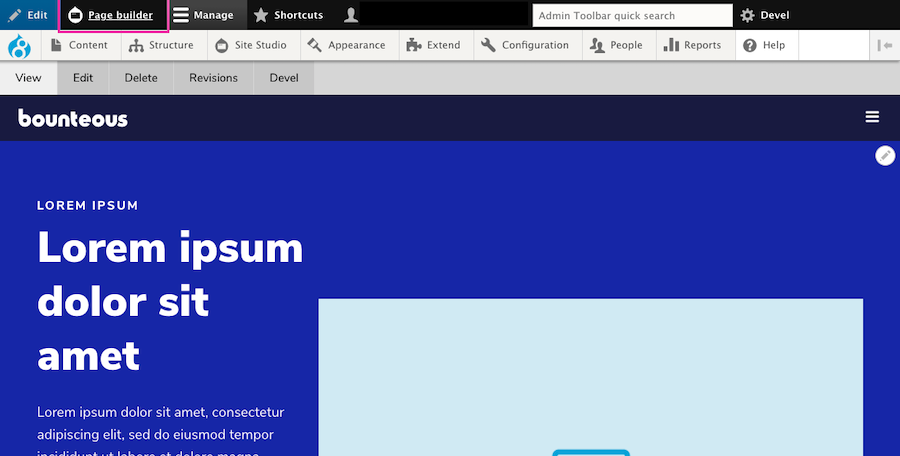
When a user is logged in and on a page that utilizes Site Studio and a layout canvas, they will see a new Page Builder button on the admin toolbar.
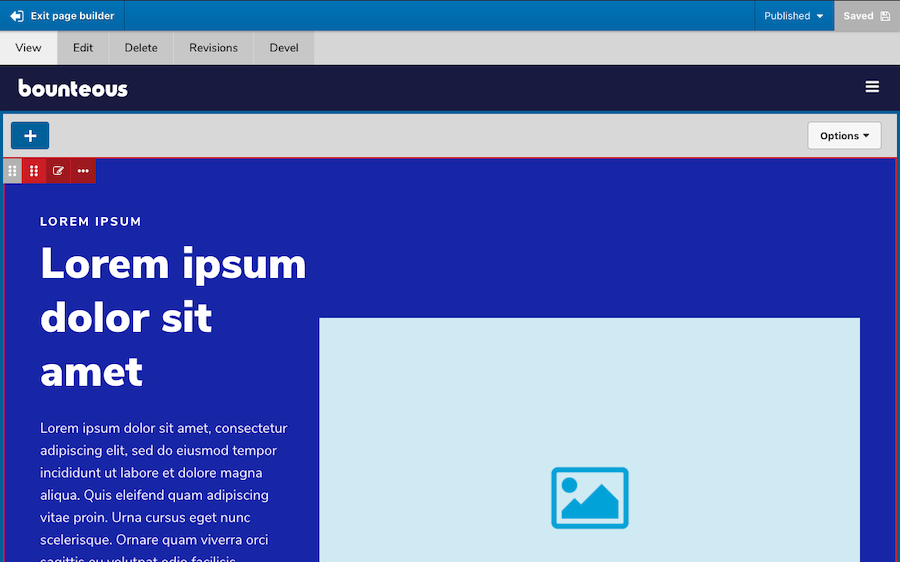
Enabling page builder mode will allow users to add, edit, move, delete, duplicate, and/or save as component content. Users can also save the entire page layout.
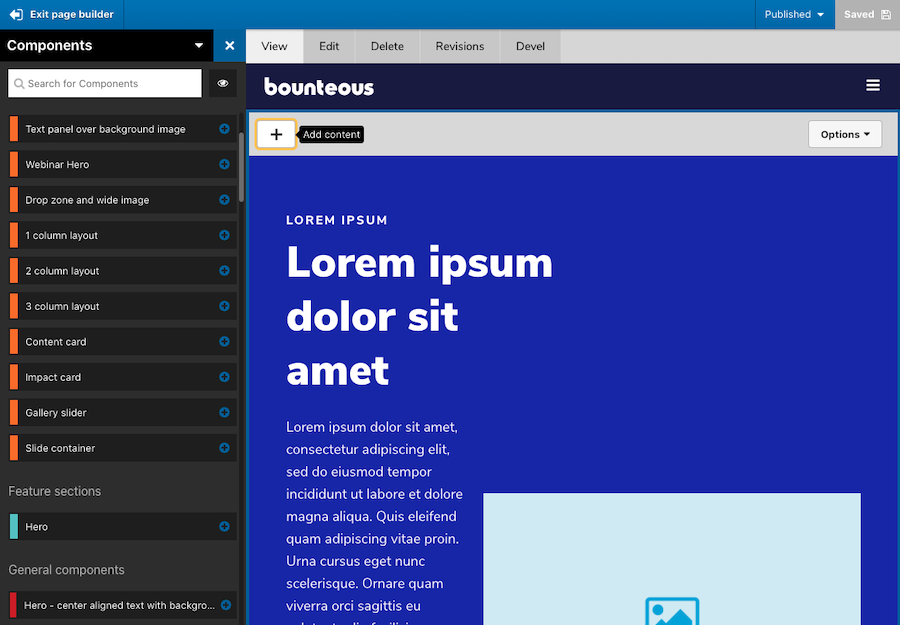
As great as this new experience is, it's also helpful to see consistency in how new components or elements can be added via the left side, off-canvas components drawer, making it seamless. Users don't have to re-learn how to add components, but rather get an improved page building experience.
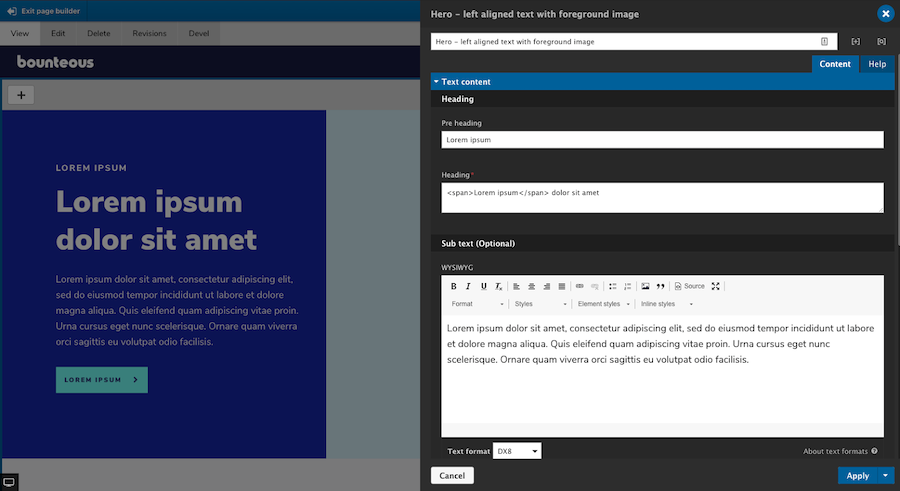
The component editor itself also behaves the same way whether users are using the page editor, visual page builder, or the layout canvas on the node edit form.
The visual page builder is included as a new submodule within Site Studio and has to be enabled before it can be used.
Pro Tip: Developers should also be aware that anytime you update Site Studio, enable new submodules, and/or create or alter components, it's important that you run the import and rebuild functions. This can be done from the Site Studio UI or via Drush commands. For additional information on how the visual page builder works, visit Acquia's Site Studio documentation.
Site Studio's new visual page builder provides a whole new meaning to "what you see is what you get." The page building experience for content editors has never been better or easier, and this new feature alone should be enough to convince you to use Site Studio on your next project.
Other Site Studio Highlights
While the addition of the Visual Page Builder is kind of a game-changer for Site Studio, the latest release also includes some other smaller but no less important features, including some accessibility enhancements, rel attribute support, and more.
Sync Batch Limit Overrides
On previous builds of Site Studio, admins were limited to importing 10 configuration items at a time via Site Studio Sync to reduce the amount of memory required. Acquia has now exposed a method allowing admins to override the default setting. By adding the following to a Drupal settings file, you can increase the number of configuration items that process per import batch:
$settings['sync_max_entity'] = 20;This is one of the few items of Site Studio that is controlled by a developer and must be updated in code. Users should also be aware that by increasing this value, more memory will be required and can lead to issues.
Rel Attribute Support
Acquia has also added support for the Rel attribute on the link element. This attribute defines the relationship between the linked resource and the current document. Previously, if users wanted to have Rel attribute options on links, they had to be added by a component builder. Now, when a link uses the type "URL" and the target is set to "New window," a group of checkboxes will automatically appear for the following options:
nofollow- prevents backlink endorsement, so that search engines don't pass page rank to the linked resource.noopener- prevents linked resources from getting partial access to the linking page, something that is otherwise exploitable by malicious websites.noreferrer- similar tonoopener(especially for older browsers), but also prevents the browser from sending the referring webpage's address.
The new Rel attribute can be found on the Link, container, slide item, and column elements. It should be noted for the SEO conscious, that the use of nofollow will stop search engines from passing page rank endorsements to the linked resource. This is often used in blog comments or forums, as these can be a source of spam or low-quality links.
Google and other search engines require nofollow to be added to sponsored links and advertisements. Additionally, the use of the No referrer toggle can affect analytics because it will report traffic as direct instead of as referred.
Nolink Token Support
One under-the-radar update from Acquia is the ability to use the token on Site Studio menu templates. For any experienced site builders, you probably know about the ability to use the token on menu links to render them as a heading, etc., and without a link attached. It's a great way to add sub-level menu headings.
On previous builds of Site Studio, users were unable to use the token as it would still render as an anchor tag with an empty href. In 6.5, using will result in the menu item rendering with a tag instead. Nothing needs to be done to start using the token, though, your menu styles may need to be updated to account for the usage of tags. Also to note, if a different HTML element has been specified in your Menu Template, that setting will take priority.
Accordion Accessibility Enhancements
Accessibility is a moving target. Keeping a site up-to-date with accessibility enhancements is one of the more important responsibilities we have and Site Studio is no exception.
In this version, Acquia has added some accessibility improvements to the Accordion element for the end-user. The header links will now have an aria-expanded attribute, which toggles between true and false when expanded and collapsed, respectively.
Accordion header links will now use aria-disabled="true" if the parent Accordion tabs container has the Collapsible setting toggled OFF. This is only applied when the item is expanded, to indicate to a screen reader that the panel cannot be collapsed manually.
When the panel is collapsed because a sibling accordion item is expanded, the aria-disabled attribute is removed. Accordion header links now have aria-disabled="true" permanently set if the accordion item has been disabled through Navigation link settings.
Bug Fixes and Other Improvements
The latest build of Site Studio also includes a bug fix that is related to sync package entity dependencies not being removed if they were no longer being used on the entity. Essentially, when a sync package contained entities that have had their dependencies updated, the sync package would contain both the original and the new dependency.
For example, if your component exists in a package, you then update that component's default image, both image files would be included in the sync package rather than just the latest one. Now the old dependencies should no longer appear in that sync package. This could also potentially reduce the size of sync packages in the case where multiple, deprecated dependencies were present.
Font Display Property Options
And last but not least, Acquia has now added a font-display property option to the Font library settings page. This CSS property, when used, will determine how a font face is displayed based on whether and when it is downloaded and ready to use. It is a very small feature update but a useful one; although, only developers really need to worry about implementing it.
Summary
As with any Drupal updates, it's recommended to fully test these new features and fixes (as applicable) on your site's development environment before deploying to production. You should also have a backup of any code or databases before upgrading. Version 6.5 of Site Studio is not backwards compatible.
With the addition of Visual Page Builder, Site Studio is just further cementing itself as an excellent component and page builder tool for Acquia-hosted Drupal applications. The more improvements they make, the harder it is to imagine building a site without it.
For additional information on Site Studio, check out some of our other posts:
With so many products and services available these days to assist with your website needs, it can be difficult to navigate all the options and determine the right solution for your business.
At Bounteous, we do a lot of work with Drupal and Acquia products and services. Over the past year, we've spent considerable time working with Site Studio, developing training materials for clients, creating resources, and working through various projects. Let us give you a brief tour of Site Studio and why it's perfect for your next project.
What Is Site Studio?
Site Studio, formerly known as Cohesion, is a Drupal product from Acquia that makes it easy to build a component-based website. Site Studio transfers the Front-End theming layer to the UI and gives content editors and marketing managers more control than ever over their sites. It provides a new site-building paradigm that's far more efficient than traditional builds.
The tools and features that come with Site Studio provide an excellent base to start with that allows client-side developers to contribute to a build from Day One. The low-code nature of Site Studio shields content editors from the Drupal backend and allows developers to focus on the overall content editing experience they're creating. It also provides your development team the ability to create elegant, performant, more powerful sites in half the time.
Let's break down the top points that contribute to the above philosophy.
Low-Code
Site Studio is designed to be low-code. This can mean a lot of things for different systems; however, in the context of Drupal, this is an important point to highlight.
Drupal inherently has its own hooks and other functions in place that make it a very powerful but also customizable CMS. However, to be able to use these ideas and functions correctly requires some prowess that a developer who has never touched a Drupal site will most likely not possess.
This is where the low-code nature of Site Studio really shines. New developers do not need to learn hooks, template suggestions, or any of the other Drupalisms that you will find on most sites. By layering Site Studio on top of Drupal, we now have a mechanism that takes care of the heavy lifting that we as developers use to write in custom functions. Site Studio may be low-code, but it is certainly not low on features.
Easily Extendable
Site Studio comes with a myriad of predefined components and styles thanks to the DX8 UI Kit. After initial setup, developers are immediately given access to over 50 different components consisting of sliders, cards, accordions, and more. While this is all great to have at the start of site-building, Site Studio takes it one step further.
Every single component that comes with Site Studio is extendable. Not only does this allow developers without previous Drupal experience to build rich editing experiences—but it also gives a noticeable jump start to most any component the developer is tasked to build.
Need to build a slider but the existing component is missing a field you need? No problem! Extend the existing slider and add your field. All of which takes minutes and no custom code to be written. Site Studio has a ton to offer out-of-the-box, but there is far more you can do with it.
Staying True to Drupal
There's an important synergy to highlight here. Site Studio comes with wonderful and easy-to-use features right out-of-the-box, which is one of the main draws to using it on any project. But at the end of the day, Site Studio is using Drupal as its backend—and we as developers need to be sure things are done correctly and the overall health of the application is kept at the forefront.
The beauty of Site Studio is how it uses features of Drupal developers love and simply extends them rather than rewriting them. By using these strengths that come with Drupal, there's essentially no more complexity in debugging, testing, or deploying sites that use Site Studio. This translates into a developing experience that all developers, both experienced and novice alike, can use together.
Starting With the Backbones of Site Studio
Composer, configuration management, and local environment: these are things a Site Studio implementation will not shake up too much from the stock Drupal setup we already know.
When getting a client resource up to speed, it's important to make sure that these fundamentals are understood and configured correctly from the beginning to ensure the developer is set up to succeed. Let's break down each of these points.
Site Studio - Composer
Composer is still behind the scenes managing all packages and modules just like a stock Drupal site. The only difference here is the inclusion of acquia/cohesion in the composer.json file.
However, for a developer working with Drupal and Composer for the first time, it can be a bit daunting to make a change to the project. The understanding of Composer's inner workings and how it relates to a Site Studio and Drupal implementation is crucial for any developer to contribute to a Site Studio project.
Site Studio - Local Environment
Again, no real changes here when developing with Site Studio. Something we have found that can greatly benefit any developer, whether it be internal or client-side, is to choose a single virtual environment scheme for all Site Studio implementations. Once a standardized system has been sanctioned, you can build custom tooling for said system.
This is a massive save when it comes to time constraints and debug headaches. When using Site Studio, there is a Drush command that updates all Site Studio templates and components. Manually running this one command may seem trivial on the surface—but when added to our automated tools for resetting a local environment, it proved to be one of those little things that was worth more than its weight in code.
Site Studio - Configuration Management
With Site Studio, this is probably the biggest change you will first notice. Just about every setting, component, and template in Site Studio is tracked in configuration. While this is a wonderful part of Drupal 8 that Site Studio utilizes well, it can get a bit confusing when trying to decipher exactly what these YAML files are doing when it comes to a pull request and working alongside other developers.
The best way to handle these config files is to pull down the branch of the pull request and import the config to be sure that everything is showing as expected and there are no errors on import.
What's New in Site Studio
Like with any Drupal Module, continuous development and improvements are essential in keeping your module relevant and in use. Since we first got our hands on Site Studio in early 2020, we've seen a ton of improvements. We started with version 5.7.9 and are now working with version 6.4.0. The following are some of the improvement highlights.
Component Field Repeaters
In version 6.3, Acquia added the Component field repeater feature to Site Studio. This is one of the most essential and important features added to date. Previously, repeater patterns were only available via the Site Studio Views Template builder. Think of this like a For Each loop, a control flow statement for traversing items in a collection.
Without the ability to repeat field items in components (a feature that is common in Drupal Site Building), we had to create a parent/child component relationship using dropzones. This method was okay and got the job done, but there were some limitations with the accordion components. Some of the issues with using this approach were that we could not limit which components could be added to a dropzone nor could we save a component as component content (more on that later).
The only other option was to create components with limited cardinality or item limits. That's okay in some cases, but when considering an accordion component or a carousel, users usually want unlimited. But now with field repeaters, that can be done directly on the component, making Site Studio even more powerful than before.
For example, to build a component using Site Studio's accordion elements, you no longer need to rely on the drop zone and separate components. Users can set a field repeater on the accordion item and repeat as needed. This simplifies the component building experience, making it even more intuitive.
Component Content Improvements
In the newest version of 6.4, Acquia adds two major improvements to component content. For those not familiar, component content is a saved component created on a page that allows users to reuse it on multiple pages but have a singular point of entry in order to update.
Previously, component content could only be created via a layout canvas field and saved from there. This is fine for instances where you create a component that you decide to reuse after the fact, but what about a component that you'd like to go through an approval process before it ever ends up on a page? Now, component content can be created directly from the list of component content which now matches a more standard entity behavior.
In addition to being able to save component content from the Component Content Manager, you can also now save components as component content when using a dropzone element. Previously, components using the dropzone element could not be saved as component content, thus limiting what you could actually save. This was challenging to deal with since, in order to create the effect of a repeating field, we had to rely on dropzones beyond their original intended scope. Now, any component can be saved as component content.
There are plenty of other improvements and fixes. It's clear that Acquia is committed to continuously improving Site Studio, and we would expect nothing less.
Why You Need It for Your Next Project
Creating Drupal websites with Site Studio has never been easier for the content editor or the developer. No matter their experience, anyone can contribute to a Site Studio project. With all the feature-rich aspects that are available today, as well as the ones to come in future updates, we can all see why Site Studio is an important shift into modern application and website development.
Gone are the days when there are hard lines in the sand between content editor and developer. Site Studio is a welcomed tool because it echoes the same mantra that Drupal and the community have had since its inception: let's build something together.
Want to learn more about Site Studio and what it can provide for your client solutions? Check out our article that takes a closer look at Site Studio as well as how we built a site in 10 days.

Normally, being asked to build a component-rich website in 10 days might feel like a tall task that requires a superhero effort from all parties involved. But with Acquia’s Site Studio, formerly Cohesion, that’s exactly what we did.
There were no panic attacks and while we might look like superheroes, it didn’t require a superhero effort. Working alongside Marketing and Experience Design (XD), we took the requirements for a component-driven, single-page site and built it in a little over a week with ease.
What We Needed
Here at Bounteous, specifically within the Drupal Practice, we’ve spent a lot of time and effort learning about Site Studio. We completed the Early Adopter Program, we’ve earned certifications, and we’ve even written about it. It was time to put Site Studio to the test and our own Co-Innovation initiative was the perfect candidate for it.
We needed a single landing page site, one that would be a rich, component-driven page that was also elegant, bold, and looked great on any device. We needed a webform that would drive visitors to download our Co-Innovation Manifesto along with all the other behind-the-scenes elements involved with a build. And, it needed to be built in 10 days to coincide with a webinar that was being hosted by our CEO, Keith Schwartz.
Building a site in 10 days should not feel like a big deal, but to do it right, you need Marketing, XD, and Development to come together quickly to provide an actionable plan, provide design direction, and architect it. But, we are always up for a challenge.
How We Did It
So, how did we build a component-rich website in 10 days? The easy answer is that Bounteous is awesome and that’s just how we roll. We’re experts at what we do and there’s no challenge we can’t meet. But a more specific answer is, we used a combination of Drupal, Acquia Site Studio, and UI Kit to complete our project in such a short timeline.
We met with Marketing, where they outlined the requirements, which were to launch a landing page to coincide with a webinar. But how could we pull this off? We were all immediately on the same page: Site Studio. This gave Bounteous and the Drupal Team a great opportunity to finally put Site Studio’s promises to the test.
In addition to using Site Studio, we also suggested Acquia’s UI Kit. UI Kit was designed and built to accelerate the design and development process of a component-driven website. It provided us with the ability to build a Drupal site at scale, fast and efficiently.
Besides saving significant time on the build, another benefit of UI Kit was that marketing was able to view demos of each component, allowing them to quickly and easily select the elements they wanted us to use.
Not only that, but UI Kit provides templates using Sketch, an app that allows for rapid prototyping and collaboration. All we had to do was apply our color palette and typography to keep our brand consistent with our other digital properties. We even made a few structural and functional tweaks with ease to make the site shine. This made our conceive phase super fast, efficient, and it set everyone's expectations about how the site would behave once it was assembled and in the browser.
For the build, we quickly spun up a new Drupal site on our Acquia Site Factory instance. We configured our site based on Drupal standards. We installed Site Studio, imported UI Kit, and started building. From there, all that was needed was for us to add our color palette and typography. Next, we took advantage of Site Studio's ability to easily update and adjust components to fit within the Bounteous style guide.
There was no backend coding needed. This led to faster deployment and put the site into the hands of our stakeholders faster than ever before. It was just that easy. Once everything was in our production environment, we added content and published it. All in ten days, with plenty of QA time to spare.
Easy Building & Theming with Acquia’s Site Studio
As we use it more and more, Acquia’s Site Studio continues to be an exciting product; one that lives up to the hype. Site Studio makes the process of building and theming sites from start to finish smooth and easy. I am personally excited to continue to push the boundaries of what can be accomplished with Site Studio and the projects that it will benefit. And as for the Co-Innovation site, we have plans to expand it even further.
As a developer, building a partially or fully headless Drupal site can feel like a daunting task. There are always more questions than answers when getting started. Like with any new site build, determining the build path in the beginning is crucial to ensure your site is scalable. Acquia offers a site starter kit called Acquia CMS, which is a pre-packaged version of Drupal and an enterprise content management system.
To improve headless applications and make API management and site building easier for front-end developers using Acquia CMS, Bounteous collaborated with Acquia to co-develop a Headless Dashboard module for Acquia CMS. This module is currently in beta but will be able to get you up and running via Next.js with a Headless site with relative ease. Let’s take a look!
Acquia CMS Headless Users
In Acquia CMS Headless, there are two general types of users:
Content Managers
Whom the CMS is built for, manage the structured content that gets served to third party consumers such as node.js websites, front-end apps, IoT integration (e.g. smart displays) and native mobile applications.
Developers
Who build those third party consuming applications. They need to use the CMS to:
- Setup consumer identity, permissions and access
- Setup data models for consumption
- Access API documentation based upon the defined data model of the CMS.
These developers are commonly working with javascript/typescript frameworks such as React, Next, Vue and Svelt and do not need to be PHP or Drupal developers (the technology Acquia CMS is built on).
Accessing the Headless Dashboard
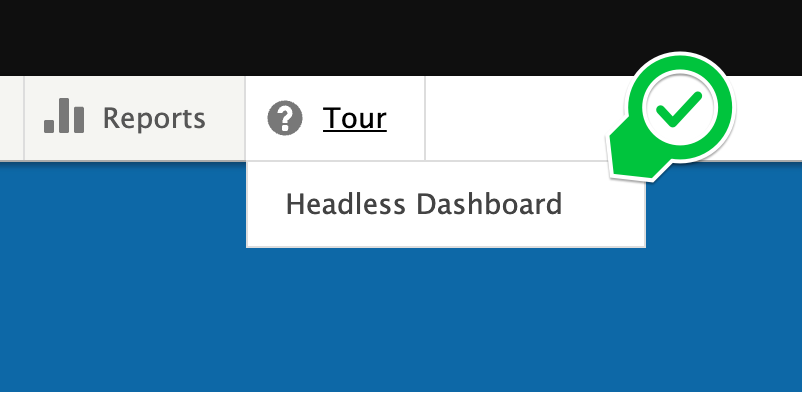
The headless dashboard can be found as a drop-down from the Tour menu item in the admin menu navigation.
Headless Dashboard Overview
API Endpoint and Documentation
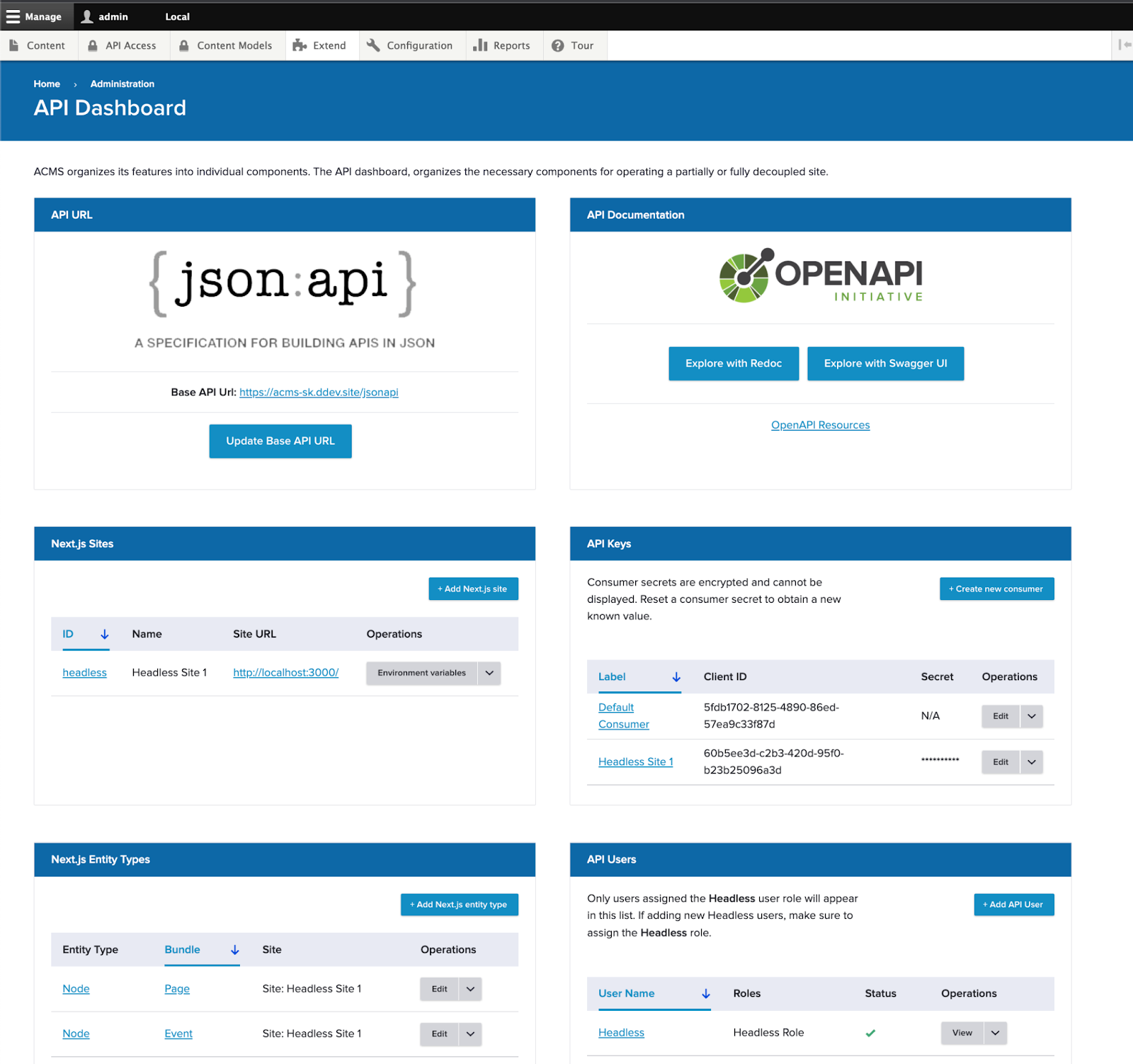
At the top of the dashboard, you’ll see access to the default endpoint: json:api. json:api is a standardized format for communication over APIs. There is wide support for json:api across many languages including drupal-jsonapi-params: A library for building query parameters when connecting with Drupal CMS’s JSON:API.
All of Acquia CMS’s data model can be accessed through the json:api endpoint and you can access the documentation for that endpoint through https://www.openapis.org/: a standard for API documentation. It comes in with two UIs: Redoc and Swagger UI.
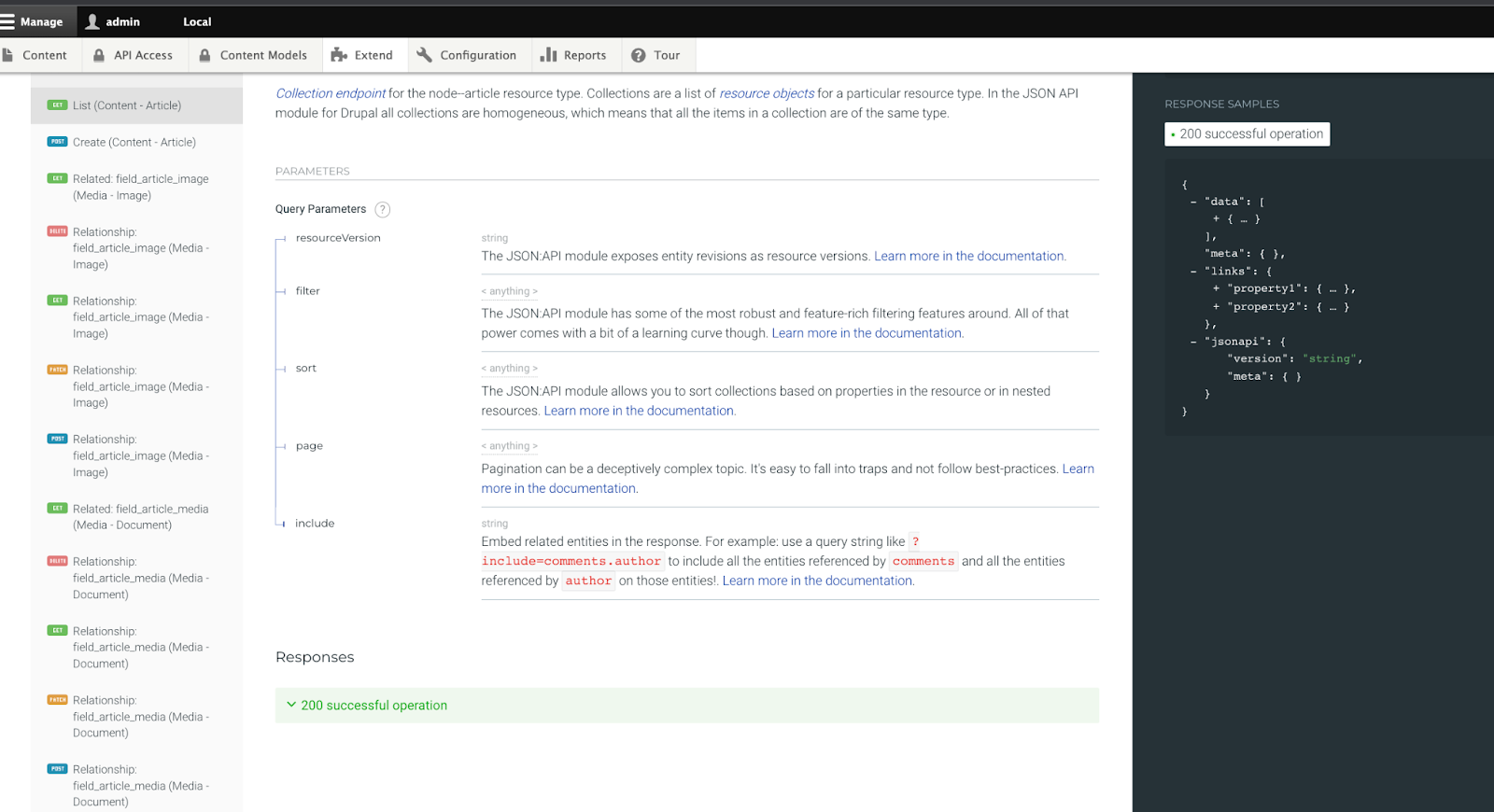
Viewing the article content type from the default content model in Acquia CMS through the Redoc API endpoint documentation inside the CMS.
API Access
With Acquia CMS users and roles, you can customize how consumers authenticate with your API (using API keys) and what parts of the API they can access (using users and roles).
By default, Acquia CMS is setup for OAuth authentication using OAuth consumers. From the API Keys panel in the headless dashboard, you can create new consumers and determine which users and roles a consumer should represent.
Any user assigned the Headless Role, they will also be listed here in the dashboard under API Users. This way it is quick to see all the users that represent your API consuming third party applications.
Next.js sites
Out-of-the-box, Acquia CMS comes ready to integrate with Next.js for Drupal: a library for native integration between Next.js and Drupal over the json:api endpoint. Acquia CMS also has a next.js starter kit here (see tutorial).
Knowing about your Next.js sites helps:
- Know how to route site preview* for a given content type to the right next.js site
- Provide the required environment variables for the next-drupal application.
- Handle content invalidation at the Next.js application when updates occur in the CMS (experimental feature).
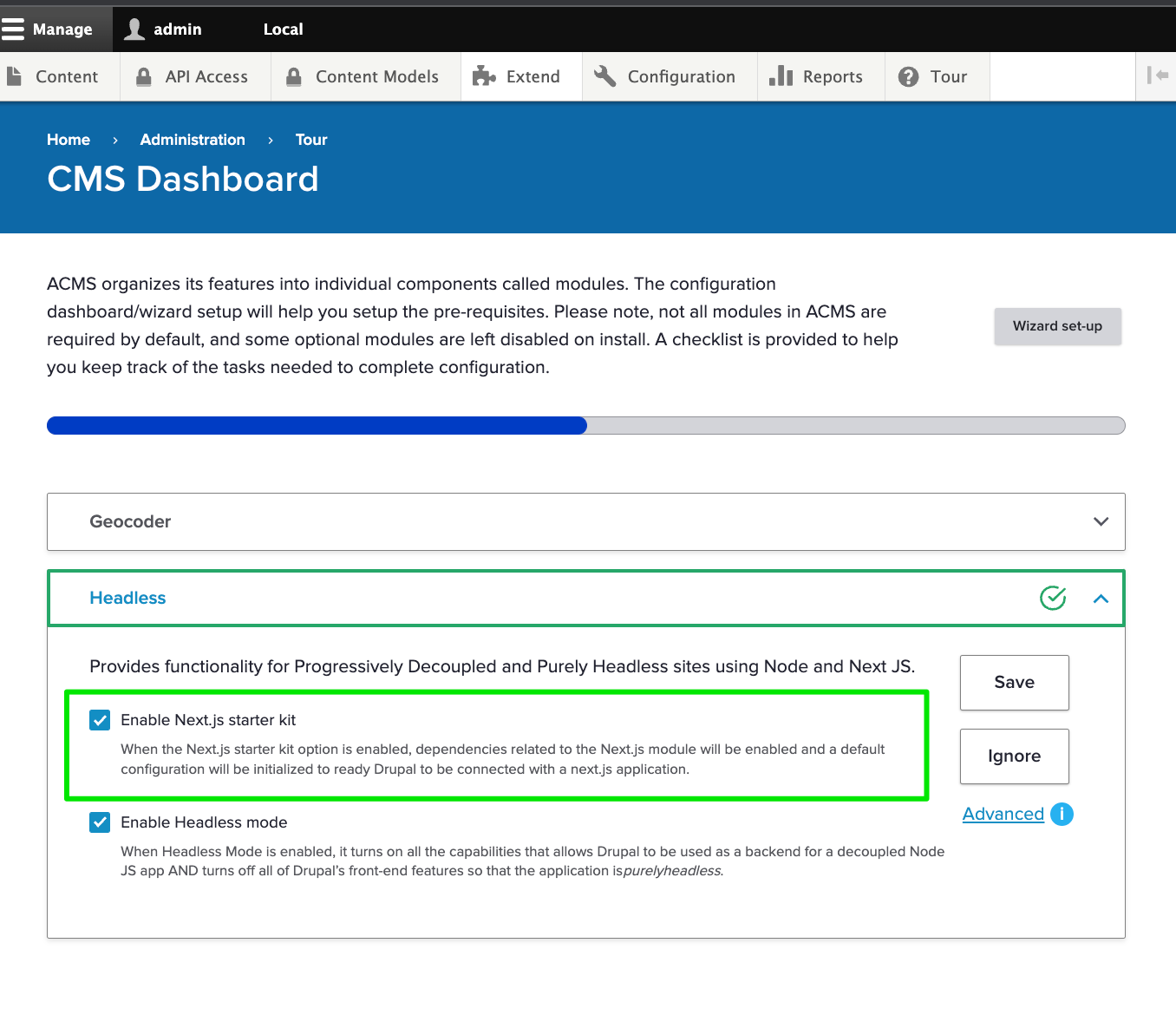
If you’re interested in using Next.js, check the Next.js starter kit check box in the Acquia CMS Tour setup. This will precreate the Next.js site, user, roles and configuration ready to integrate with your next.js application.
Get Started with Acquia CMS Headless
If you’re a developer building with Acquia’s headless CMS, the headless API dashboard makes working with Acquia CMS easier than ever. Try it out now!
Visit dev.acquia.com for more information.
About Drupal Sun
Drupal Sun is an Evolving Web project. It allows you to:
- Do full-text search on all the articles in Drupal Planet (thanks to Apache Solr)
- Facet based on tags, author, or feed
- Flip through articles quickly (with j/k or arrow keys) to find what you're interested in
- View the entire article text inline, or in the context of the site where it was created
See the blog post at Evolving Web
