

Upgrade Your Drupal Skills
We trained 1,000+ Drupal Developers over the last decade.
See Advanced Courses NAH, I know EnoughDevelopers are the backbone of innovation, writing the code that powers our digital world. Automation can be a game-changer, transforming how developers work, collaborate, and innovate. By taking over repetitive tasks and streamlining processes, automation boosts efficiency. It allows developers to focus on what truly matters—solving complex problems and creating impactful solutions.
Without automation, teams get bogged down by manual tasks, leading to wasted time and increasing chances of errors. Repetitive processes drain energy and slow down progress, preventing developers from focusing on more valuable work. The lack of consistency also leads to errors and uneven results, ultimately hampering productivity and quality.
What Can Be Automated?
Automation can touch various aspects of the development lifecycle, transforming how tasks are executed and enhancing efficiency. In the following sections, we will explore specific areas where automation can make a significant impact:
Enhancing Code Quality And Consistency
Automating code quality checks is fundamental to maintaining high standards across development projects. Tools like PHPCS, PHPStan, eslint, and stylelint automatically enforce coding standards and detect potential issues before code is committed.
We integrate these tools with our CI pipeline using GitHub Actions, ensuring that code quality checks are performed consistently and automatically. This not only improves the immediate output but also helps in upholding a reference baseline that guides our developers throughout the project lifecycle.
Streamlining Debugging Processes
Debugging can be time-consuming, but automation tools can streamline this process significantly. For instance, using XDebug integrated with DDEV enables developers to set up efficient debugging environments quickly.
This integration allows for seamless identification and resolution of code issues, enhancing developer productivity and reducing downtime. By utilizing these tools, we maintain a consistent reference baseline, minimizing deviations that could lead to larger issues down the line.
Automated Testing For Reliability
Automated testing is essential for ensuring the reliability and performance of software applications. At Axelerant, we employ various automated testing frameworks such as Cypress for visual regression testing, Appium for mobile applications, and Behat for behavior-driven development.
These tools help us maintain high standards of quality while reducing the manual effort involved in extensive testing. By aligning automated testing with our established baselines, we can ensure consistency and reliability across all projects.
Simplifying Onboarding And Offboarding
Automation plays a critical role in streamlining onboarding and offboarding processes. For example, automating the onboarding process can reduce the time required by up to 83%, saving valuable resources and improving employee satisfaction.
These automated processes ensure that every new developer starts with the same foundational setup, promoting consistency and efficiency from day one. This allows developers to focus on their core responsibilities without unnecessary delays, enhancing their overall experience and productivity.
Take a quick DevEx Assessment here
Accelerating Development Workflows With No-Code Tools
No-code and low-code automation tools enable developers to create and manage complex workflows without extensive coding. These tools provide visual interfaces for building workflows, integrating various applications, and automating repetitive tasks.
They are particularly useful for rapidly creating and implementing automation solutions, which enhance developer efficiency and foster innovation. By integrating these no-code tools into our established development standards, we ensure that the solutions developed are consistent with our broader project goals and standards.
Continuous Integration and Deployment (CI/CD)
Implementing CI/CD pipelines automates the process of integrating code changes, running tests, and deploying applications. This automation ensures that code changes are tested and deployed efficiently, reducing the time to market and allowing developers to focus on feature development and innovation.
CI/CD pipeline, powered by GitHub Actions, exemplifies how automation can streamline these processes. By grounding our CI/CD practices in a solid reference baseline, we ensure that every iteration of the software builds upon a stable foundation, reducing the risk of regressions or inconsistencies.
Empowering Developers Through Intelligent Automation
Intelligent automation combines AI and machine learning to handle more complex tasks that go beyond simple repetitive actions. For instance, Axelerant leverages AI-driven tools to automate business process discovery, enabling developers to focus on high-value tasks that require human intelligence and creativity.
This empowerment not only enhances productivity but also empowers developers to take ownership of their work. By integrating intelligent automation with our established reference baselines, we ensure that these advanced tools continuously align with our evolving project standards and objectives.
Wrapping Up
Automation is a key enabler in optimizing Developer Experience by reducing manual effort, enhancing code quality, and accelerating development workflows.
By integrating automation tools and practices into our development processes and grounding them in solid reference baselines, we at Axelerant are committed to providing a superior Developer Experience that fosters innovation, efficiency, and job satisfaction.
Explore how Axelerant’s Developer Experience Services can help you implement automation solutions tailored to your unique needs, ensuring your projects are delivered with excellence and consistency.
The shift to remote work has revolutionized how development teams operate. While it offers unparalleled flexibility and access to global talent, it also brings unique challenges that can impact productivity and satisfaction. Elevating Developer Experience (DevEx) for remote teams is crucial for maintaining high performance and engagement.
Teams can overcome these challenges by focusing on improving communication tools, automating workflows, and providing access to streamlined developer platforms. Key areas include setting up efficient CI/CD pipelines, offering seamless onboarding, and ensuring consistent access to essential documentation and tooling to boost overall efficiency and satisfaction.
The Importance of Remote Developer Experience
Companies that invest in elevating remote DevEx can expect higher retention rates, better collaboration, and more innovative solutions. By prioritizing DevEx, organizations can drive business success through more engaged and productive teams.
Take a quick DevEx Assessment here
Best Practices to Elevate Remote Developer Experience
Implementing Robust Communication Tools
Effective communication is the foundation of any successful remote team. Utilizing reliable tools like Slack or Zoom ensures seamless interaction. These platforms support asynchronous and/or synchronous communication, which is crucial for maintaining connectivity across different time zones.
However, excessive meetings and constant communication can lead to distractions and reduce productivity. Establishing clear protocols, such as limiting meetings to essential discussions and encouraging asynchronous updates, helps avoid over-communication.
Integrating communication tools with other development tools through an Internal Developer Platform (IDP) can further streamline workflows, reduce cognitive load, and enhance efficiency by minimizing unnecessary interruptions.
Utilizing Advanced Version Control Systems
A collaborative development environment is vital for remote teams. Implementing robust version control systems like Git helps manage code changes efficiently, ensuring all team members can work on the same codebase without conflicts.
Platforms like GitHub, GitLab, or Bitbucket facilitate seamless collaboration, real-time code reviews, and continuous integration/continuous deployment (CI/CD) pipelines, making it easier for developers to work together and solve problems collectively.
CI/CD processes not only enhance collaboration but also support deep work by reducing the need for manual interventions, allowing developers to focus on complex problem-solving tasks.
Maintaining Comprehensive Documentation
Maintaining comprehensive documentation is crucial for remote development teams. While tools like Confluence and internal platforms provide a centralized repository, it's the processes and culture in place that ensure documentation is regularly updated and remains accessible.
Establishing clear ownership, regular review cycles, and fostering a culture of collaboration encourages team members to contribute and keep the documentation current.
An Engineering Handbook serves as a valuable resource for best practices, coding standards, development workflows, and project information. It helps remote developers stay aligned and maintain consistency, which reduces errors and improves overall project quality.
Establishing Streamlined Feedback and Review Processes
Effective feedback and review processes are vital for motivating remote developers and ensuring continuous improvement. Regular performance reviews allow teams to discuss progress, set goals, and address challenges, fostering both individual and team success.
Clear performance metrics, combined with constructive feedback, help align developers with project objectives and personal growth. Recognizing achievements through virtual awards, shout-outs, and incentives such as bonuses or additional time off further boosts morale.
Periodic check-ins ensure that developers stay engaged, enabling timely adjustments and sustaining long-term productivity and motivation.
Providing Continuous Learning and Development
Professional development opportunities are crucial for keeping remote developers engaged and updated with the latest technologies. Offering online training programs, webinars, and workshops through platforms like Coursera, Udemy, and Pluralsight helps developers enhance their skills. Establishing a mentorship program where experienced developers guide newer team members fosters a culture of continuous learning and growth.
Pair programming, even in a remote setting, can be an effective way to facilitate knowledge-sharing and collaborative problem-solving, helping developers learn from each other in real-time. Additionally, providing access to documentation, tutorials, and development sandboxes encourages experimentation and skill enhancement.
Ensuring Effective Tooling and Development Environments
Providing remote developers with the right tools and development environments is vital for productivity. Utilizing cloud-based Integrated Development Environments (IDEs) such as Visual Studio Code or AWS Cloud9 allows developers to access their workspaces from anywhere.
Standardizing development tools and automating environment setups with tools like Docker ensures consistency and reduces setup time. Continuous Integration/Continuous Deployment (CI/CD) pipelines automate testing and deployment, streamlining the development workflow.
Building a Secure and Efficient Infrastructure
A secure and efficient infrastructure is fundamental for remote development. While security measures such as VPNs, two-factor authentication, and encryption are essential for protecting sensitive data, they can often make the developer experience cumbersome.
It's important to strike a balance by implementing modern security solutions that are both robust and user-friendly, ensuring safety without compromising ease of use. Utilizing cloud-based services and infrastructure as code (IaC) practices with tools like Terraform ensures scalable and reproducible environments.
Investing in reliable hardware and software tools, including high-speed internet, powerful laptops, and necessary software licenses, equips remote developers with the tools they need to succeed and deliver high-quality work.
Why Investing in Remote DevEx Pays Off?
Investing in the remote Developer Experience is not just about making developers happy; it's about driving business success. Elevated DevEx leads to higher productivity, more innovative solutions, and a better bottom line. Companies that prioritize DevEx find that their teams are more engaged, collaborative, and capable of delivering high-quality work, even in a remote setting.
How Axelerant Can Help
At Axelerant, we understand the unique challenges of remote development. Our comprehensive DevEx services are designed to create a supportive and productive environment for your remote developers.
From setting up robust communication frameworks and advanced version control systems to providing comprehensive documentation practices and continuous learning opportunities, we cover all aspects of elevating remote DevEx.
By partnering with us, you can focus on building innovative solutions while we take care of optimizing your Developer Experience. Contact us today to learn how we can help your remote teams thrive.
Introduction
The presence of Artificial Intelligence (AI) is now an undeniable reality that can no longer be overlooked. It has captured the interest of clients across all budgets and industries.
Many organizations are still confused about what they want to achieve with AI. This confusion also extends to Digital Experience Platforms (DXPs), where companies are often unsure how they can utilize AI to enhance customer experiences, automate workflows, or ensure holistic automation.
The Launch Of ChatGPT
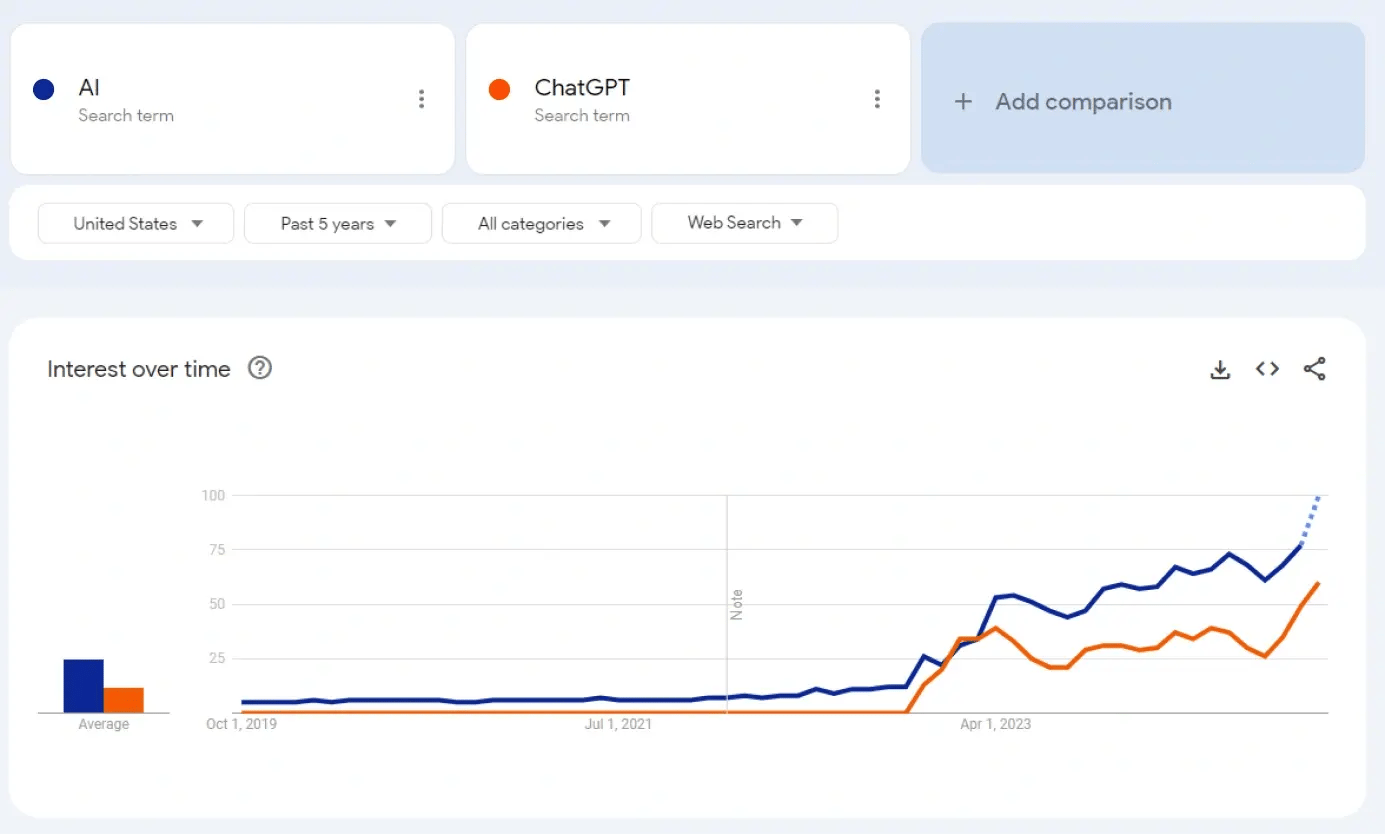
It’s not that AI didn't exist before ChatGPT, it did. But the advent of ChatGPT in November 2022 transformed AI's perception. For the first time, everyone could access this tech in its simplest form, a chatbot.
Tools like Dall-E and Midjourney emerged, generating graphics and images indistinguishable from real photos, blurring the lines of reality.
Similarly, DXPs began using these tools to create engaging content, deliver personalized digital experience, help improve customer service, and enhance how brands connect with their audiences.

ChatGPT did to AI, what Tesla did to electric cars, Netflix did to streaming and what iPhone did to Smartphones.
Swarad Mokal | Technical Program Manager, Axelerant
Google Search trends show a clear correlation between the terms AI and ChatGPT.
To understand where AI can be used, it is important to understand what AI is. The simplest definition is a machine exhibiting human-like intelligence, having the ability to think and respond to tasks like a human would.
Understanding The Terminology
There are different terms related to learning and working with AI.
Machine Learning And Deep Learning
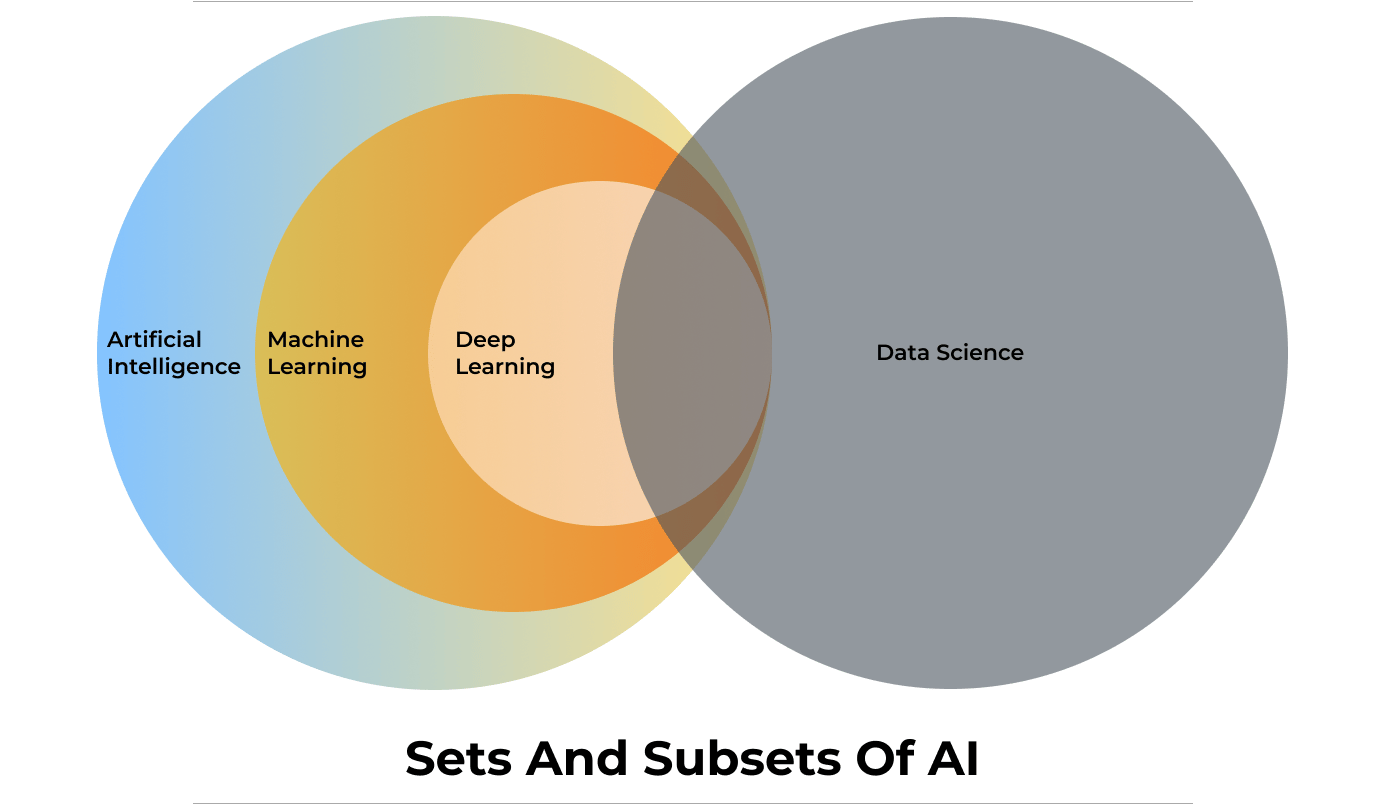
Machine learning (ML) and Deep Learning (Dl) are two of the most important terms related to AI and can be considered as subsets of AI.
Machine Learning is a branch of AI that learns patterns to make predictions, recommendations, or decisions based on the data fed to the system. Once it has learned from the data, it can identify patterns and perform tasks autonomously.
DXPs often use Machine Learning to analyze user behavior, predict customer needs, and suggest personalized content, enhancing user engagement and retention.
Deep Learning is a subset of ML that uses many-layered neural networks to model complex data and its relationships, hence the term “deep.” DL setups are particularly useful when dealing with multi-dimensional data like images, language, or speech. For example, Natural Language Processing (NLP), an application of Deep Learning, enables DXPs to offer voice search, multilingual support, and more personalized customer interactions.
[embedded content]
Generative AI
Generative AI is a subset of Deep Learning. It is an artificial intelligence system that can generate new content, such as text, images, audio, video, and even programming code. Unlike other AI models which focus on recognizing patterns or making predictions, generative AI models create new data based on already learned patterns.
In a digital experience platform, generative AI can be used to dynamically generate personalized content such as custom product descriptions, individualized email campaigns, or unique landing pages tailored to user preferences.
Large Language Model
A Large Language Model (LLM), is an AI system designed to understand and generate human language. These models are trained on vast amounts of text data, enabling them to perform tasks like answering questions, summarizing information, and generating content that mimics human writing. Examples of LLMs include GPT-4, Gemma, Llama, Mistral, and Claude.
LLMs can be open or closed, with key differences in accessibility and transparency. An open LLM is available for public use and is usually open-source licensed. The model’s code, architecture, and data used for training the LLM are disclosed and available openly.
Closed LLMs are typically proprietary, which means access is restricted and might be available through a paid subscription or license. The internal workings, code, architecture and training data are not disclosed.
For a DXP, the choice between open and closed LLMs depends on customization needs, cost considerations, and the importance of transparency.
Vector Database
Humans interact with data like a relational database system. Relational databases are essentially two-dimensional, which means users store data in rows and columns. To fetch a cell in this 2D grid, the user will require a query.
Instead of using this system, AI uses Vector Databases to store and interact with data. Vector Databases store higher dimensional data. Higher dimensional data is more than just rows and columns. It is not just storing data but also memorizing how data is related to each other.
For example, in a box of LEGO bricks, a traditional database will just store information like shapes, sizes, and colors. But a vector database will also store data about how they connect with each other so that you can build a cool racing car with it.
RAG
RAG (Retrieval-Augmented Generation) is an AI approach that blends information retrieval with the power of generative language models (LLMs). This combination allows the AI to produce more accurate, current, and relevant text by using targeted knowledge along with its language abilities.
Prateek Jain, Director of DXP Services at Axelerant, and Swarad Mokal, Technical Program Manager at Axelerant, discuss the basics of the RAG AI framework and its possible use cases in a recent webinar.
[embedded content]
Privacy And Security
AI models are trained on data, requiring large amounts of data to be trained properly. This raises concerns about personal information being gathered without consent.
As AI becomes embedded in DXPs, it becomes critical to responsibly handle large volumes of user data. DXPs also need to ensure compliance with data protection regulations like GDPR and CCPA while providing seamless and personalized experiences.
AI models often act as "black boxes," where the decision-making process isn't transparent. Ensuring that AI-driven DXPs maintain high levels of trust and transparency is essential for building and maintaining user confidence.
It is also critical to safeguard against potential AI misuse. For example, if a malicious individual knows that the organization is allowing an AI model to read all incoming emails, they can send an email to talk to your AI model. This email will subtly manipulate the AI model or even send misleading messages and information.
That is why it is important to first come up with a set of AI policies to decide how to integrate AI, for example: a general good practice is to always have a Human in the loop.
How Can Axelerant Help You Transform Your Customer’s Digital Experiences With AI
The experts at Axelerant have been constantly exploring many possibilities for integrating AI into Digital Experience Platforms.
How Axelerant Successfully Implemented AI In DXP Workflows
Axelerant’s experts have implemented multiple Proof of Concepts (POCs) that showcase how AI can be seamlessly integrated into DXP workflows.
Axlebot
Axlebot is a cloud-based AI model trained on localized knowledge bases like Confluence, Handbooks, and GitHub repositories. It can answer queries with citations through Slack integration.
Contextual Learning Search With Drupal
This is a RAG AI setup integrated with Drupal for sites with large content stores. It offers direct answers to queries rather than simple search links, making it ideal for universities, government sites, and NGOs.
AI In Content Search
This POC demonstrates how organizations can integrate the Drupal AI module with OpenAI and Anthropic LLM models to improve content search. The search results were further improved by integrating Pinecone’s vector database for indexing.
AI-Generated Alt Tags And Meta Tags
By integrating OpenAI with Drupal 10, AI can generate meta tags such as title, description, abstract, and keywords. This data is based on content fields like the body and title. If the body field is empty, AI will generate tags from the title alone. To fit specific content needs, customization can be implemented by modifying the module code.
Interested In A Demo?
Reach out to the experts at Axelerant for a demonstration of how to make your customer’s digital experiences more intelligent, responsive, and capable.
Handling vast amounts of data concurrently causes system hiccups and service disruptions. Apache Kafka is a powerful distributed data streaming platform that helps businesses handle large datasets efficiently without latencies.
Kafka achieves low latency through three key techniques:
- Batching: Data can be read and written in batches, reducing the number of requests and minimizing latency.
- Partitioning: Kafka divides data among different brokers, enabling parallel processing.
- Compression: When data is written to a Kafka topic, it's compressed using algorithms like ZSTD, LZ4, Gzip, and Snappy. This reduces read and write bandwidth, allowing for quick delivery and lowering latency. Additionally, compression helps cut storage costs.
Some of the pivotal components of Kafka are:
- Topics
- Partitions
- Consumers
- Consumer groups
Understanding Kafka’s Components
Kafka Topics
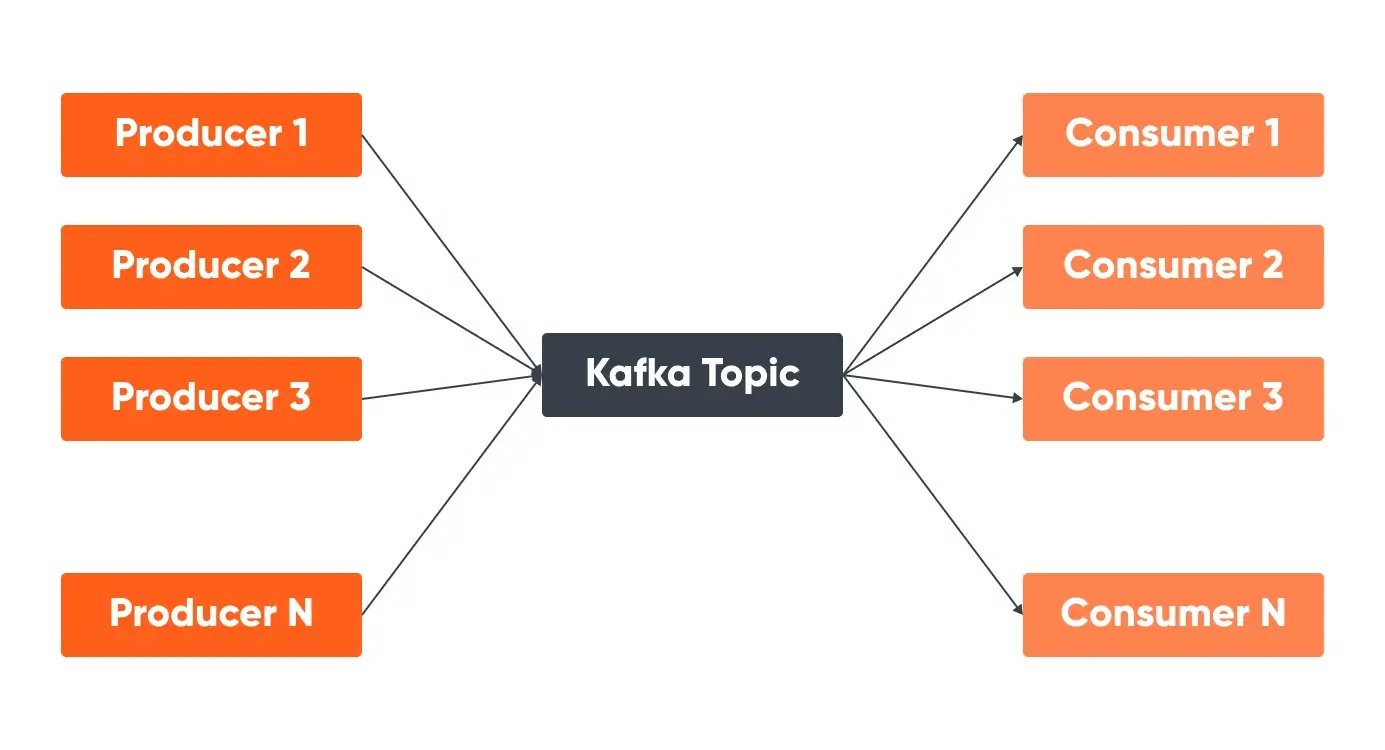
Kafka topics serve as the organizational categories for messages, each distinguished by a unique name across the entire Kafka Cluster. Messages are directed to and retrieved from specific topics, facilitating streamlined data management.
Kafka Partitions
Partitioning divides the single-topic log into several logs, each capable of residing on distinct nodes within the Kafka cluster. This partition allows a topic to be split into multiple partitions, enabling parallel processing and scalability. Each partition is an ordered, immutable sequence of messages. The number of partitions is set during topic creation but can be increased later if needed.
Messages within a partition are stored in the order they arrive and are assigned an offset, which is a unique identifier. When retrieving messages, consumers can specify the offset to start reading from, ensuring they process messages in the correct order
If a message has a key, Kafka uses a hash of the key to determine the partition, ensuring that all messages with the same key are stored in the same partition, preserving their order.
Kafka Consumers & Consumer Groups
A Kafka consumer is a component that reads and processes messages from Kafka topics. Consumer groups are a set of consumers from one application that work together to process events or messages from one or more topics in parallel. Each consumer in the group processes a subset of the partitions, allowing for parallel processing and scalability.
Consumers in a group coordinate to ensure that each partition is consumed by only one consumer at a time, preventing overlap and ensuring efficient processing. This means that one consumer group’s activities do not interfere with another group’s space or processing. To manage this coordination, Kafka uses offsets, which are unique identifiers assigned to each message within a partition.
Offsets mark the position of the last processed message, allowing consumers to track their progress and specify an offset to resume processing from where they left off. The relationship between consumers in a group and partitions is such that each partition is assigned to only one consumer within the group at any given time, ensuring messages are processed in order within each partition.
The maximum number of consumers in a group is equal to the number of partitions; if there are more consumers than partitions, some consumers will remain idle but can act as standbys in case of failures.
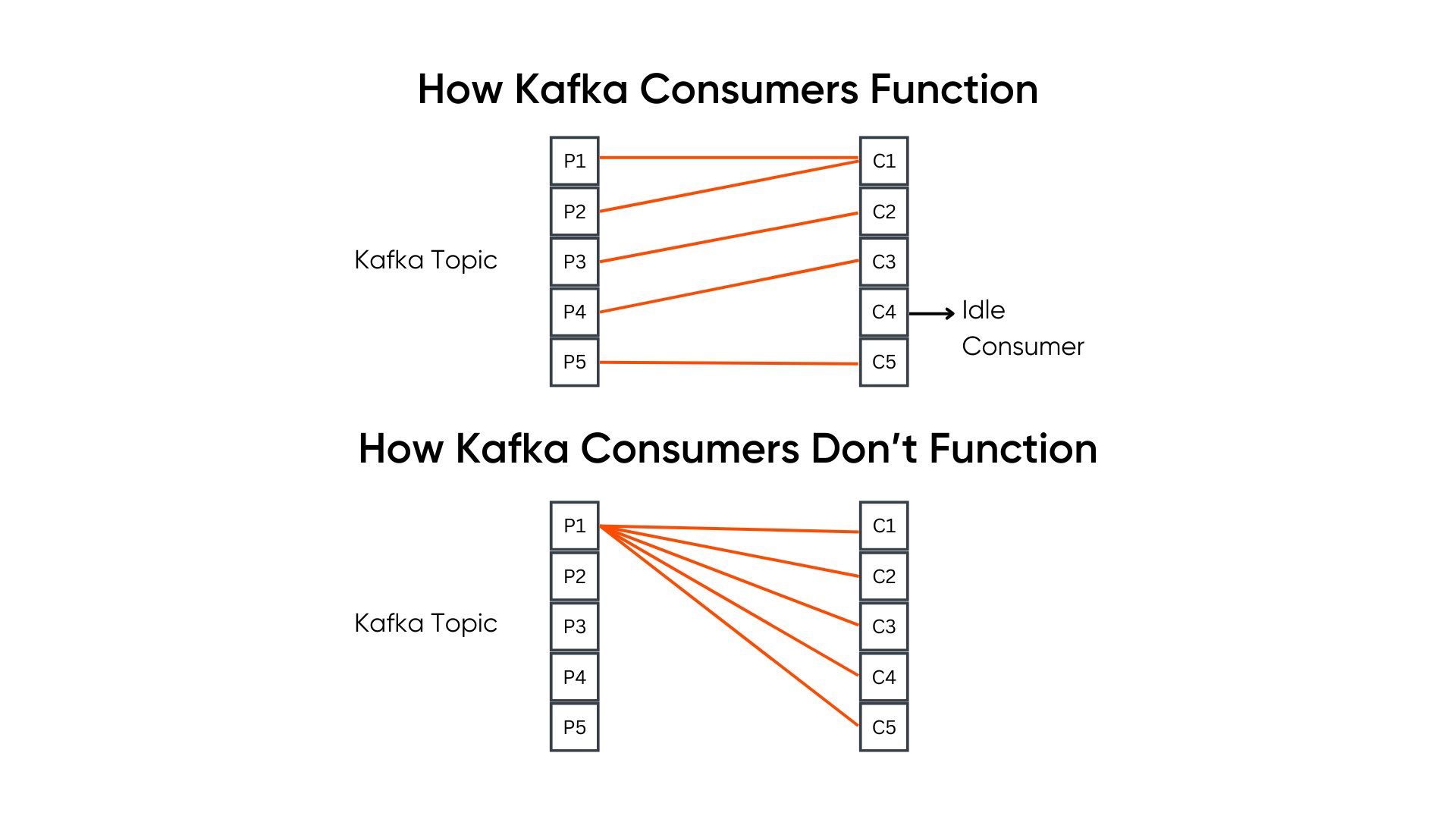
One consumer can read messages/events from one or more partitions. For example, a topic with 5 partitions can have upto 5 consumers, but if it has only 2 consumers, then the two consumers in the group will read messages from more than one partition. However, it is important to note that one partition can not be read by more than one consumer.
Use Cases Of Kafka Consumers
Example 1: Let's assume an application wants to send log data to one topic (Topic 1) and crawl data to another (Topic 2). Once both the topics, producers, and consumers are configured, all the log data will go within Topic 1, and all the crawl data will go within Topic 2.
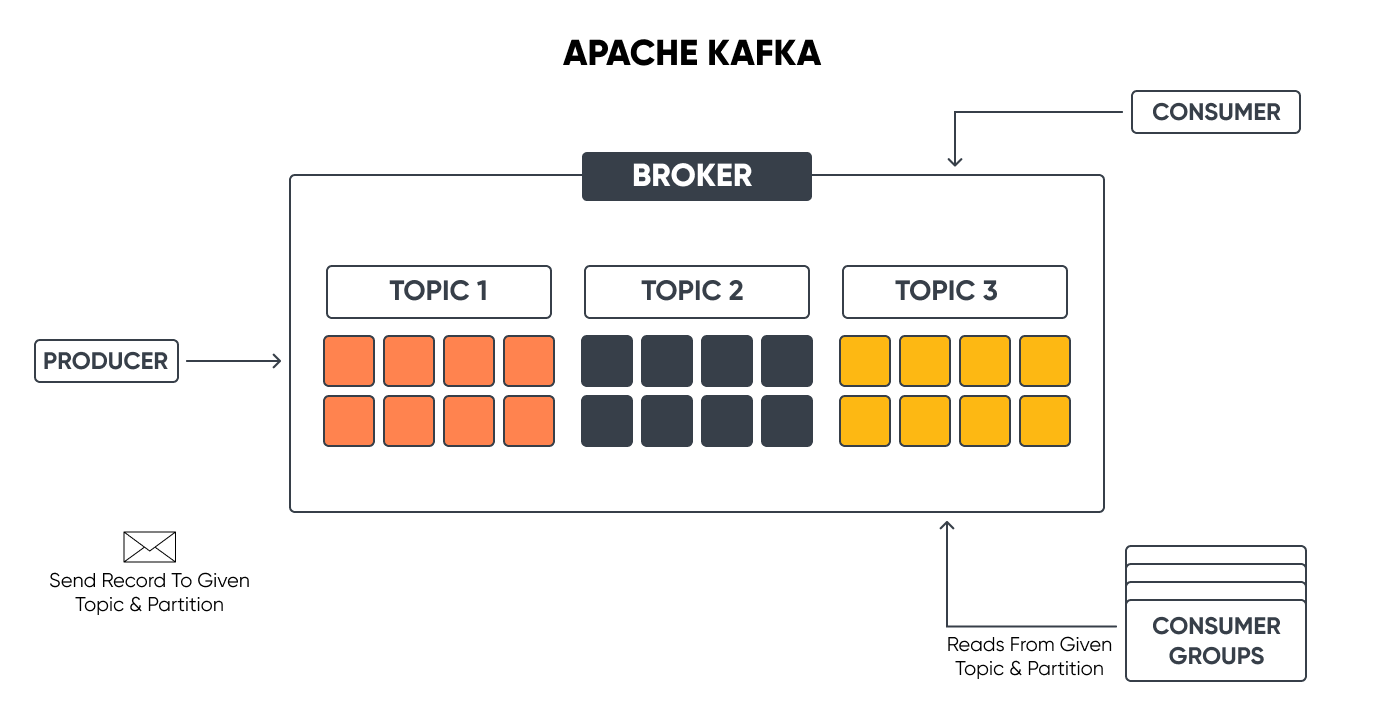
This log data may be useful for a service (Service 1) here, but it does not require the crawl data. We need a different topic to process crawl data, but this topic (Topic 2) will only have crawl data, and the consumers for this will only be expecting crawl data.
We can feed the log data in Topic 2 also, but that does not mean we will. Though Kafka wouldn't throw any error as such, we don't do that because the service/application does not demand the log data to be present in Topic 2.
Example 2: In this example, client one is a mobile phone, and the second client is a car, but they both are expecting the same type of data so that they can process it.
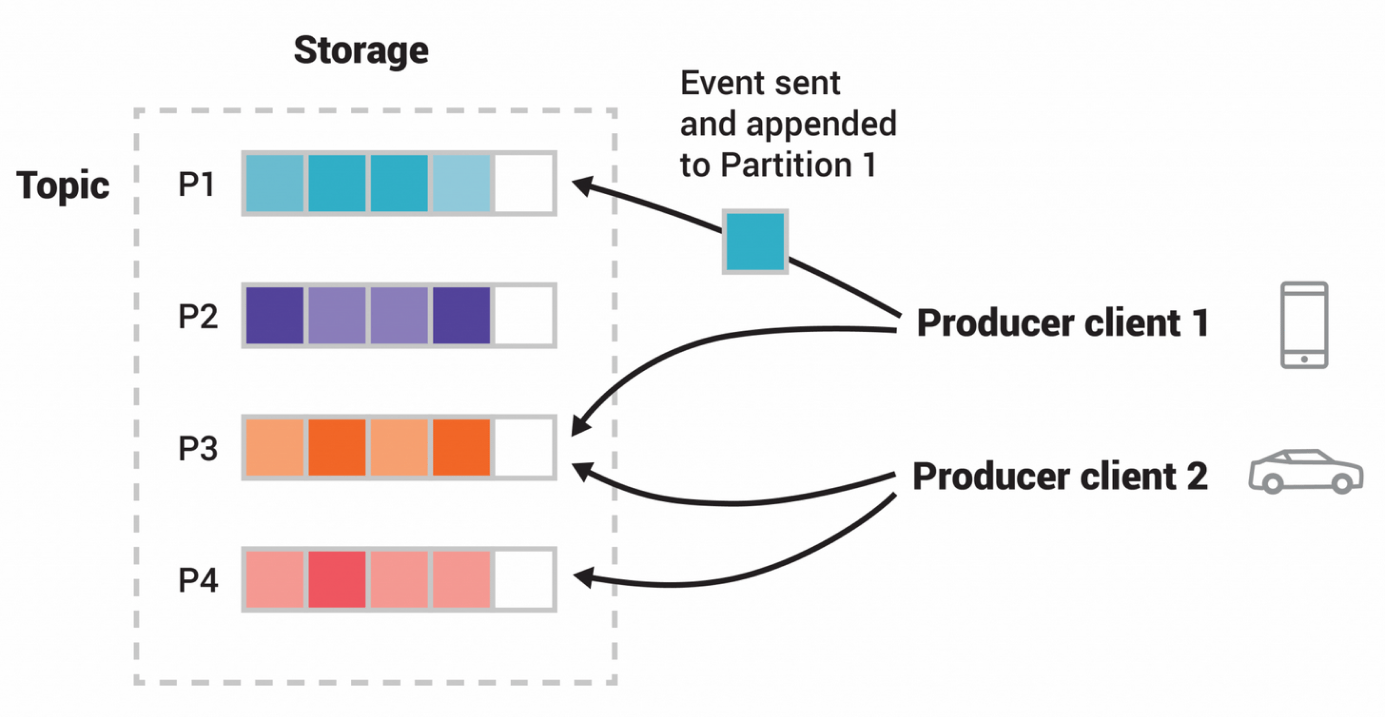
Image Source: Kafka Documentation
A couple of questions may arise here: Why are there multiple topics within the same Kafka cluster? Can we have a different Kafka cluster?
Since the overall Kafka cluster is so huge and brings in more complexities, we don't want multiple Kafka clusters within our application. We can build as many pipelines as we want within one Kafka cluster. Topic 1 can have one type of data, and Topic 2 can have another type of data and relevant producers and consumers.
Metrics to Monitor/Track for Optimizing Kafka Consumers
Optimizing Kafka Consumers requires monitoring and tracking a few metrics. These metrics provide insights into the performance and health of the Kafka consumers by identifying inefficiencies, bottlenecks, and possible issues in the data processing pipeline. Below are some of the key metrics to focus on.
1. Consumer Offset
Consumer offsets show the position of the consumer in the partition from which it is reading. Consumers use this offset to keep track of their progress within a partition. If a consumer restarts, it will resume reading from this offset, ensuring no messages are missed or reprocessed. Optimum offset management helps consumers process each message only once and recover from failures without data duplication or loss.
How to Monitor: You can track committed offsets using:
- committed_offsets (last committed offset for each partition)
- last_committed_offset (the most recent offset committed)
2. Consumer Lag
It is a metric that indicates the lag between Kafka producers and consumers. In other words, it is the gap between the latest offset (position of the most recent message in a Kafka partition) and the consumer offset. If the gap grows bigger between the rate of data production and data consumption, it leads to delays in data processing.
How to Monitor: Developers can use tools like the built-in Kafka monitoring APIs, Kafka Manager, Grafana dashboards, or Burrow to track consumer lag. Below are some metrics to look at:
- current_offset (the offset the consumer has processed up to)
- consumer_lag (per partition)
- log_end_offset (the latest offset in the partition)
3. Throughput
Throughput is determined by the number of messages consumed per second. To maintain the data pipeline's performance, consumers must process messages efficiently, which is a sign of high throughput.
How to Monitor: Developers can use Kafka’s JMX metrics or integrated monitoring systems like Grafana and Prometheus to track metrics such as:
- records_consumed_rate (number of records consumed per second)
- bytes_consumed_rate (amount of data consumed per second)
4. Latency
It is the time taken for a message to be consumed after it is produced. For applications that require real-time data processing and immediate insights, low latency is crucial.
How to Monitor: Developers can monitor end-to-end latency, i.e., by comparing the timestamp when the message was produced to when it was consumed. Key metrics include:
- fetch_latency_avg (average time to fetch records)
- fetch_latency_max (maximum time to fetch records)
5. Error Rates
It measures the frequency of errors consumers encounter during message processing. High error rates can detect problems with data processing logic, network problems, or other systemic issues that need to be addressed.
How to Monitor: Developers can monitor the metrics:
- record_error_rate (rate of record processing errors): Kafka calculates the average number of record sends that result in errors per second. This metric is part of the producer metrics and can be monitored using tools like JMX (Java Management Extensions) or Kafka’s built-in command-line tools.
- request_error_rate (rate of request errors to Kafka brokers)
6. Resource Utilization
Resource utilization monitors various resources, such as CPU, memory, and network bandwidth, used by the Kafka consumers. Monitoring these resources is essential because high resource utilization can lead to increased costs and performance degradation.
How to Monitor: You can use system monitoring tools (e.g., top, iostat, htop) and Kafka-specific metrics:
- consumer_cpu_usage
- consumer_memory_usage
- Network_io
7. Fetch Metrics
Fetch metrics provide details about consumers' ‘fetching behavior.’ By understanding this behavior and tuning the consumer configuration accordingly, you can optimize consumers for performance.
How to Monitor: Key fetch metrics include:
- fetch_rate (rate of fetch requests)
- fetch_size_avg (average size of fetched records)
- fetch_wait_time_avg (average wait time for fetch requests)
8. Consumer Rebalance Activity
It tracks how often and for how long consumer rebalances occur. Rebalancing is the process by which Kafka redistributes partitions among consumers in a group to ensure an even distribution of workload. This is crucial for maintaining optimal performance and preventing any single consumer from becoming overloaded or underutilized.
Although it is recommended to avoid rebalances, they can sometimes become inevitable due to changes in the consumer group, such as consumers joining or leaving the group or changes in the number of partitions.
Frequent rebalances can disrupt message processing and increase latency, as consumers need to stop processing messages during the rebalance and reassign partitions. Therefore, monitoring rebalance activity is essential to identify and mitigate performance issues.
How to Monitor: Developers can monitor the metrics:
- rebalance_rate (frequency of rebalance events)
- rebalance_time (time taken for a rebalance to complete)
Complexities In Rebalancing And Factors Influencing It
Let’s assume a consumer group with some workers. The first consumer worker is connected to a partition (say, Partition 1) and has established connections to the partition at many replicas. When a rebalance is triggered, the consumers break all those connections. Again, it has to figure out which replica to connect to.
Now, there is complexity at two levels:
- Kafka has to decide which worker to connect to which partition.
- Kafka has to figure out the replica within that partition.
This is why rebalance is a costly operation. And one of the ways to optimize the consumer workers is to avoid rebalancing.
Factors Influencing Rebalancing And How To Avoid Them
- To maintain efficient resource (worker) utilization, predefine the number of consumer workers needed to prevent overutilization or underutilization. Rebalancing occurs when workers fall into either of these extremes.
- Ensure consumer workers do not die. Workers are usually designed in such a way that it scales up and down. We shouldn't do that with Kafka as it is not a best practice to scale them up and down. It should stay as it is.
- Do not overload the workers so that they run out of memory, kill themselves, and then come again. Even when a worker leaves a consumer group, the connection is lost, and rebalance is triggered.
Factors Influencing Kafka Consumer Performance
Network Latency and Bandwidth: Affects the speed of data transmission between Kafka brokers and consumers.
Consumer Configuration: Settings such as fetch size, batch size, and session timeout can impact performance.
Resource Allocation: CPU, memory, and disk I/O capacity on consumer machines.
Kafka Cluster Configuration: Broker settings and partitioning strategy.
Tools For Monitoring Kafka Consumers
- Prometheus and Grafana: Collect Kafka metrics using Prometheus and visualize them with Grafana dashboards.
- Kafka Manager: An open-source tool for managing and monitoring Kafka clusters.
- Confluent Control Center: Provides a comprehensive monitoring solution for Kafka clusters, including consumer metrics.
- Burrow: A monitoring tool specifically for Kafka consumer lag tracking.
By regularly monitoring these metrics, you can gain valuable insights into the performance of your Kafka Consumers, identify areas for optimization, and ensure that your data processing pipeline runs efficiently and reliably.
Best Practices For Scaling Kafka Consumers
Increase Partition Count: More partitions allow for greater parallelism, enabling more consumers to work simultaneously.
Distribute Load Evenly: Ensure partitions are evenly distributed among consumers to avoid bottlenecks.
Use Horizontal Scaling: Add more consumer instances to the consumer group to handle increased load.
Conclusion
Optimizing Kafka consumers helps with real-time data processing, prevents service disruptions, enhances user experience, and reduces financial losses.
Effective strategies involve understanding consumer groups, applying real-life use cases, and monitoring key metrics such as consumer lag, throughput, latency, and error rates. Tools like Prometheus, Grafana, Kafka Manager, and Confluent Control Center provide valuable insights into consumer performance and optimization opportunities.
Schedule a meeting with our experts to understand how Kafka Consumers can help improve your application’s performance.
About Drupal Sun
Drupal Sun is an Evolving Web project. It allows you to:
- Do full-text search on all the articles in Drupal Planet (thanks to Apache Solr)
- Facet based on tags, author, or feed
- Flip through articles quickly (with j/k or arrow keys) to find what you're interested in
- View the entire article text inline, or in the context of the site where it was created
See the blog post at Evolving Web
