

Upgrade Your Drupal Skills
We trained 1,000+ Drupal Developers over the last decade.
See Advanced Courses NAH, I know Enough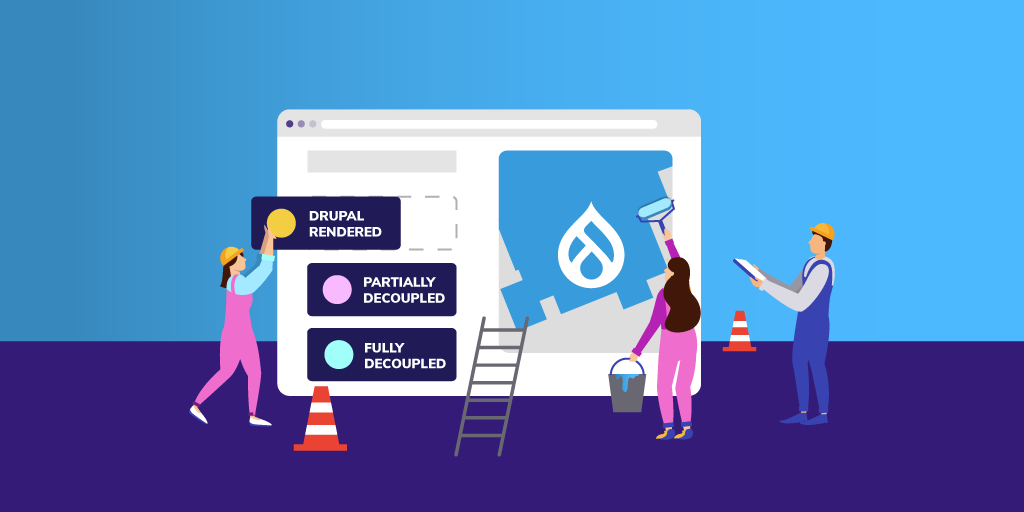
Enterprise organizations are increasingly looking at Drupal as a reliable, open source option for developing their online presence—contributing and benefiting from the active community base and potentially taking advantage of cutting-edge, decoupled capabilities.
With over 10 years of Drupal experience and implementations ranging from small to complex, we are often asked to recommend the best approach for building a Drupal site. The answer, as with many questions is, it depends. For some clients, the best choice is to build a traditional, coupled Drupal website. For other clients, it makes sense to build a completely decoupled solution using Drupal as the backend. And for others, the best solution is somewhere in between. Many factors determine which is the best approach for a particular client and their situation.
One important factor in deciding what approach to take is to understand the needs and skills of the people that will use and maintain the system. The two main users to consider are the content creators and others that will work in the system daily and the developers that will build and maintain the system.
View Webinar Recording: Building Enterprise Websites with Drupal: Unleash Your Full Potential
Considering the Content Manager
For the content creators and content managers that work directly in the content management system (CMS), having an easy-to-use content admin system is key. Drupal has increasingly focused on this experience and has provided many features with this in mind. With traditional Drupal, content editors can quickly create pages leveraging the drag-and-drop capabilities of Layout Builder. Inline editing allows content editors to make quick changes to the content without diving deep into the content admin UI. And, content preview is available to review before publishing the content to the website.
All of this is also possible in a decoupled solution, but the developers must build and maintain this functionality or cobble a solution together from existing technologies. If the project requirements already require changes to Drupal's out-of-the-box functionality, building from scratch may be easier.
Considering the Development Team
The development team's skills are also an important consideration. If you have a team that has deep technical knowledge of a technology (or a desire to develop that knowledge), that can have an impact on the recommended approach. For instance, if your team has never themed a Drupal site before, but has experience with React, using a decoupled approach would fit nicely with the team's skills.
Like any framework, it takes time to learn how to theme Drupal sites. If you have a small team that is spread thin or maybe you don't have a team, a coupled approach using Layout Builder or Acquia's Site Studio could give your content editing team the flexibility it needs without requiring much help from a development team.
Considering the Digital Strategy
The overall digital strategy is an important factor to consider as well. Will the platform support a single site or is this a key piece to a multisite, multi-brand digital platform? Is Drupal the only platform involved, or is Drupal a part of a broader digital experience platform (DXP) that includes CRMs, Commerce platforms, a CDP, and other platforms? Whether working with Acquia, the open digital experience platform built on top of Drupal, or connecting into other tools—Drupal is designed to make these connections easy.
Drupal is a great platform to integrate with other platforms. Many integrations are easy to implement by installing a community module. Drupal provides a robust migration system that makes pulling data into Drupal easy to do. Drupal also makes it easy to pull data out of Drupal using REST APIs or GraphQL.
If you are only building one website with the platform and it is primarily for marketing your organization, a traditional Drupal build probably makes sense. The more systems you are integrating and the more channels you want to use the content in, the more sense it makes to build using a decoupled approach.
Considering the Requirements
The requirements are another important factor to consider. Requirements help us define the solution. Just as important as the requirements are how flexible the requirements are. Drupal provides lots of functionality out of the box. When you add the availability of more than 40,000 free community-contributed modules, Drupal can meet many requirements with very little effort.
As you define the requirements, you should compare them to what Drupal can do. And where there is a module that meets most, but not all, of the requirements, decide whether it is possible to change the requirements. The more Drupal satisfies the requirements that you would need to build yourself in a decoupled approach, the better the coupled Drupal approach makes sense. If you find that your requirements will require a lot of customization to Drupal, a progressively decoupled or even fully decoupled approach may make sense.
Considering the Budget and Timeline
Every project has budget and timeline constraints. If you are on a tight timeline (and budget), building a coupled Drupal platform is often a solid choice. Drupal provides so many out-of-the-box features that, with flexible requirements, you can build a website in a very short period of time. For instance, we were able to build a small Drupal site using Site Studio in just a few days. The more expansive your budget and timeline, the more options you have in approach.
The Versatility of Drupal
After you've done the analysis and come up with the best approach, understand that circumstances may change. And, regardless of the approach, because Drupal can handle any of the approaches in the spectrum, you can evolve your approach over time. Because Drupal has been built with an API-first approach, it allows you to change your approach from a coupled Drupal approach to a fully decoupled approach over time.
Here at Bounteous, our website was originally built with a coupled approach. However, we recently decided to refresh the site. Drupal has allowed us to decouple parts of the site that make sense to decouple but keep the other parts coupled. As needs dictate, we can continue to decouple only the parts that we need to.
Drupal is a versatile system that can be the centerpiece of your DXP. How you use it will depend on the factors above and others that you find important. Regardless of the approach you take, Drupal is versatile enough to change as your needs change in the future.
It’s been ten years since the release of Drupal 7. In that time, building experiences for the web and digital marketing needs have grown more complex. The Drupal platform has had to evolve to keep pace with market trends and other content management solutions. This concept of an evolving platform aligns perfectly with "Embrace Change," which is Principle 7 from Drupal’s Values and Principles. There’s a long shared saying in the community stating that, "The drop is always moving." Drupal (the drop) needs to grow to remain competitive and developers need to embrace these changes to take advantage of the latest features and functionality.
When it comes to embracing the latest Drupal offerings, as a community we still have a lot of work to do. Of the over 950K sites reported on the Drupal Usage Statics page for November 21, 2021, roughly 520K of those websites are running some version of Drupal 7. Drupal 8 support ended November 2, 2021, and after an extension due to COVID, Drupal 7 support will end in November of 2023. This means for organizations running any version less than Drupal 9, now is the time to be planning the next steps.
Why Migrate to Drupal 9?
Before jumping into the process of planning and executing a migration, it’s important to understand the value of this effort to your business. This is the perfect time for an organization to evaluate if it makes sense to continue investing in Drupal and understand what they’ll receive from their investment. There are a number of compelling reasons to invest in moving to Drupal 9, but here are some highlights!
Drupal Is API-First
The API-First initiative, introduced in Drupal 8, simplified using REST APIs to pull content out of Drupal and into other systems. This means fully decoupling or progressively decoupling is easier in modern Drupal. Additionally, as composable architectures grow in popularity, Drupal enables developers to quickly surface REST endpoints as JSON in core or GraphQL via contributed modules.
It’s also worth noting the Decoupled Menus initiative aims to prove the model for integrating JavaScript libraries with the RESTful Web Services API. The goals of this initiative are to make the JavaScript developer experience and the process of building decoupled experiences in Drupal rival competing content management platforms.
Drupal’s Continuous Innovation Model
Once you’ve migrated to Drupal 9, future updates (like Drupal 10) will be minor releases. This is due to introducing a continuous innovation model that aims to shorten release cycles, add new features and APIs, and simplify the upgrade path. This development model reduces the total cost of ownership and allows organizations to spend less time maintaining the platform and more time investing in features that will grow the business.
More in Core With Drupal
Panels in Drupal 7 have been replaced with Layout Builder. This enables site administrators to visually configure content in Drupal by node or content type. Acquia customers can take this a step further by using the Site Studio low-code page building tool. Other enhancements include a native media library that enables content authors to upload and reuse media assets, a modernized administrative theme, improved multilingual support, enhanced accessibility features which comply with WCAG 2.0 and ATAG 2.0, customizable workflow tools, and robust configuration management.
Where to Start With Your Migration?
Before any code is written or migrations are run, the first step to any successful platform upgrade should be putting together a plan and defining what success looks like. Many organizations will use these projects as an opportunity to make other enhancements to the website. For example, there may be content on your existing site that is out of date or doesn’t receive much traffic based on your analytics. You may manage a taxonomy structure that has grown unwieldy or content types that can be consolidated or removed altogether. In short, we want to ensure any incorrect assumptions, bad habits, or abandoned features don’t make their way into the new experience.
If it’s been a few years since any visual updates have been made, this could also be a great opportunity to update the look and feel of the website. Moving from PHPTemplate to TWIG and including Layout Builder in core opens up new theming possibilities for developers. This may also be the right time to modernize the look of your site and revisit the information architecture while simultaneously updating the theme layer. As mobile traffic has increased, optimizing for a mobile-first approach that prioritizes performance, responsive assets, and serving the best experience regardless of the device should be part of the implementation plan.
Before jumping in, it’s important to understand if there’s a migration path for any modules in use and identify alternative approaches where there are gaps. This process typically starts with taking inventory of the existing modules and content, verifying and documenting existing functionality, and identifying deprecated code. Though this can be done manually, the Migrate Accelerate tool can significantly streamline this effort for organizations using the Acquia platform. The Acquia solution will recommend Drupal 9 modules and patches based on Drupal 7 and tooling that helps automate the content migration process. There are also some helpful solutions like the static PHP analysis tool, drupal-check, and using the upgrade status module.
The outcomes of this evaluation may reveal that an automated migration may not be the best approach. If the content, information architecture, and designs are changing significantly, it may make more sense to rebuild your site in Drupal 9 instead of porting over lots of content that is no longer relevant. The best approach will vary, but it's important to identify the unique needs of your organization before jumping straight into migrating data.
Migrating to Drupal 9
Due to underlying architecture changes in Drupal 8 and 9, more work is required to migrate a Drupal 7 site. Moving will require migrating both content and configuration to a clean Drupal 9 website. Drupal 9 also uses Composer for PHP package management, which is a shift from managing projects in Drupal 7. You’ll want to be mindful to structure your composer files correctly, but there are some helpful existing composer project templates like the Drupal Recommended Project, opinionated build tools via Acquia BLT, and the Acquia CMS project for Acquia customers.
There are two approaches to migrating from Drupal 7 to 9, using the Migration UI or Drush. Using the Migration UI assumes you want to migrate everything and first requires enabling the core migration modules and any other required modules needed in the new experience. This includes installing and enabling the Migrate Upgrade, Migrate Plus, and Migrate Tools contributed modules.
To proceed with the UI approach, import the D7 database, visit the upgrade path, enter your credentials, and follow the on-screen instructions to run the migration. The core Migrate modules support most nodes, taxonomy, fields, users, content, and user roles. However, themes, custom modules, and views without a contrib migration path will need to be rebuilt. This also assumes the contributed modules used in Drupal 7 have a migration path to Drupal 9. Any modules without a clear upgrade path will require manual or custom migration.
For developers looking for greater configuration options, using Drush provides more flexibility to pick and choose your migrations. After importing the D7 database, you can run the following Drush command to get a list of the available migrations:
drush migrate:upgrade --legacy-db-url=mysql://root:root@localhost/drupal7db --legacy-root=drupal7site/docroot --configure-only
From there, you can run Drush migrate-import (or Drush mim) for the individual migrations you’d like to bring over to the Drupal 9 website. For example:
drush mim d7_user
Lastly, there is a lot of helpful documentation on this process on Drupal.org. There is also a running list of known issues which may be a helpful resource for troubleshooting migration issues. Depending on the amount of content that needs to be migrated and the complexity of the Drupal 7 site, developers should expect some level of trial and error to ensure all intended content was migrated successfully. Stripping down the Drupal 7 site to the bare essentials before starting this process can help greatly streamline this effort.
The Drupal Drop will Keep Moving
The Drupal project celebrated its 20th anniversary in January 2021. The web has changed significantly over that time as we’ve seen internet fads come and go. However, it’s a testament to the Drupal project leads and the developer community for continuing to push the platform forward so that it remains relevant today.
There are some exciting initiatives planned, including making Drupal easier for new users with the Easy out-of-the-box initiative, making it easier to find and install relevant modules with Project Browser, and simplifying the Drupal contribution process with GitLab Acceleration. For any organization evaluating a migration from Drupal 7, this should be the last significant upgrade needed to take advantage of all the new and exciting features now available in modern Drupal.
Drupal entered the market as a small content management framework in 2001. First created as a college project by Dries Buytaert to stay in touch with friends, the platform has become a flexible, enterprise-grade solution that powers some of the largest organizations.
I've been part of the Drupal community for over ten years, and it's been amazing to watch the growth of the platform, the vibrant community, and its adoption in the market. This open, API-first solution offers many features out-of-the-box, has a large and active community, and over 45,000 modules that add functionality to the core platform enabling teams to build digital solutions of any size.
Though many are familiar with Drupal, we often hear questions about where Acquia fits into the picture. If Drupal is an open-source platform that anyone can freely use, why do we need Acquia? What benefits does Acquia bring to the table that are not already freely available in the core Drupal platform? Why should we consider Acquia if we're already hosting Drupal internally?
Let's take a closer look at some of the solutions available through Acquia and why Acquia and Drupal together may be the right solution for your digital experience platform (DXP).
Enterprise Hosting Tuned for Drupal
Acquia is probably best known for its enterprise Drupal hosting capabilities. Acquia's high-availability hosting solution is tuned for Drupal and offers a scalable solution for hosting mission-critical websites on the Drupal platform. By default, a three-tier Drupal environment (development, staging, and production) with a drag-and-drop UI is included. Other features like search via Apache Solr, multiple caching layers, a global content delivery network, and Kubernetes-native environments are also available.
For organizations managing tens, hundreds, or thousands of Drupal instances, Site Factory is a powerful solution to build and govern those properties in a unified interface. There are also accelerators to migrate from other platforms or old versions of Drupal, a cloud-native development environment to onboard developers quickly, and CI/CD workflows available with Acquia Pipelines. All of this infrastructure is built on top of the scalable and battle-tested Amazon Web Services platform.
Acquia Content Management System
Drupal has configuration options that allow developers to take the core platform, compile the best community modules, and package those settings into an exportable distribution. Acquia CMS is a distribution of Drupal, which includes the best community modules curated by Acquia to enable teams to launch quickly on their platform.
In addition, Acquia CMS acts as an accelerator to remove some of the repetitive tasks development teams require on every project. Instead, that setup time can be repurposed and invested in building the platform to address business requirements.
Low-Code Page Building
Site Studio is a robust low-code page building solution built specifically for Drupal. Marketing teams can drag and drop components onto the Site Studio layout canvas and build out landing pages in Drupal without development or IT resources. These responsive components are highly configurable and can integrate with core Drupal features like Blocks and Views.
Developers can also create custom Site Studio components in other frontend solutions like React. After the Site Studio components have been defined, marketers and site builders can reuse these elements across the experience to create dynamic Drupal landing pages with localization.
Additionally, teams can utilize Acquia's UI Kit, which provides over 70 pre-built components to help accelerate the page building process. Bounteous is actively using Site Studio with about half a dozen clients, we've written about this product on our blog, and have even highlighted how it enabled our team to launch a new website in a little over a week.
Personalization at Scale
While there are many personalization solutions in the market, Acquia Personalization (formally Acquia Lift) is a no-code solution built to work with Drupal. Acquia Personalization lets teams pull content from Drupal and non-Drupal platforms via APIs to personalize your customers' frontend experience and use data from a unified profile to drive engagement.
Real-time segments can be created based on geography, device, source, past behavior, content interest, or any combination of segmentation criteria. Data can be personalized to the individual with A/B testing, refined over time, and integrated with any system with an API. Once configured, personalization programs can be launched in a no-code personalization UI without the need for IT support.
An Open Customer Data Platform
Acquia added its CDP offering in late 2019 with the acquisition of AgileOne. They have since renamed this solution to Acquia CDP, overhauled the UI to match other Acquia tools, and added forward-thinking features like machine learning models to the product.
Acquia CDP can be used to create a 360 profile with identity resolution to understand the actions and behaviors of every customer. Data can be consumed from any platform with an API, and custom dashboards can be made in their application or exported to other BI tools. In addition, innovative new features like machine learning fuzzy clustering can intelligently add each customer into multiple segments.
True Composable Architectures
While there are many tools available in the Acquia stack, there are thousands of MarTech solutions in the market. One of the most compelling features of the Drupal and Acquia offering is you're not bound by the tools only available in this ecosystem. For example, composable commerce solutions using the Acquia Commerce Framework can be utilized to manage landing pages and product data in Drupal, commerce in Elastic Path or Commerce Tools, and AI-driven product recommendations in Lucidworks.
This is just one example, but there is a lot of flexibility to compile the best solutions and pass data via APIs versus being locked into one platform. It's also worth noting we touched on the topic of creating Drupal platforms with interchangeable services in a recent webinar with Preston So. Picking the best tools for the job with Drupal and Acquia at the center of the stack opens the door to create flexible, feature-rich solutions using best-of-breed tools.
Why Acquia?
Is Acquia required to run Drupal? No. Our responsibility as consultants at Bounteous is to understand the needs of the client and make informed recommendations. As we've seen, there are many features available in the Drupal and Acquia offering, but that doesn't mean it's the right solution for every project.
That said, you can see the true power of Drupal as a platform when you combine it with the robust features and functionality available in the suite of Acquia products. With so many MarTech solutions out there, having products tuned to work with Drupal enables teams to get up and running quickly or pivot as the needs of the organization change.
If we've learned anything from this pandemic, it's that we need digital solutions that are as flexible as they are powerful. A recent customer experience study states 94 percent of organizations have changed their digital CX strategies in the past 18 months. Businesses require the capabilities to launch quickly, pivot gracefully, integrate seamlessly, and scale globally. Acquia is the leading solution for organizations to have those capabilities with Drupal and build their own open digital experience platforms.
In 2021, Acquia acquired Widen, a provider of digital asset management and product information management software. With Widen, Acquia extends its leadership in managing web applications. Widen solutions will make it simple for Acquia DXP users to add brand and product content to any digital customer experience and manage it at scale. The company's focus on managing content and the marketing workflow surrounding rich media and product information complements Acquia's and makes Widen an ideal fit.
We look forward to seeing how Acquia continues to invest in customers and the Acquia Open DXP.
About Drupal Sun
Drupal Sun is an Evolving Web project. It allows you to:
- Do full-text search on all the articles in Drupal Planet (thanks to Apache Solr)
- Facet based on tags, author, or feed
- Flip through articles quickly (with j/k or arrow keys) to find what you're interested in
- View the entire article text inline, or in the context of the site where it was created
See the blog post at Evolving Web
