

Upgrade Your Drupal Skills
We trained 1,000+ Drupal Developers over the last decade.
See Advanced Courses NAH, I know EnoughMany of the enterprise-grade Drupal sites we build at Bounteous rely on lots of data—much of which is often managed and stored in a third-party provider’s system. While conventional APIs—like those that rely on RESTful services—are common sources for pulling external data into a website, you may encounter some third-party providers who dispatch updates via webhooks. Here's how to work with those notifications in Drupal.
While Drupal 8/9 core provides all of the necessary tools for receiving and processing webhook notifications, the lack of an established API, dedicated plugins, or generic contrib modules can make building a custom solution a bit daunting. In this blog post, we’ll walk through a complete top to bottom implementation that’s able to create, update, and delete (CRUD) entities whenever webhook notifications are received.
Note: To try out our example code, you can skip over the lengthier explanations and simply follow the instructions in the blue boxes. You’ll want to begin by downloading the sample Drupal module we’ve assembled from the Bounteous GitHub account. Clone that repository to your Custom modules folder and enable it to follow along with our example.What Are Webhooks, Anyway?
If you’ve worked with APIs in the past, you’re probably familiar with the general process: make a request to a third-party service to ask for some data and it responds to let you know what—if anything—is new.
In Drupal, we most commonly rely on a cron task to make periodic requests, tailoring the frequency of those calls to the timeliness of the data that’s being retrieved, the ebb and flow of traffic to the site, or both. Think of that process as being akin to calling a friend every evening to find out what’s happened over the past 24 hours. Some days will be slow and they won’t have any updates to share, while others are full of news; either way, you get a complete rundown of their day in one fell swoop.
Webhook notifications are more like that friend who texts throughout the day whenever something happens. While the frequency, urgency, and length of their messages may vary, you always receive their updates on a rolling basis—and only when there’s something that (they feel) you need to know. Webhooks provide a similarly timely heads-up whenever data is modified in an external system, saving you that daily (API) call.
Use Cases for Webhooks
All that’s required in Drupal 8/9 is core—there are no contrib modules required! But, there are a few additional prerequisites to cover before we get started.
A Data Provider That Dispatches Webhook Notifications
This piece of the puzzle will be specific to your particular use case. Learning that your third-party service is capable of delivering webhook notifications likely led you to this post; if you’d like to work with that provider’s actual data, you’ll need to review their API documentation and adapt the code in our example module to accommodate the specific data structure in their notifications.
In order to bootstrap a working example, we’ll be using the Postman app to post webhook notifications to our Drupal site in this tutorial. Whether you plan to follow along with our example or do local development against actual data you’ll want to download and install Postman on the computer you typically use to write code.Sample (or Actual) Notification Data
In order to develop a custom solution that can act on a provider’s data, you’ll need at a minimum a sample notification that represents what will ultimately be posted to your Drupal site. Example data is useful for any project since it—in combination with Postman—allows you to trigger notifications without logging into your provider’s system and/or modifying any actual data.
Fire up the Postman app on your computer, then follow their guide on importing Postman data to pull in the sample collection (Webhook Entities.postman_collection.json) found in the root directory your downloaded copy of our example module.If you’re already up and running with a particular provider and would like to use their data but can’t find an example in their documentation, several online tools may provide some help. One, webhook.site, is a particularly indispensable resource. Simply pull up that site and copy the temporary URL it generates, then log into your provider’s system and paste the temporary address into their webhook notification field. At that point, any valid events in the provider’s system should result in a notification being sent to the temporary webhook.site URL you’d copied—and that will allow you to see all of the data received from each new notification that’s generated.
A (Publicly) Accessible Drupal Site
Longer-term, your site will ultimately need to be publicly accessible via the Internet in order to actually listen for any real notifications. While that’s a given for hosted environments (and you can skip the rest of this section if that’s you), most development with modern tools (Acquia Dev Desktop, a Docker container running the Lando D8 recipe, or Drupal VM, etc.) is done locally—and therefore effectively offline. While offering solutions for all possible approaches to local development is beyond the scope of this post, two common approaches have proven to be the most reliable and quickest to get up and running for us at Bounteous:
Exposing a Local Environment on the Internet via ngrok
ngrok is a tool that allows you to create a secure tunnel to a locally hosted site so that it’s accessible via the web. If your local development workflow requires working with actual notifications dispatched directly from your provider, then this tool might be the way to go.
Let Postman Stand in for Your Webhook Provider
If you can access your local or hosted dev environment from a browser on your computer, Postman can post sample notifications to it. We’ll be relying on this approach below since it’s much more tooling-agnostic and the Postman app is freely available for Windows, Mac, and Linux.
Universally Unique Identifiers
The last prerequisite is a Universally Unique Identifier (UUID) that will be used to permanently associate an individual data point in your third-party provider with a corresponding Drupal entity. This value will be distinct from Drupal’s internal entity IDs and is required in order to look up previously imported records whenever future updates are made. Consequently, every Drupal entity type that will be storing webhook data needs a custom field to store the identifier that accompanies each notification.
Log in to your site and navigate to /admin/structure/types, then Manage Fields for the Basic Page content type and add a new plain text field named Webhook UUID. Ensure the generated machine name is field_webhook_uuid) before saving.
While many providers automatically include a unique string that represents a record in their system, others may rely on a specific field. In the rare instance that your notifications don’t contain a dedicated UUID that’s present across all events, you may need to do some additional legwork to concatenate one or more static values into a usable identifier. Check your specific provider’s documentation or use webhook.site to examine notifications and determine which value(s) might be good candidates.
Building the Webhook Entities Module
The sample code you’ve already downloaded has all of the necessary components that are required in order to listen for, receive, and process webhook notifications. It was built to serve as a reusable springboard that can get your own project up and running quickly (in other words, feel free to use our code!). Here’s the overall file and folder structure:
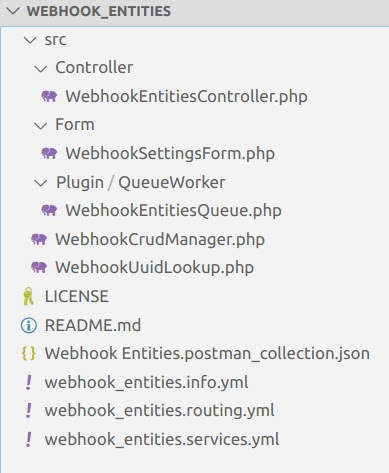
We’ll briefly review the key components below.
The Listener Endpoint
All webhook dispatchers require an endpoint that can receive notifications, so the first step is to define a new route in Drupal.
webhook_entities.listener:
  path: '/webhook-entities/listener'
  defaults:
    _controller: '\Drupal\webhook_entities\Controller\WebhookEntitiesController::listener'
    _title: 'Webhook notification listener'
  requirements:
    _custom_access: '\Drupal\webhook_entities\Controller\WebhookEntitiesController::access'
You might have noticed that the last line in the code from our routing.yml file above looks a bit different—that’s because it enforces custom access checking on the listener endpoint.
Access Tokens
/src/Form/WebhookSettingsForm.php
Security is a critical consideration whenever data makes its way from any external source into Drupal; since webhooks fit that bill, our custom access check validates each incoming notification to ensure it was legitimately dispatched from the actual provider.
In order to facilitate that handshake, our custom module includes a simple form that allows you to specify a secret key that can be used to allow or deny access. The most common security mechanism implemented by webhooks is an Authorization header that’s included in each notification and corresponds to a secret value that only you and your provider know (like an API key).
Log in to your Drupal site and navigate to /admin/config/webhook_entities/settings. Enter the authorization key used by our sample Postman collection: 123456. Then save the form.
Authorizing Notifications
/src/Controller/WebhookEntitiesController.php
In this simple example, we retrieve the config value saved via the form and compare it to the notification header to validate that the notification is legitimate and should be captured in the Drupal database.
/**
   * Checks access for incoming webhook notifications.
   *
   * @return \Drupal\Core\Access\AccessResultInterface
   *   The access result.
   */
  public function access() {
    // Get the access token from the headers.
    $incoming_token = $this->request->headers->get('Authorization');

    // Retrieve the token value stored in config.
    $stored_token = \Drupal::config('webhook_entities.settings')->get('token');

    // Compare the stored token value to the token in each notification.
    // If they match, allow access to the route.
    return AccessResult::allowedIf($incoming_token === $stored_token);
  }
Be sure to check your specific provider’s documentation to confirm this is the correct authorization method, since some services implement more robust security measures. For example, one CDN that we worked with required combining a notification-specific signature with a timestamp, hashing that value, and then comparing it to another header value. Clearly they’re a bit more serious about not letting anyone spoof their notifications!
Updating the Notification URL
Now that we have a dedicated path that can be used to listen for incoming notifications, we’ll need to instruct our provider to direct your implementation of their webhook API to that URL.
Your mileage will vary here, since the actual method for accomplishing this varies from provider to provider—however, in most cases, it’s a simple change that can be accomplished by logging into the control panel associated with your account. To facilitate local development we’ll make this change in Postman.
With Postman running and our sample collection imported as described above, expand the collection folder named “Webhook Entities” to find three sample requests. One at a time, you’ll need to click on each one and update the POST value found at the top of the Params tab to point to your development environment.For example, if you access your local development site via your browser at http://mysite.local, you’ll need to update the POST URL in all three of the requests to http://mysite.local/webhook-entities/listener.
Additional Data Concerns
Before completely moving away from the topic of security, it’s worth discussing some additional measures that are often overlooked when processing notifications. While it’s probably unlikely that your provider will intentionally deliver malicious code, it’s possible that a bad actor could gain access to their system and inject something nasty or get ahold of your authorization token and spoof legitimate notifications.
In order to safeguard against those risks, we’ll follow two golden rules of working with someone else’s data:
- Only keep what you’re actually going to use;
- Sanitize everything before using it.
Since Drupal typically sees us capturing all user input as it’s entered and sanitizing on output (and Twig’s autoescaping facilitates that to a large extent), we’ll focus primarily on working with only a limited subset of incoming data in the queue worker (below). However, the extra-cautious among us might also consider the addition of a generic service capable of sanitizing individual data points in each webhook notification or escaping HTML entities on markup-rich fields like body text.
Handling Notifications as They Arrive
/src/Controller/WebhookEntitiesController.php
The controller referenced in our routing.yml file (above) primarily serves as a gatekeeper that receives incoming notifications, determines whether or not to act on them (via the authorize method), and then shuttles them along to their final destination.
/**
   * Listens for webhook notifications and queues them for processing.
   *
   * @return Symfony\Component\HttpFoundation\Response
   *   Webhook providers typically expect an HTTP 200 (OK) response.
   */
  public function listener() {
    // Prepare the response.
    $response = new Response();
    $response->setContent('Notification received');

    // Capture the contents of the notification (payload).
    $payload = $this->request->getContent();

    // Get the queue implementation.
    $queue = $this->queueFactory->get('webhook_entities_processor');

    // Add the $payload to the queue.
    $queue->createItem($payload);

    // Respond with the success message.
    return $response;
  }
For maximum efficiency, we’re not doing anything with the data as it rolls in—but instead handing everything off to Drupal’s queue API for actual processing.
Processing Notification Data
/src/Plugin/QueueWorker/WebhookEntitiesQueue.php
Relying on the queue to process notifications in batches helps prevent your site from becoming overloaded in the event that it’s inundated with an influx of webhook notifications (for example, a bulk update that’s triggered when you upload a CSV file to your third-party provider).
Our custom module tells Drupal to queue notification data for processing later alongside any number of other notifications that might have come before or after it; the queued notifications (or a portion thereof, depending on how full the queue is) are processed during each cron run.
While authorization has already occurred by the time a notification reaches the controller, we perform several additional verifications to ensure the data we’ve received is usable and speed up processing time. We start by checking to ensure the notification body actually contains data and isn’t empty, then further validate that it contains the necessary UUID identified during our preparatory steps above (for simplicity we assume the UUID is a simple value contained within the headers for each notification).
Assuming both of those checks pass, we then implement the previously mentioned security tactic of stripping out anything we won’t be using. This step has the added benefit of simplifying the data we’ll be working with later as well as potentially gaining some efficiency by not passing along unused values that might end up being processed unnecessarily.
Remember that all-important UUID you’d identified in your incoming notifications? Here’s where it finally comes into play. Since your third-party provider probably doesn’t know anything about Drupal (most webhook notifications are purposely written to be generic), we’ll need a way to cross-reference the incoming data with any entities that Drupal already knows.
Since two of our CRUD actions (updating and deleting) will require database queries to find existing nodes—and considering there’s a good chance some of your other custom code will also need to identify those entities—we’ve abstracted this functionality out into a service (/src/WebhookUuidLookup.php) that other components of our Drupal site can leverage in order to more easily work with the entities managed via webhooks.
public function findEntity($uuid) {
    $nodes = $this->entityTypeManager
      ->getStorage('node')
      ->loadByProperties(['field_webhook_uuid' => $uuid]);

    if ($node = reset($nodes)) {
      return $node;
    }

    return FALSE;
  }
The last step is to shuttle each notification on to its final destination according to the action it represents. We’re managing create events a bit differently from the others since they’re the only occasion where we specifically don’t want to have an existing record in the Drupal database.
// Handle create events.
if ($entity_data->event == 'create') {
  // Create a new entity if one doesn't already exist.
  if (!$existing_entity) {
    $this->entityCrud->createEntity($entity_data);
  }
  // Otherwise log a warning.
  else {
    $this->logger->warning('Webhook create notification received for UUID @uuid but corresponding entity @nid already exists', [
      '@uuid' => $entity_data->uuid,
      '@nid' => $existing_entity->id()
    ]);
  }
}
// Handle other modification events.
else {
  // Ensure a Drupal entity to modify exists.
  if ($existing_entity) {
    switch($entity_data->event) {
      case 'update' :
        // Update an entity by passing it and the changed values to our CRUD worker.
        $this->entityCrud->updateEntity($existing_entity, $entity_data);
        break;

      case 'delete' :
        // Call the delete method in our CRUD worker on the entity.
        $this->entityCrud->deleteEntity($existing_entity);
        break;
    }
  }
  // Throw a warning when there is no existing entity to modify.
  else {
    $this->logger->warning('Webhook notification received for UUID @uuid but no corresponding Drupal entity exists', [
      '@uuid' => $entity_data->uuid
    ]);
  }
}
}
// Throw a warning if the payload doesn't contain a UUID.
else {
$this->logger->warning('Webhook notification received but not processed because UUID was missing');
}
Ultimately this is yet another component that will be specific to your provider and data model; the sample notifications in our Postman collection contain an event key, the corresponding value of which indicates which action should be taken when that particular notification is posted to your Drupal site.
Managing Drupal Entities
Now that we have a tool for recalling data that’s already been sent to Drupal, we can build out the logic required to handle each type of event that can be triggered by one of our notifications.
Since our sample postman collection contains short and simple notification data, all of our example CRUD components have been defined as separate methods within a single service class—however you might want to consider breaking yours out into separate services, since operations on actual data will almost certainly be more complex.
Rather than diving into the specifics of the CRUD manager service in our sample module, we’ll wrap up our code explanations by pointing out some general observations for best practices worth considering when you modify the examples to your own needs.
Our create() method offloads the handling of incoming notification data to a separate mapFieldData() function, which in turn constructs an array of values corresponding to Drupal field data that are required for creating a node. We’ve taken the approach of only mapping those values that might also be included in other events (such as updates) in order to prime the pump for future code reuse. We also ensure the notification payload contains a title value before creating a new node—since that’s the one value required for the basic page content type.
The update() method implements a series of simple checks to determine which values exist in the notification data—since unlike API calls that often return complete records, webhook notifications typically only contain modified values. This allows us to only act on those fields that have actually changed, rather than updating every value for a given node.
And finally, the delete() method does simply that. Like the update() method it’s receiving the complete node entity as an argument—so we’re able to call that entity’s built-in method in order to remove it from Drupal.
Seeing it All in Action
Go back to Postman and post the sample notifications in the same order as the actions listed above, returning to Drupal in-between each post:
Create: after posting the create notification and running Drupal cron, you should find a new node listed on your content overview page. View that node and you’ll see that all of its values correspond to those in the notification data (excluding the one we removed before handing the create notification off to the CRUD worker).
Update: post this update notification, run cron, and reload the Drupal node and you’ll find the title and body fields have been updated.
Delete: Finally, post the delete notification and run cron a third time to remove the sample node from Drupal.
Webhook Processing Done Simply
And there you have it—a simple yet functional example of processing webhook notifications. While this tutorial has touched on all of the key pieces that are required to manage one type of core-provided entity (nodes), you’ll find that your own specific application might warrant additional considerations such as:
- Locking down (or hiding) any Drupal fields populated from webhook data. This helps to preemptively stave off frustration for content admins since they won’t be able to edit any values that might be programmatically updated via future notifications.
- Creating additional CRUD managers: Each distinct entity type—particularly any custom ones you might create to store webhook data—will require its own set of field mappings. This is especially true if you aim to manage Media entities as we did for a recent project, since that task also requires parallel management of File entities. Be sure to leverage that UUID!
- Handling duplicate entries: While our example module simply throws an error—and ignores create operations—whenever a representative node already exists, your use case might warrant a different approach to safeguard against data loss. For example, you might want to instead hand off the incoming notification data to your update method.
Finally, despite how powerful webhooks can be it’s important to give some consideration to what they can’t do:
- Perhaps most critically, Drupal won’t receive any notices when your provider’s system goes offline and stops dispatch notifications—since your site is passively listening, the running assumption is that no news means nothing has changed. Unless the third-party service that’s broadcasting your notifications is capable of queuing and re-sending notifications, that gap will translate to missed updates that won’t be made to your Drupal entities.
- In a similar vein, webhook notifications are a one-and-done setup—so if your custom code contains a bug that prevents the changes specified in a payload from being saved, that update is lost forever once the queue believes it’s been processed. Be sure to test your code thoroughly with sample data that are highly representative of the actual notifications you’ll be receiving!
- Additionally, there’s always the possibility that your provider might modify the data structure of their notifications. Hopefully, they’ll be considerate enough to give you a heads-up if they do so, however it’s not a bad idea to wrap any functions that parse that data in try/catch statements so you’ll see some indication that things aren’t being processed in your Drupal logs.

One of the best parts about working for a digital experience agency is the number and variety of projects we get the opportunity to work on. And while the size and complexity of the digital experience platform projects we work on differ, they’ve offered us the opportunity to learn and discover best practices that others can use to help drive the success of their own projects.
Though the type of client work we take on can vary greatly, some frequent projects we’ve been tasked with are clients looking to switch content management systems (CMS) and clients looking to build multiple websites. From this, we’ve discovered the best way to ensure success involves two key factors: having the correct mindset and the correct approach.
It’s a Replatform—Not a Lift and Shift
A key part of any digital experience platform (DXP) is a CMS. The CMS serves as a hub to centrally manage content. Over the past several years as clients have built out their DXP, we have seen more and more of them looking to move off of one CMS and onto another.
Many times, the move is between two different CMS options (e.g. Sitecore to Drupal). Other times, it can be moving from one major version to the next major version of the same CMS (e.g. Drupal 8 to Drupal 9). In both these cases, it’s best to think about the project as a replatform or a rehost, and not as a lift and shift.
The term “lift and shift” can make the project seem very easy. We already have a website over here. We just need to move it over there. That shouldn’t be too difficult. Not only does the term obscure the project’s complexity, but it also misses one of the most important advantages to a project like this. When moving to a new CMS, it’s the perfect time to reassess the goals and requirements.
Discovery Phase
When a project like this comes up, an upfront Discovery phase is key for a successful replatform. The Discovery phase helps the team understand the requirements and learn what works in the current system and where improvements can be made in the new platform.
A key component of the Discovery phase is to perform stakeholder interviews to find out what is and is not working in the current system. If you just “move” everything as is to a new platform, you’re bound to repeat the mistakes and shortcomings of the current system.
We aren’t just concerned with the current system’s mistakes. If the current system has been in use for a number of years, the system’s goals may have changed since it was built. If you are investing in a new platform, you do not want to solve yesterday’s problems.
Platform Audit
In addition to the stakeholder interviews, a full audit of the current platform is also key. Even though the goal is not to recreate the current platform in the new CMS, the architect can learn a great deal from the current platform.
Part of the audit should focus on the custom code that has been written. Often, custom code will contain business logic that is needed in the new platform. Another important part of the audit is understanding how the current platform is used and any workflows that have been created for it. The better the architect understands the current system, the better they can plan for the building of the new system.
Understand the CMS Features and Functionality
One last key point is that the new CMS will have different features and functionality than the current CMS. When moving to the new CMS, you will want to change how the current system is built to take advantage of the strengths of the new CMS. Trying to make the new CMS work exactly like the old CMS will result in a lot of frustration and a poorly-built platform.
Build an Ecosystem, Not a Series of Websites
Whenever you need a system that will support multiple websites, it’s important to approach it as an ecosystem and not just a number of individual websites. Building an ecosystem can be, and often is, a challenge. But done correctly, building an ecosystem results in an easier-to-use and easier-to-maintain system that takes advantage of the CMS.
Building an ecosystem allows you to take advantage of the economies of scale. One way to realize that is to build all of the websites with the same code base. This lets you update the CMS and modules as needed in one place, saving time and resources.
But, you can extend this further. If your platform is built with a component-based approach and you build all the websites using a common set of components, the builds will take less time, as will future updates.
By building a custom theme for each website, but using the same components, you can create different looks to cater to your specific brands. Or, for even more scale, you can build out a common theme to use for all websites and just change colors, fonts, etc. By leveraging the same functionality and components across websites, you can make the platform much easier to maintain and use.
Component Consolidation
One of the main challenges with building an ecosystem versus a series of websites is that doing so requires compromises from the websites owners. It is not uncommon for a client with 10 websites to have hundreds of components and dozens of page templates among the websites.
However, when building the new ecosystem, you should consolidate the components and page templates to reduce the number needed. Without consolidation, the build will cost more and take longer than needed and result in a harder-to-user and harder-to-maintain platform.
This consolidation will require the stakeholders to make compromises as it is not possible to rebuild all of the websites exactly the same with fewer components and templates.
A well-built ecosystem lends itself to be easier to build, use, and maintain. This reduces the total cost of ownership and makes it a better choice than building highly-customized, individual sites.
Flexibility is Key
A new DXP is a large undertaking. Today’s consumers expect a much more personalized and seamless experience across channels. The CMS is a critical piece to providing that flexibility.
One way to provide flexibility in the CMS is by using a component-based approach for the content editors to create content. A component-based approach allows content editors to build pages using a series of components within the CMS rather than having a structured format to the page.
This allows flexibility to build pages tuned to the exact message they are trying to send. When done correctly, it can also speed up the content building process by eliminating the need to have developers involved in the creating and publishing of content.
Component-Based Approach
Component-based approaches are much more common these days, but they’re not always executed well. Having someone experienced with this type of approach is vital to the success of the project.
From a design perspective, striking the correct balance between the number of components and the number of component settings is essential to creating an easy-to-use content editor experience.
From a technical perspective, there are usually a number of ways to execute a component-based approach and pros and cons to each. For example, in Drupal, we can use the Layout Builder module as the foundation for our component-based approach, and it works very well.
As an alternative, we can also use a site-building tool like Acquia Cohesion to execute the component-based approach. Both are solid options with pros and cons depending on the requirements.
A CMS that Provides Data
Another way to provide flexibility is by having the CMS be able to provide data to all of your platforms. Using your CMS as a centralized content source allows each channel to use the content as needed.
Drupal is an example of a CMS that excels in this area. Drupal was built with an API-first mentality, meaning that exposing content using APIs is baked into its fabric. Drupal has several modules that make exposing your content as REST APIs services very easy. Drupal also makes it easy to return that data in a variety of formats, such as JSON and GraphQL, as needed by the system consuming the data.
Mind Over Matter
No two projects are alike. However, your next project can benefit from what we have seen and learned from our projects here at Bounteous. The best way to be successful is to have the correct mindset (“This is a replatform, not a lift-and-shift”) and the correct approach (“Build an ecosystem, not a series of websites”) while focusing on creating a flexible system.

Many organizations depend on Drupal to build digital ecosystems. As a powerful content management system (CMS), it works well as one of the cornerstones of a composable architecture—but it can also function as its own standalone composable architecture. A composable approach has several benefits, including making it easier and more efficient to build out new channels (e.g., new websites or landing pages). It also empowers the business— especially the marketing team—to create and deliver content to customers where and when it is needed. This frees up developers to work on projects that deliver the most value.
Here, we outline some of the best practices to build out a digital ecosystem using Drupal.
Tips to Build Reusable Front-End Components
Using a tool like Drupal means that companies will benefit from the experiences and recommendations from the broader Drupal community, as ideas are shared and discussed widely. With our own clients and contributions to the Drupal community, as well as considering the enterprise tools available, we’ve identified a number of recurring practices that can help make this process easier.
Use Layout Builder to Create Reusable Components
To build new channels efficiently, composable approaches seek to move building pages and channels out of the developers’ hands and into the marketers’ hands. A great way to do this is to build flexible, reusable front-end components. Drupal is well-equipped in this area. Layout Builder has been part of Drupal core since Drupal 8, and the Drupal community continues to add features and refine the experience to enable ambitious site builders.
Layout Builder allows developers to build components and templates that give marketers greater flexibility to build pages without the need for developer intervention. If a new landing page is needed, a content editor can quickly assemble the page from the reusable components and get it published quickly.
Provide an Enterprise-Grade UX with Acquia Site Studio
While Layout Builder is a great choice for building out reusable components, Acquia Site Studio provides an enterprise-grade user experience, which makes it even better. With Site Studio, marketers can not only build out new content using reusable components and templates, they can update styling to the components as well. Site Studio makes it efficient for developers by providing a user interface (UI) kit that includes components and helpers to get the build started. Acquia Site Studio makes building reusable components a breeze.
Create Efficient Development Processes with CI/CD
Building reusable components is an important aspect of a composable approach, but it is also important to have an efficient development process. A key component to having an efficient development process is creating a continuous integration/continuous delivery (CI/CD) pipeline. CI/CD pipelines make the development process efficient by automatically enforcing coding standards, testing the new code to ensure quality, and creating deployment artifacts so the code is always ready to be deployed.
It has never been easier to create a CI/CD pipeline. All the major cloud-based source code version control providers offer tools to make doing so very easy. Once the CI/CD pipeline is built out, the process is automatically kicked off when a developer commits a change to the code base. If the process detects any issues, the developer gets immediate feedback and can fix those issues. All this automation makes the development process quicker so if there is a new feature or an enhancement to an existing feature that is needed, the development team can deliver it quickly.
Use Composer to Manage Drupal and Dependencies
Another key component to an efficient development process for Drupal projects is using Composer to manage Drupal and all other dependencies, like libraries, modules, and themes and their dependencies. Using Composer makes it easy to ensure all the needed dependencies are installed and ensures that all developers are using the exact same version of all the libraries, modules, and themes. This helps prevent issues where it works in one developer’s environment, but not in another developer’s environment.
Simplify the Development Process with Acquia Code Studio
Acquia has developed tools such as Acquia Code Studio that help developers create an efficient development process. Code Studio includes everything needed to have an efficient development process from a zero-configuration CI/CD pipeline to automatically created feature branches to easy to create merge requests and more. In partnership with GitLab, Code Studio helps keep the development tasks on target from feature request through production deployment. Acquia has done all the heavy lifting to build out a solid, efficient development process so you don’t need to.
Isolate Your Business Logic
Another idea to keep in mind when using Drupal as a composable solution is that business logic should be isolated as much as possible. Business logic in this sense means not only the code needed to implement business processes, but also any data mapping needed to integrate with other platforms. In a truly composable architecture, business logic would be built in the orchestration layer to keep the ecosystem front-end and back-end agnostic. With composable Drupal, Drupal acts as the orchestration layer, but that does not mean the business logic should go just anywhere.
Whether you are implementing a traditional Drupal theme or using Drupal as a headless CMS, the business logic should be out of the theme layer. With a traditional Drupal theme, a good indication that you kept business logic out of the theme is if you can create a drop-in replacement for your theme. Whether you use a traditional Drupal theme or a headless implementation, the code should be narrowly focused on presentation.
Any business logic that is needed should be isolated to and grouped in custom modules. The more centralized the business logic is kept, the easier it will be to update or replace various parts of the system, like platform integrations, in the future.
Future-Prep Your System
Often developers will talk about future-proofing what they are building. However, the future is hard to predict. (Any developer that has been asked for an estimation knows this to be true.) Without being able to predict the future, we cannot future-proof our system. We can, however, future-prep our system.
Isolating the business logic is a great example of future-prepping. By isolating the business logic, companies can minimize the disruption in the system as changes are inevitably needed. Marketing teams may not have a need for an email marketing system, but that could easily change in the future. Building a system that can efficiently adapt to ever-changing business needs can give you an edge.
One of the attributes that I like about the Acquia Platform is that it is both built to be open, yet is also well-integrated. Because of the open nature of both Drupal and Acquia, you can build a best-of-breed system. And, if you already have a platform that is working well, it can easily be integrated into a Drupal-based solution built on Acquia. But, if as your needs grow, you find yourself needing to do more with customer data or need additional help managing your digital assets, Acquia has products like CDP and PIM that can be easily plugged into your existing platform. In short, Acquia’s products make it easy to grow at your pace.
Empowering Organizational Agility through Composable Architecture with Drupal
A composable architecture provides organizations with the agility to react to their ever-changing business challenges. Using Drupal as a composable platform can help you achieve that agility. The key is to put the power to freely create new content and channels in the hands of marketers—so that developers can focus on building more tools that deliver value and make the process of development reliable and efficient.
Businesses need to react quickly to changes and the wants and needs of their customers. While this has always been true, it has become increasingly evident since the COVID-19 pandemic hit and the disruption to businesses was massive. Overnight, brick-and-mortar businesses were forced to build or expand their digital footprint. The companies that had built their digital infrastructure with modular and open platforms had a huge advantage over their competitors.
One of the latest trends in the digital experience space is composable architecture. Using a composable architecture provides organizations with the ability to add new channels and add or replace digital capabilities quickly. The speed, agility, and flexibility that composable architectures provide better prepare organizations to adapt to changing technological and consumer trends.
What is Composable Architecture?
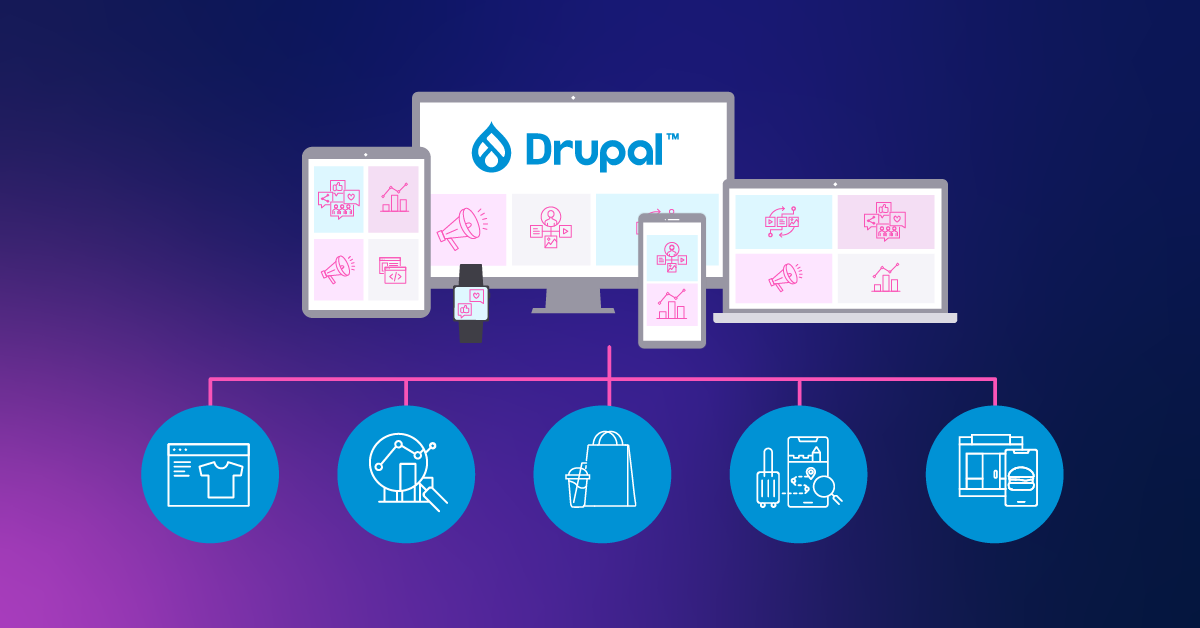
A composable architecture is one that uses a modular approach that effectively separates the digital experience channels (e.g. website, mobile app, digital signage) from the back end platforms (e.g. Commerce, CMS, Search). Two of the key principles of composable architectures are: composable architectures are front-end agnostic and composable architectures are back-end agnostic. Being front-end agnostic allows a composable architecture to be omni-channel. Being back-end agnostic allows a composable architecture to be omni-capable. These two principles are the key to the flexibility provided by a composable architecture.
To achieve those two principles, an orchestration layer is used to separate the front-ends from the back-ends. The orchestration layer is responsible for integrating with the back-end systems, applying business logic and processes, and providing an interface to provide the data and content to the front-end applications. To satisfy those responsibilities, the orchestration layer is built using packaged business capabilities (PBCs). PBCs allow the data and content to be retrieved from the back-end systems, processed, and returned to the front-end applications in an organized way. There is no one way to build and organize the PBCs, which provides additional flexibility.
Using a composable architecture results in a system that is flexible and agile. Adding a new channel, platform, or PBC can be done with a faster time to market. The back end developers can focus on exposing more functionality and platforms. The front end developers can focus on composing solutions to best meet the end users’ needs. The architecture is able to adapt to the ever-changing business needs. In essence, composable is headless at scale.
Composability Within Drupal
You may be wondering, if composable is the future, how does Drupal fit in? Drupal has been around for a long time, and during that time, it has continued to evolve. In many ways, as Dries Buytaert points out, Drupal has evolved to be a composable digital experience platform on its own. The goal has always been to allow developers to build flexible systems with a modular approach to allow their organizations to quickly adapt to their customers’ needs.
Drupal was an early adopter of the headless movement. Modules to expose the content via REST APIs using JSON and GraphQL have been available since Drupal 7 and many of these modules are now incorporated into Drupal core. Indeed, there are many recipes and starter kits that make building a headless Drupal site easier.
Being modular is a key attribute of a composable architecture. The ability to build solutions from reusable components provides agility and speed in building a new experience. The Drupal platform is modular. Drupal core comes with a variety of modules used to build most Drupal sites. In addition, the Drupal community has built thousands of modules that extend Drupal core allowing developers to extend the functionality even further. Developments like Project Browser are making it easier to find and use these modules.
One of the key benefits of a composable architecture is the ability to seamlessly integrate different back-end systems to create a best-of-breed solution. To deliver the customer experience that is demanded by their customers, organizations need to bring together data and functionality from a variety of platforms. Third-party integration modules are one of the key areas covered by the extensive pool of Drupal community contrib modules. With these modules, Drupal developers can build a composed solution within the Drupal platform that brings together data and functionality from a variety of platforms.
Part of the promise of a composable architecture is the ability to quickly bring together an experience. Having a low-code/no-code tool available can really speed up the process and this is where the Drupal platform shines. Layout Builder is a Drupal core module that gives editors the ability to build pages using drag-and-drop capabilities with prebuilt components built by the developers. Products like Site Studio from Acquia take low-code/no-code building to the next level. The business is free to innovate at the speed it needs to innovate.
In many ways, Drupal provides a composable solution. Drupal provides out-of-the-box support for a headless website. It’s built with a modular approach, is open and makes it easy to bring together many systems, and provides low-code/no-code builders that make it simple to compose solutions. And while Drupal can provide many of the benefits of a composable solution, it does not quite reach the full potential of a truly composable solution.
Composability With Drupal
A truly composable architecture is a modular solution where the front end and back end are completely separated by an orchestration layer. A composable architecture is more flexible, scalable, and efficient than a monolithic architecture. This results in huge benefits to the organization. As there is a need to add an additional channel to the digital experience, the builders have the flexibility to build it exactly as needed by leveraging the already built components. And, as the organization’s needs change, those components can be updated in one spot to efficiently distribute those changes. As the need to scale arises, the back end systems can be swapped out and scaled up without disrupting the digital experience channels.
Drupal has a long history of being used as a headless CMS. For the better part of the past decade, Drupal has been used to power some of the most innovative and powerful headless experiences. Beginning in Drupal 8, Drupal core provided REST and JSON:API support giving developers the option of using Drupal in a coupled or headless manner. In addition, Drupal provides GraphQL support by installing a community contrib module.
Drupal really excels as a CMS when it comes to complex authoring workflows and complex content modeling. Drupal has a mature feature set that makes building workflows and complicated data models easy. There is great flexibility and power to be leveraged with Drupal.
By using Drupal’s headless capabilities, Drupal can be a key part of a composable solution. Content administrators are comfortable using Drupal and developers can harness the power of Drupal. In a composable architecture, Drupal’s many features can be used while also using other platforms for their strengths. The best-of-breed model leverages the best of all worlds.
Composable architectures are a powerful approach to building headless at scale, and Drupal is a powerful tool that embraces many concepts of a composable architecture when used by itself. But Drupal is not limited to that. As organizations look to unlock the value of all their systems, Drupal can be a key component of a composable architecture.
Check out this blog to learn more about how composable is powering transformative digital experiences.
About Drupal Sun
Drupal Sun is an Evolving Web project. It allows you to:
- Do full-text search on all the articles in Drupal Planet (thanks to Apache Solr)
- Facet based on tags, author, or feed
- Flip through articles quickly (with j/k or arrow keys) to find what you're interested in
- View the entire article text inline, or in the context of the site where it was created
See the blog post at Evolving Web
