

Upgrade Your Drupal Skills
We trained 1,000+ Drupal Developers over the last decade.
See Advanced Courses NAH, I know EnoughBetween November 2020 and October 2021, 5212 organizations worldwide experienced data breaches. (source: statista).
And the number is steadily increasing.
While every business that operates online faces some cyber threats, there are many ways to prevent data breaches or at least minimize their impact.
Delays before security updates are applied on site can result in compromised sites as seen in Drupalgeddon.
Manually updating a Drupal site can be an expensive, difficult, & time-consuming.
The goal of the Automatic Updates Initiative is to provide safe and secure automatic updates for Drupal sites. It aims to solve the problem of any security concerns while over ridding the troublesome manual update process of a Drupal site.
Explained: Drupal Automatic Updates
Drupal’s Automatic Updates focus on resolving some of the most difficult usability concerns in maintaining Drupal websites. It is listed as one of the Drupal Core Strategic Initiatives for Drupal 9.
It comprises of updates on production, development, and staging environments, with some integrations required in existing CI/CD processes.
Automatic Updates in Drupal offers some major benefits to its users such as a reduction in the total cost of ownership (TCO) for Drupal websites and also a decrease in the maintenance cost.
Presently, we get to see a stable release that comprises features such as public safety alerts and readiness checks which will be discussed below.
Importance of updating website
Here is the importance of updating a website. Take a look below:
- Helps in increasing brand exposure
If we update a website by changing the outdated information with newly updated content then it will lead to an increase in brand exposure. But if we do not take this responsibility of updating content then it can be an obstacle in increasing the brand exposure which is essentially important.
- Increases security
One of the major reasons for updating a website can be security concerns. For example, if a website is hacked then it can bring trouble for both the business and clients. But if we frequently update our website with the latest security features then such troubles of website hacking can be avoided.
- Mobile-friendly
By updating our website to a mobile-friendly website we enable our users to go through our website across various devices and platforms with ease and comfort. This leads to an increase in website traffic also resulting in a better company reputation.
Key Features of the Automatic Updates Module
Here’s a list of features in the Automatic Updates module.
- Update readiness checks
We might not be always capable of updating all websites. Therefore, in instances like such, the readiness checks, one of the key features of Automatic Updates helps in identifying if a website is ready for updating automatically after a new release is offered to the Drupal community.
For instance, websites that have un-run database updates, not having sufficient disk space for updating, or working on read-only file systems, won’t be able to get automatic updates. And if our website fails readiness checks and a Public service announcement (PSA) happens to be released, then it is essentially important to solve the readiness issue so that the website can be updated instantly.
- In-place updates
- After the PSA service provides a notification to a Drupal site owner of an available update, and also the readiness checks happen to confirm that the website is ready to be updated, the website administrator is then able to update through the Update form.
- Tarball-based installations are well supported by this particular module and it doesn’t happen to choose some of the requirements in order to secure updating, rollback, etc which will come under the core solution.
- This module doesn’t support contrib updates or composer-based site installations. And also, the work on composer integration has begun already and is in progress.
- Public service announcements (PSAs)
We get to see that infrequent announcements are done especially for critical security releases in regard to core and contrib modules. After a PSA is released, site owners need to review their websites so that they are updated well with the latest releases. Also, the website needs to be in a good position in order to quickly update if any fixes are given to the community.
Here is a quick video on the above-discussed features of automatic updates.
[embedded content]
Conclusion
The Drupal community never fails to make an honest effort in building a community where its users can be benefited by making their software and websites safer and more user-friendly. The Automatic Updates initiative is a great example of it and by far it has made tremendous progress that cannot be unseen.
The way companies are developing their products is changing. That’s because more people are accessing websites in more ways than ever before. To create and innovate at a faster pace, developers are leveraging reusable components. Pattern Lab is one such front-end framework that uses atomic design architecture to execute the component-based design. Reusability and portability of components are the prime reasons for its fast-gaining popularity.
In this blog, we’ll cover what Pattern Lab is, and how developers can use it with Drupal to create their own frontend library and accelerate their product development.
What is Pattern Lab?
Pattern Lab is based on Brad Frost’s Atomic Design concept. Pattern Lab proves to be one of the best dynamic prototyping and organization tools for professionals. It is easily available for download on GitHub and can be used as part of existing or new projects.
It helps in transforming pattern templates, authored by developers, into a full-featured, static site. Easy to learn, it can be used in different types of projects. In fact, it can also be used as a front-end style guide, a rapid prototyping tool, and the actual templates powering one or more live sites. It uses atomic design for accelerating the process of creating modular designs.
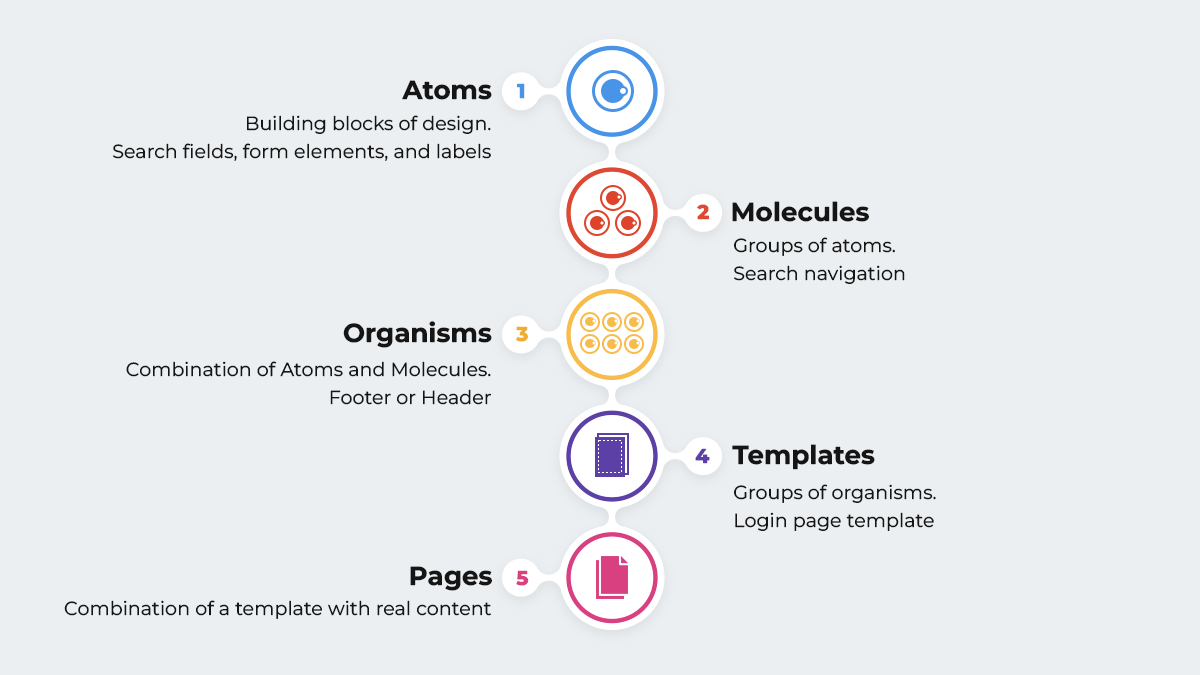
Now, let’s break down the above visual building blocks:
- Atoms: They are the basic building blocks of design. For example, UI elements such as buttons, search fields, form elements, and labels.
- Molecules: These are groups of atoms that work together for performing a particular action. For example, search navigation involves a combination of atoms such as a search button, a search field, and a label.
- Organisms: These are molecules and atoms grouped together to define sections of the application. They’re more complex and also have more interactions. For example, a footer a header, or a related blog post section.
- Templates: Groups of organisms form Templates. They are placeholders for organisms. For example, a login page template, a blog page template, or a shopping cart page template.
- Pages: When we combine a template with real content, we get a page.
Pattern Lab with Drupal
Pattern Lab has become popular in the Drupal community, since the release of Drupal 8 with Twig. The combination of Pattern Lab and Drupal leads to better performance of Drupal websites that are complex in nature. Pattern Lab ensures that its Twig templates and CSS can be consumed like a service by Drupal.
Contributed theme such as Emulsify Drupal that comes with inbuilt the Pattern Lab architecture. Emulsify is basically a component-driven prototyping tool that uses atomic design principles and modern frontend practices in order to build a living style guide. It can be executed easily into any CMS for rendering twig files since it adopts the methodology where the smallest components are atoms, which are assembled into organisms, molecules, templates, and pages.
Emulsify authorizes us to manage and assemble components in a way that improves the workflow by integrating Pattern Lab. So, the Emulsify-based project works with custom template names that are very particular to the project, clients, and developers. This helps in segregating the category-wise patterns (modules) and also increases the expertise of the process.
When the templates are ready for production, Emulsify then connects them to Drupal in a non-complex way as a Twig function (include, extend, or embed) and connects the Drupal templates to the component files.
Emulsify prioritizes a "living style guide" approach where the style guide components are basically the same ones in use on the live websites. And we do not need to worry about the components becoming outdated or more unusual than the normal style guide.
Why should we use Pattern Lab?
Let’s now look at why should we use Pattern Lab.
- Dynamic Data: Patterns are supposed to be authored to work with dynamic data. Example data files are easily customizable, included, and available to templates. Also, we will find a global set of data and the capability to customize per component, and variant. This will further encourage writing templates in such a manner that they can also be used outside of the pattern lab, with real data.
- Organization and Presentation: A high-level structure, or groups, based on "Atomic Design" principles is offered in Pattern Lab. We can choose to work within that structure or change the terminology to whatever fits our wants by directly renaming file system directories. These groups happen to turn into dropdown menus, that expands in order to show all the pattern templates in that group and also allow navigating to them. This indeed makes it very simple for the team members to browse and discover what patterns actually exist.
- Proper documentation: Documentation can be easily added at group and component levels, as wished, by simply adding a markdown file, with the same name. This documentation happens to be exposed in the static site, along with the source code of the template.
- Variants: It’s very common to have several variants of a pattern. For instance, in a typical "Hero" pattern we might just have a "light" and "dark" version. So, basically, Pattern Lab supports variants, which it calls "Pseudo Patterns" and displays them very clearly in the static build.
Conclusion
By implementing Pattern Lab, teams can quickly prototype and iterate without multiple rounds of expensive redesigns with the help of traditional design flats. It enables us to be more efficient when it comes to multi-device testing and cross-browser and also makes the job of a front-end developer a lot easier and more fun.
Pattern Lab supports keeping designers, developers, and stakeholders on track in regard to visual decisions. So, if we prioritize brand consistency, and value design, and wish to have a website that works in a very effective way both on the front-end and the back-end then Pattern Lab is the right choice.
About Drupal Sun
Drupal Sun is an Evolving Web project. It allows you to:
- Do full-text search on all the articles in Drupal Planet (thanks to Apache Solr)
- Facet based on tags, author, or feed
- Flip through articles quickly (with j/k or arrow keys) to find what you're interested in
- View the entire article text inline, or in the context of the site where it was created
See the blog post at Evolving Web
