Upgrade Your Drupal Skills
We trained 1,000+ Drupal Developers over the last decade.
See Advanced Courses NAH, I know Enough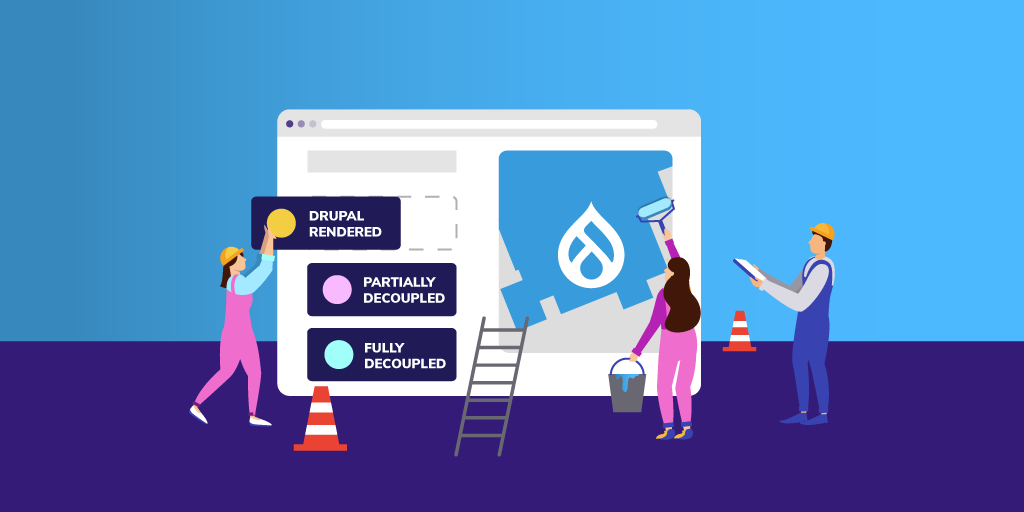
Enterprise organizations are increasingly looking at Drupal as a reliable, open source option for developing their online presence—contributing and benefiting from the active community base and potentially taking advantage of cutting-edge, decoupled capabilities.
With over 10 years of Drupal experience and implementations ranging from small to complex, we are often asked to recommend the best approach for building a Drupal site. The answer, as with many questions is, it depends. For some clients, the best choice is to build a traditional, coupled Drupal website. For other clients, it makes sense to build a completely decoupled solution using Drupal as the backend. And for others, the best solution is somewhere in between. Many factors determine which is the best approach for a particular client and their situation.
One important factor in deciding what approach to take is to understand the needs and skills of the people that will use and maintain the system. The two main users to consider are the content creators and others that will work in the system daily and the developers that will build and maintain the system.
View Webinar Recording: Building Enterprise Websites with Drupal: Unleash Your Full Potential
Considering the Content Manager
For the content creators and content managers that work directly in the content management system (CMS), having an easy-to-use content admin system is key. Drupal has increasingly focused on this experience and has provided many features with this in mind. With traditional Drupal, content editors can quickly create pages leveraging the drag-and-drop capabilities of Layout Builder. Inline editing allows content editors to make quick changes to the content without diving deep into the content admin UI. And, content preview is available to review before publishing the content to the website.
All of this is also possible in a decoupled solution, but the developers must build and maintain this functionality or cobble a solution together from existing technologies. If the project requirements already require changes to Drupal's out-of-the-box functionality, building from scratch may be easier.
Considering the Development Team
The development team's skills are also an important consideration. If you have a team that has deep technical knowledge of a technology (or a desire to develop that knowledge), that can have an impact on the recommended approach. For instance, if your team has never themed a Drupal site before, but has experience with React, using a decoupled approach would fit nicely with the team's skills.
Like any framework, it takes time to learn how to theme Drupal sites. If you have a small team that is spread thin or maybe you don't have a team, a coupled approach using Layout Builder or Acquia's Site Studio could give your content editing team the flexibility it needs without requiring much help from a development team.
Considering the Digital Strategy
The overall digital strategy is an important factor to consider as well. Will the platform support a single site or is this a key piece to a multisite, multi-brand digital platform? Is Drupal the only platform involved, or is Drupal a part of a broader digital experience platform (DXP) that includes CRMs, Commerce platforms, a CDP, and other platforms? Whether working with Acquia, the open digital experience platform built on top of Drupal, or connecting into other tools—Drupal is designed to make these connections easy.
Drupal is a great platform to integrate with other platforms. Many integrations are easy to implement by installing a community module. Drupal provides a robust migration system that makes pulling data into Drupal easy to do. Drupal also makes it easy to pull data out of Drupal using REST APIs or GraphQL.
If you are only building one website with the platform and it is primarily for marketing your organization, a traditional Drupal build probably makes sense. The more systems you are integrating and the more channels you want to use the content in, the more sense it makes to build using a decoupled approach.
Considering the Requirements
The requirements are another important factor to consider. Requirements help us define the solution. Just as important as the requirements are how flexible the requirements are. Drupal provides lots of functionality out of the box. When you add the availability of more than 40,000 free community-contributed modules, Drupal can meet many requirements with very little effort.
As you define the requirements, you should compare them to what Drupal can do. And where there is a module that meets most, but not all, of the requirements, decide whether it is possible to change the requirements. The more Drupal satisfies the requirements that you would need to build yourself in a decoupled approach, the better the coupled Drupal approach makes sense. If you find that your requirements will require a lot of customization to Drupal, a progressively decoupled or even fully decoupled approach may make sense.
Considering the Budget and Timeline
Every project has budget and timeline constraints. If you are on a tight timeline (and budget), building a coupled Drupal platform is often a solid choice. Drupal provides so many out-of-the-box features that, with flexible requirements, you can build a website in a very short period of time. For instance, we were able to build a small Drupal site using Site Studio in just a few days. The more expansive your budget and timeline, the more options you have in approach.
The Versatility of Drupal
After you've done the analysis and come up with the best approach, understand that circumstances may change. And, regardless of the approach, because Drupal can handle any of the approaches in the spectrum, you can evolve your approach over time. Because Drupal has been built with an API-first approach, it allows you to change your approach from a coupled Drupal approach to a fully decoupled approach over time.
Here at Bounteous, our website was originally built with a coupled approach. However, we recently decided to refresh the site. Drupal has allowed us to decouple parts of the site that make sense to decouple but keep the other parts coupled. As needs dictate, we can continue to decouple only the parts that we need to.
Drupal is a versatile system that can be the centerpiece of your DXP. How you use it will depend on the factors above and others that you find important. Regardless of the approach you take, Drupal is versatile enough to change as your needs change in the future.
Upgrading from Drupal 7 to the latest version opens up a range of benefits, allowing you to leverage a modern CMS. By enhancing areas like content structure, SEO, and security during migration, you can maximize the impact of your investment.
But, without Drupal expertise, deciding what to change and improve can be overwhelming during the migration process.
Our free checklist, built on Droptica’s experience with clients, helps you explore common migration improvements and decide which ones fit your needs.
Migration Options
During your Drupal 7 to 10/11 migration, there are three primary strategies to choose from. Your decision will shape the timeline, budget, and overall migration success. Here’s a look at the options:
1. Migrate Without Changes
This is the quickest and simplest approach, where you upgrade to Drupal 10/11 without changes. It’s ideal if you’re focused on compatibility and keeping the site operational. However, it may bypass opportunities for SEO, security, or content improvements.
Recommendation: Choose this option if you’re on a tight budget, need a quick upgrade, and are planning to address improvements later.
2. Migrate with Small Changes and Improve Later
This option involves upgrading while making essential adjustments to enhance performance, fix urgent issues, or implement minor improvements. For example, you could address outdated content types, enhance SEO configurations, or clean up old fields.
Recommendation: If you’re looking for immediate improvements while staying within budget, this approach strikes a good balance. You can tackle more complex updates later, spreading out costs and efforts.
3. Migrate and Overhaul All Aspects at Once
This option offers a full-scale transformation, tackling everything from redesigning the user experience to fixing issues like content structure, user permissions, SEO, and security.
Recommendation: This is the best route for businesses aiming to modernize their site to align with updated buyer personas and current audience expectations. If you have the budget and want a comprehensive solution, this approach ensures long-term success, though it requires more investment upfront.
How We Created This Document
We built this guide by analyzing our last 10 Drupal migration projects, which ranged from small (200 hours) to large (thousands of hours). Simple migrations focused on quick fixes, while larger ones involved redesigns, performance improvements, and content restructuring.
By combining insights from these projects, we’ve created a document that highlights key improvements to consider during migration. No matter the size of your project, this guide will help you make informed decisions and focus on impactful changes.
Scope of the Document
This document provides a comprehensive guide to the key areas you should consider when migrating from Drupal 7 to Drupal 10/11. It covers essential aspects of the migration process, helping you identify potential improvements in various areas of your website. The document includes recommendations for:
- Content Structure: Optimizing nodes, taxonomy, and other data types.
- User Management: Enhancing user profiles, roles, and permissions.
- Design and Theme: Updating the look and feel of your website, including frontend and framework choices.
- SEO Optimization: Improving your website’s search engine visibility with better structure, URL management, and content optimization.
- Security Enhancements: Implementing security best practices, such as two-factor authentication and role-based access control.
- Performance Optimization: Speeding up your site by optimizing media, caching, and database queries.
- Editorial Workflow: Improving content creation and publishing processes through better workflows and automation.
- Integrations and APIs: Connecting your website to third-party tools, such as CRMs and marketing platforms.
- Hosting and CI/CD Automation: Streamlining deployments, backups, and updates for more efficient website management.
This guide offers practical insights based on real-world experience, helping you decide which areas to prioritize for your migration. Whether you’re looking for a basic update or a full site overhaul, this document will help you navigate the complexities of the migration process.
How to Use This Document
This document is available in Google Docs format, making it easy to copy and use as a checklist during your migration process. Simply go through each section, and if certain recommendations don’t apply to your project, feel free to remove them. For any features or improvements you want to implement, just describe them in the corresponding table cells.
Once you've finalized your version of the document, you can share it with your Drupal development company. To make the estimation process even smoother, we recommend providing it alongside the text file generated by the tool described in the blog post Curious about Drupal 7 to 11 migration costs? Collect all the info for estimation in 5 minutes.
If you'd like to send the document to us at Droptica, you can reach out using our contact form, and we’ll provide you with a tailored estimation for your migration from Drupal 7 to the newest version.
Where to Get This Document
You can download the Drupal 7 to 10/11 Migration: Features and Enhancements to Consider document for free on our Drupal 7 to Drupal 11 Migration Services page.
Summary
Migrating from Drupal 7 to Drupal 10/11 is a chance to update your system and improve your site's performance, security, and user experience. Whether you opt for a simple migration or a complete overhaul, our Drupal 7 to 10/11 Migration: Features and Enhancements to Consider document will guide your decisions.
Use it as a checklist to evaluate your current setup, plan improvements, and collaborate with your development team. You can download the document for free, and if you need help, Droptica is available to provide expert advice and a tailored migration plan.
Introduction
The presence of Artificial Intelligence (AI) is now an undeniable reality that can no longer be overlooked. It has captured the interest of clients across all budgets and industries.
Many organizations are still confused about what they want to achieve with AI. This confusion also extends to Digital Experience Platforms (DXPs), where companies are often unsure how they can utilize AI to enhance customer experiences, automate workflows, or ensure holistic automation.
The Launch Of ChatGPT
It’s not that AI didn't exist before ChatGPT, it did. But the advent of ChatGPT in November 2022 transformed AI's perception. For the first time, everyone could access this tech in its simplest form, a chatbot.
Tools like Dall-E and Midjourney emerged, generating graphics and images indistinguishable from real photos, blurring the lines of reality.
Similarly, DXPs began using these tools to create engaging content, deliver personalized digital experience, help improve customer service, and enhance how brands connect with their audiences.

ChatGPT did to AI, what Tesla did to electric cars, Netflix did to streaming and what iPhone did to Smartphones.
Swarad Mokal | Technical Program Manager, Axelerant
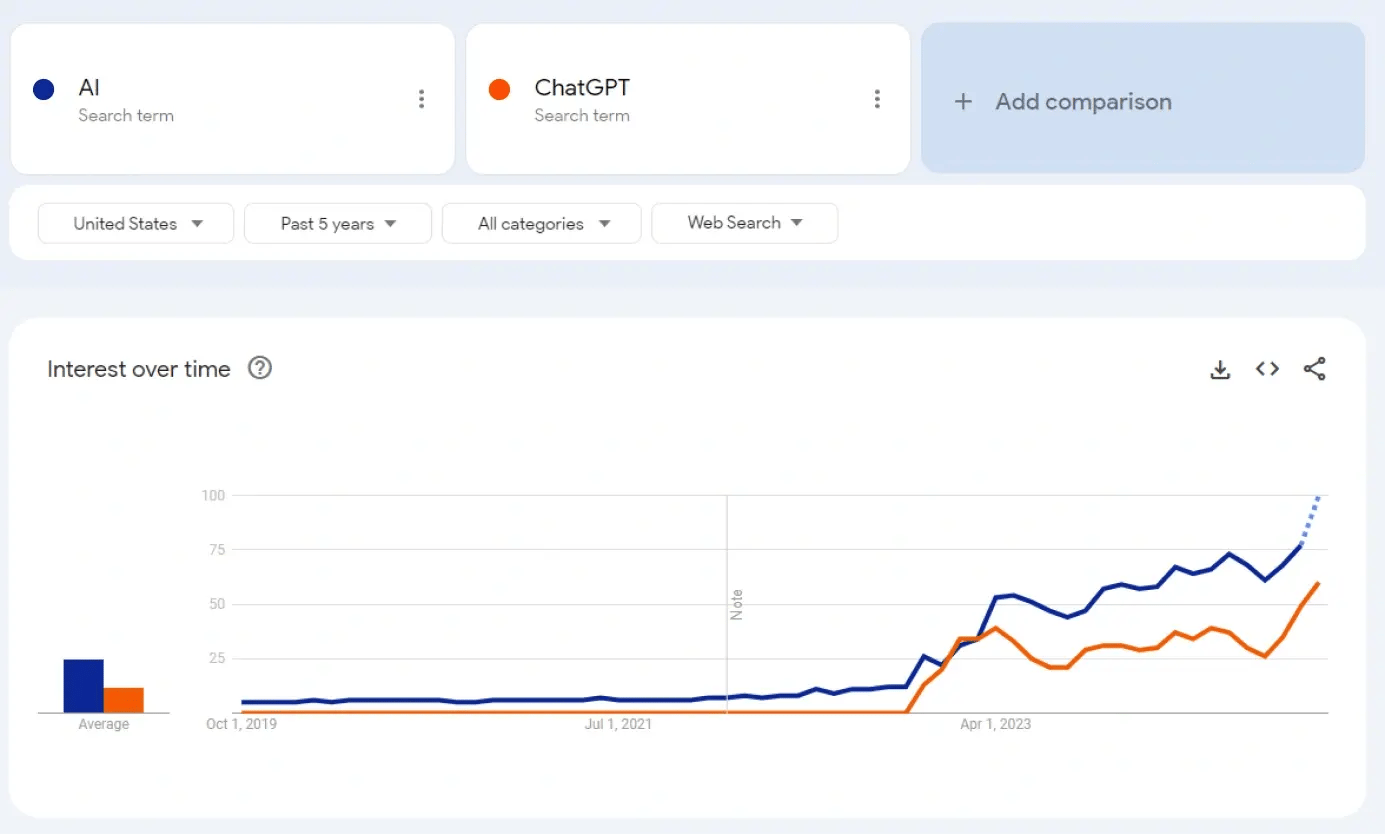
Google Search trends show a clear correlation between the terms AI and ChatGPT.
To understand where AI can be used, it is important to understand what AI is. The simplest definition is a machine exhibiting human-like intelligence, having the ability to think and respond to tasks like a human would.
Understanding The Terminology
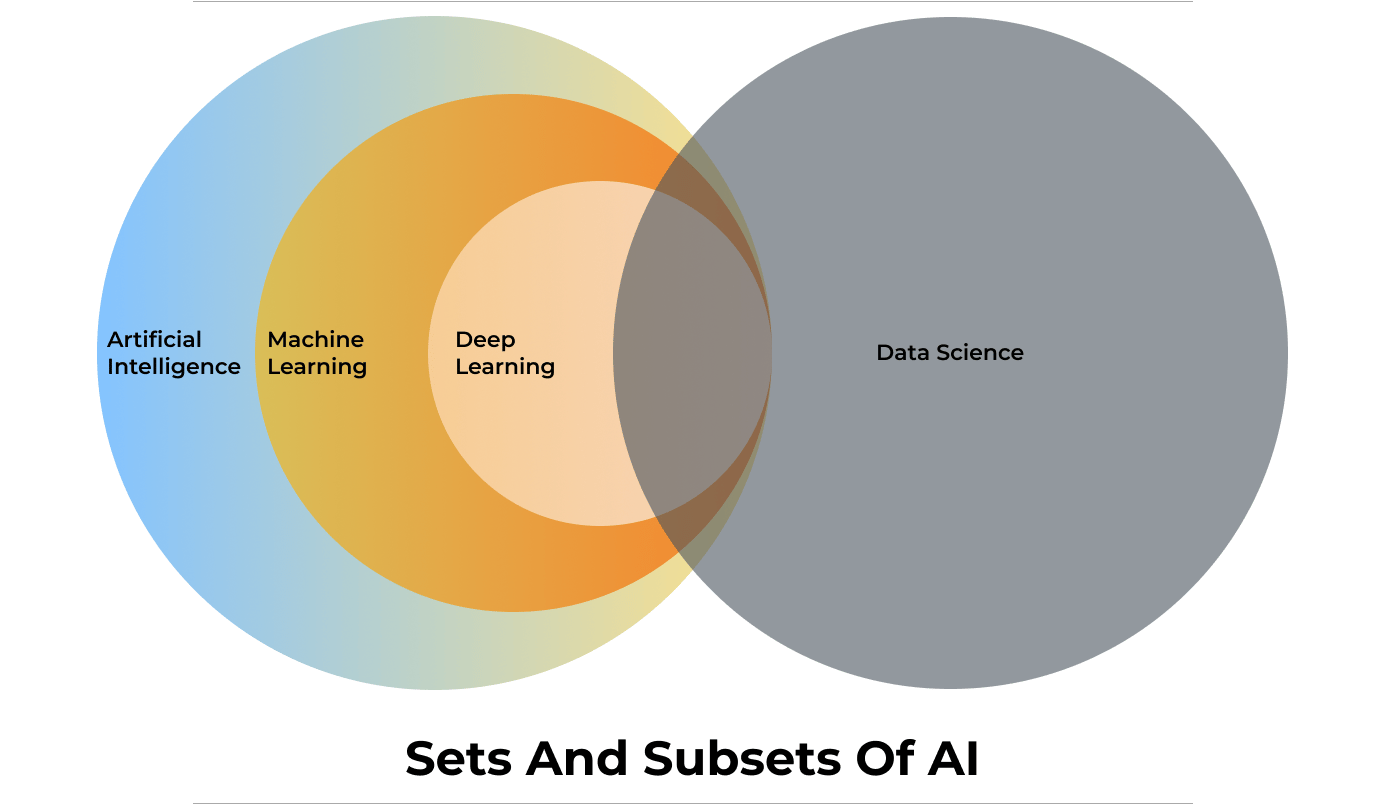
There are different terms related to learning and working with AI.
Machine Learning And Deep Learning
Machine learning (ML) and Deep Learning (Dl) are two of the most important terms related to AI and can be considered as subsets of AI.
Machine Learning is a branch of AI that learns patterns to make predictions, recommendations, or decisions based on the data fed to the system. Once it has learned from the data, it can identify patterns and perform tasks autonomously.
DXPs often use Machine Learning to analyze user behavior, predict customer needs, and suggest personalized content, enhancing user engagement and retention.
Deep Learning is a subset of ML that uses many-layered neural networks to model complex data and its relationships, hence the term “deep.” DL setups are particularly useful when dealing with multi-dimensional data like images, language, or speech. For example, Natural Language Processing (NLP), an application of Deep Learning, enables DXPs to offer voice search, multilingual support, and more personalized customer interactions.
[embedded content]
Generative AI
Generative AI is a subset of Deep Learning. It is an artificial intelligence system that can generate new content, such as text, images, audio, video, and even programming code. Unlike other AI models which focus on recognizing patterns or making predictions, generative AI models create new data based on already learned patterns.
In a digital experience platform, generative AI can be used to dynamically generate personalized content such as custom product descriptions, individualized email campaigns, or unique landing pages tailored to user preferences.
Large Language Model
A Large Language Model (LLM), is an AI system designed to understand and generate human language. These models are trained on vast amounts of text data, enabling them to perform tasks like answering questions, summarizing information, and generating content that mimics human writing. Examples of LLMs include GPT-4, Gemma, Llama, Mistral, and Claude.
LLMs can be open or closed, with key differences in accessibility and transparency. An open LLM is available for public use and is usually open-source licensed. The model’s code, architecture, and data used for training the LLM are disclosed and available openly.
Closed LLMs are typically proprietary, which means access is restricted and might be available through a paid subscription or license. The internal workings, code, architecture and training data are not disclosed.
For a DXP, the choice between open and closed LLMs depends on customization needs, cost considerations, and the importance of transparency.
Vector Database
Humans interact with data like a relational database system. Relational databases are essentially two-dimensional, which means users store data in rows and columns. To fetch a cell in this 2D grid, the user will require a query.
Instead of using this system, AI uses Vector Databases to store and interact with data. Vector Databases store higher dimensional data. Higher dimensional data is more than just rows and columns. It is not just storing data but also memorizing how data is related to each other.
For example, in a box of LEGO bricks, a traditional database will just store information like shapes, sizes, and colors. But a vector database will also store data about how they connect with each other so that you can build a cool racing car with it.
RAG
RAG (Retrieval-Augmented Generation) is an AI approach that blends information retrieval with the power of generative language models (LLMs). This combination allows the AI to produce more accurate, current, and relevant text by using targeted knowledge along with its language abilities.
Prateek Jain, Director of DXP Services at Axelerant, and Swarad Mokal, Technical Program Manager at Axelerant, discuss the basics of the RAG AI framework and its possible use cases in a recent webinar.
[embedded content]
Privacy And Security
AI models are trained on data, requiring large amounts of data to be trained properly. This raises concerns about personal information being gathered without consent.
As AI becomes embedded in DXPs, it becomes critical to responsibly handle large volumes of user data. DXPs also need to ensure compliance with data protection regulations like GDPR and CCPA while providing seamless and personalized experiences.
AI models often act as "black boxes," where the decision-making process isn't transparent. Ensuring that AI-driven DXPs maintain high levels of trust and transparency is essential for building and maintaining user confidence.
It is also critical to safeguard against potential AI misuse. For example, if a malicious individual knows that the organization is allowing an AI model to read all incoming emails, they can send an email to talk to your AI model. This email will subtly manipulate the AI model or even send misleading messages and information.
That is why it is important to first come up with a set of AI policies to decide how to integrate AI, for example: a general good practice is to always have a Human in the loop.
How Can Axelerant Help You Transform Your Customer’s Digital Experiences With AI
The experts at Axelerant have been constantly exploring many possibilities for integrating AI into Digital Experience Platforms.
How Axelerant Successfully Implemented AI In DXP Workflows
Axelerant’s experts have implemented multiple Proof of Concepts (POCs) that showcase how AI can be seamlessly integrated into DXP workflows.
Axlebot
Axlebot is a cloud-based AI model trained on localized knowledge bases like Confluence, Handbooks, and GitHub repositories. It can answer queries with citations through Slack integration.
Contextual Learning Search With Drupal
This is a RAG AI setup integrated with Drupal for sites with large content stores. It offers direct answers to queries rather than simple search links, making it ideal for universities, government sites, and NGOs.
AI In Content Search
This POC demonstrates how organizations can integrate the Drupal AI module with OpenAI and Anthropic LLM models to improve content search. The search results were further improved by integrating Pinecone’s vector database for indexing.
AI-Generated Alt Tags And Meta Tags
By integrating OpenAI with Drupal 10, AI can generate meta tags such as title, description, abstract, and keywords. This data is based on content fields like the body and title. If the body field is empty, AI will generate tags from the title alone. To fit specific content needs, customization can be implemented by modifying the module code.
Interested In A Demo?
Reach out to the experts at Axelerant for a demonstration of how to make your customer’s digital experiences more intelligent, responsive, and capable.
Drupal 10 released in December 2022 and ever since, the community has been pushing its users to migrate to the latest version.
As many as 54% of all Drupal sites are running on Drupal 7.
Using an outdated version has downsides. Businesses miss out on technological advancements and new features that can speed up and safeguard their digital properties.
With the release of Drupal 10 and the fact that Drupal 7 will reach end of life in November 2023, it is crucial to migrate to Drupal 10 soon. Here’s why enterprises should plan their Drupal 10 migration now, and not wait until the last moment.
Why should you migrate from Drupal 7 to Drupal 10?
Drupal 10 brings automated updates, improved user experience, along with several other feature additions. These components will be more secure, user-friendly, and powerful. Let’s dive deep into why enterprises must plan their Drupal 7 to 10 migration.
- Community support: As an open source CMS, community support is what keeps Drupal's continuous innovation ongoing. With Drupal community prioritizing and actively focusing on security of newer versions, as and when Drupal 7 reaches end of life, the community support will seize. This primarily jeopardizes the security of your Drupal 7 website. This also means that contributed modules and themes that are currently used in your Drupal 7 website, will also lose support for maintenance. This would bring challenges in website maintenance.
- New features and upgrades: Another consequence of not upgrading to latest version is that certain functionalities may cease to perform as intended. Or there may be better alternatives available. Not only can this cause extra annoyance among website maintainers, but resolving these issues may incur additional expenditures for your company owing to the time and resources required to do so. In Drupal 7, while developers had to manually upgrade/updates or search for modules from drupal.org , Drupal 10 has simplified this with Automated updates and Project browser, respectively. A lot of Drupal 7 features are either incorporated out-of-the-box in Drupal 10 or simply removed to maintain ease-of-use.
- Automatic updates: Drupal sites require manual upgrading, which may be challenging, time-consuming, and expensive. Delays in applying security upgrades can lead to hacked sites. The Automated Updates Initiative seeks to give Drupal sites safe, secure automatic updates. In order to minimize the total cost of ownership of maintaining a Drupal site, increase the security of Drupal sites in the wild, and lower the entry barrier for utilizing Drupal, a safe mechanism for automatically deploying updates in Drupal is to be implemented.
- Project browser: Module installation and locating involve too many steps. Some steps call for you to navigate away from your Drupal site and visit Drupal.org. Other procedures, like utilizing Composer from the command line, need technical knowledge. For users who are new to Drupal and site builders, project browser aims to make it simpler to identify and install modules. This eliminates the need to visit Drupal.org or other sites. It is one of the primary Drupal strategic projects that determines the platform's development goals.
- New themes: Olivero & Claro - The Drupal 7 "Seven" theme from 2009 gave off an out-of-date system impression. Seven was replaced by the new "Claro" theme, which was created in accordance with the most recent requirements. The front-end theme, "Olivero," was created to fit with features that are well-liked by users, such as the Layout Builder. The Olivero theme will be WCAG AA compliant.
The simple finding and installation of modules should empower Drupal newcomers as well as "ambitious site builders" – Dries Buytaert
- Automatic updates: Drupal sites require manual upgrading, which may be challenging, time-consuming, and expensive. Delays in applying security upgrades can lead to hacked sites. The Automated Updates Initiative seeks to give Drupal sites safe, secure automatic updates. In order to minimize the total cost of ownership of maintaining a Drupal site, increase the security of Drupal sites in the wild, and lower the entry barrier for utilizing Drupal, a safe mechanism for automatically deploying updates in Drupal is to be implemented.
- Technical Dependencies: Drupal work on current supported PHP versions. Recommended PHP versions are the best choice for building a Drupal site because they will remain supported longer. Drupal 10 is built on PHP version 8.0 while 7 isbuilt on PHP 7 which is also reaching end of life. This creates technical dependencies in supporting the platform better.
- jQuery, jQuery UI, jQuery Forms- Drupal 7 includes old and unsupported versions of these libraries. jQuery's current version is 3.6.x. Drupal 7 includes 1.4.2. Other libraries have comparable challenges. You may minimize this little with the jQuery Update module, although the most recent version is 2.1.x. Drupal 8 and later (as well as many other content management systems) make it simple to provide API access to your content. In the age of "publish everywhere," this is a critical feature. Drupal 7 has some basic API support, but if you want a full-fledged API with write support, you'll have to create it yourself, which adds technical debt and possible vulnerabilities.
- CKEditor 5 update from CKEditor 4 - With a thorough rebuild and an exciting new feature set, CKEditor 5 gives Drupal 10 a modern, collaborative editor experience. Users of programs like Microsoft Word or Google Docs will be used to the new CKEditor's interface. It also offers common tools for collaboration like comments, change suggestions, version histories, and other accepted editing practices. Additionally, it has outputs to.docx and.pdf files for straightforward conversion to print formats. Although the integration is still being worked on, Drupal core 9.3 already has an experimental version if you want to try it out.
- Composer 2 and PHP 8 support - Although backporting of composer 2 to Drupal 8 was successful, PHP 8 compatibility was not. PHP 8 will be required for Drupal 10 because PHP 7 will be discontinued in November 2022.
- jQuery, jQuery UI, jQuery Forms- Drupal 7 includes old and unsupported versions of these libraries. jQuery's current version is 3.6.x. Drupal 7 includes 1.4.2. Other libraries have comparable challenges. You may minimize this little with the jQuery Update module, although the most recent version is 2.1.x. Drupal 8 and later (as well as many other content management systems) make it simple to provide API access to your content. In the age of "publish everywhere," this is a critical feature. Drupal 7 has some basic API support, but if you want a full-fledged API with write support, you'll have to create it yourself, which adds technical debt and possible vulnerabilities.
- Modules that have gone out of support: The Drupal 10 core will be updated to eliminate a few modules that are redundant or are not frequently used. For uniformity, these modules will be transferred to the Contributed Module area. Gathers and presents syndicated material from outside sources (RSS, RDF, and Atom feeds).
- QuickEdit: In-place content editing
- HAL - Serializes entities using the Hypertext Application Language.
- Users may keep track of recent content with the activity tracker feature.
- RDF – Enhances websites with metadata so that other systems may comprehend their characteristics.
You will have to leave Drupal 7 behind. Eventually, the opportunity cost of continuing to use software that is more than 10 years old is substantial, and once it is considered End of Life (EOL), the risk and expense of an uncovered vulnerability increases rapidly.
There are several possibilities available to you, and you have an additional year to choose and make plans for one of them. The ideal option will rely on the expertise level of your team, the amount of business logic you have included into Drupal 7, and your projected budget.
Conclusion
Drupal 7 will reach end of life in November 2023, Drupal experts recommend that organizations begin migrating to Drupal 10 soon and not wait till November 2023.
If you want to migrate your website to Drupal 9 and prepare for Drupal 10, you may rely on our Drupal migration skills and expertise.
OpenSense Labs, as a Drupal partner, is committed to providing active support. Contact us at [email protected] for a long-term and fruitful collaboration.
The significance of SEO in digital business is no secret. Organizations invest thousands of dollars just to be on the top of the search engine result pages. Despite several tectonic shifts in consumer behavior, organic search delivers the most traffic. More on that later
SEO is more than just adding keywords.
An important part of doing SEO right is ensuring your technical SEO is set right.
Apparently, organizations that have websites built on mature CMS like Drupal have to care less about technical SEO. All aspects of Google-identified site and page-level best practices are ensured out-of-the-box.
In this article, we’ll dive deep to understand different Google ranking factors and how Drupal ensures you stay on top of those trends.
SEO Objectives
Organic search remains the dominant source since budget restraints many marketers to opt for Google Ads for more visibility on SERP.
Best SEO practices not only ensure higher ranking but are also budget-friendly.
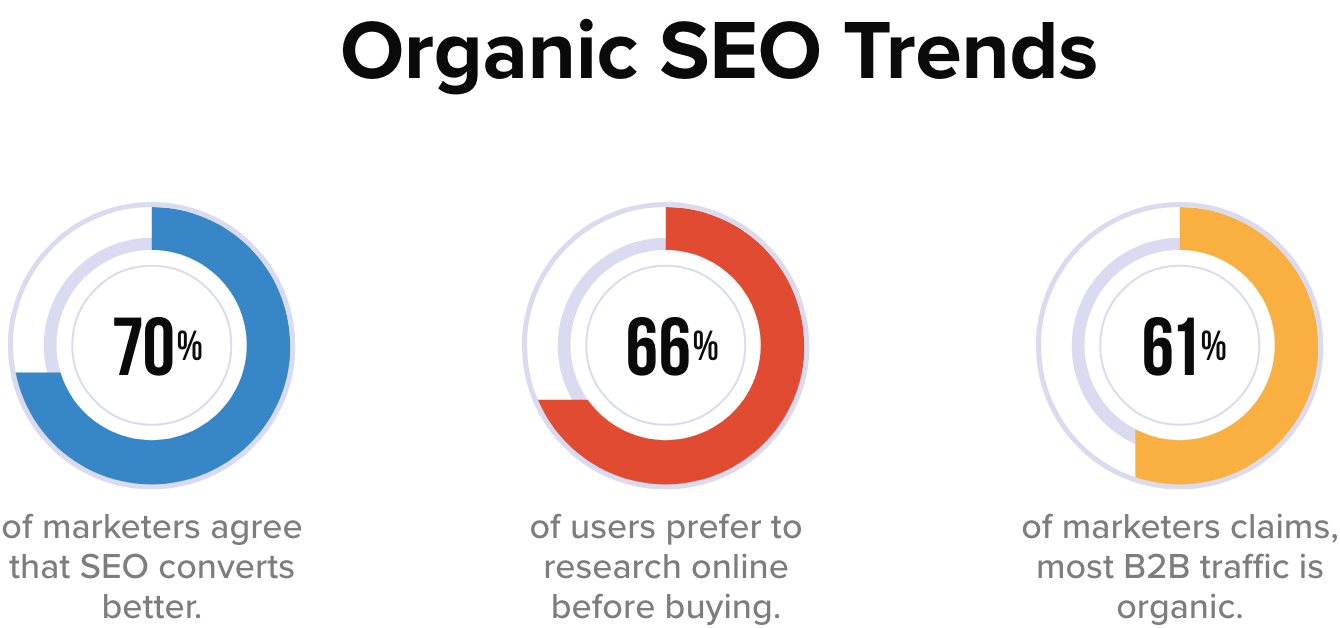
According to research, 61% of Google traffic comes from organic searches. Before we move to understand SEO objectives, here's a look at organic SEO trends.
Some of your SEO goals can be:
- Brand Visibility: It simply means the rate at which your brand is visible to the target audience. SEO immensely helps enterprises to improve their brand visibility.
The more people are aware of your brand online the better your chances of a higher conversion rate. In this digital age where people consume most of their information online, not having a solid online presence is simply not an option.
Content marketing notably has a great role to play in brand awareness and when it gets infused with SEO it has the potential to make a significant transformation.
- Better ROI: Good brand visibility paves the way to high ROI. If you use SEO strategically then your conversions will increase. On-page SEO is an effective strategy to rank higher on search engines and drive more organic traffic to your website.
The more people visiting your website the more likely you will get better conversions.
- Organic Traffic: Despite so many shifts in consumer behavior people still mostly use organic ways to search for any product/service.
According to content marketing statistics 2022, quality content with optimized images can increase organic traffic by over 111.3%. On-page SEO addresses all of the tactics necessary for improved organic traffic.
The improved technical aspects of your website contributed to a better user experience, ease to crawl, and thus increased organic traffic.
Let's understand some Drupal SEO modules that you can use to make your website SEO friendly and rank higher on search engines.
Site Level Factors & Modules
- Advanced CSS/JS Aggregation: Slow website load directly affects the search engine rankings. Advanced CSS/JS Aggregation is a must-have module for websites with a lot of CSS/JS files which means this module compresses your frontend files and speeds up your website.
- CDN: A content delivery network is a distributed system of servers deployed in multiple data centers around the world. Website performance directly affects your search engine ranking and user experience. A website that takes an eternity to load will eventually lose most of its visitors. A CDN will distribute a load of your website across servers globally to reduce load time. This module will help the website in loading faster and thus improves user experience and website performance.
- AMP: AMP also known as the accelerated mobile page is an open-source framework launched by a joint initiative of google and several other tech companies. Accelerated mobile pages are lightweight and designed to give mobile users lighting fast and more engaging experience. This module converts web pages as per AMP standards and helps web pages to load faster on mobile and tablets.
- Search 404: 404 error occurs when a content of a URL is moved or deleted. It is considered bad for SEO as it hampers user experience and google bots also penalize such websites. When a web page is deleted or moved ‘search 404 module’ will do a search for URLs that are being moved or removed and show the result of the search instead of a 404 error. This improves the site’s SEO by making sure inactive URLs don’t hamper user experience by delivering the content as per the user’s query.
- Blazy: Lazy loading is a technique for waiting to load particular parts of the website, especially images- when needed. The Blazy module provides lazy image loading to save load bandwidth and help reduce bounce rate. It also helps in saving bandwidth for important information before the website load completely.
- Cloud Flare- This module helps your website load 30% faster, use 60% less bandwidth, and process 65% fewer requests. Cloud flare is a global network designed to make everything you connect secure, fast, private, and reliable. Fast content delivery and Improve SEO are some more features of cloud flare.
- XML Sitemap: In the simplest terms site map is an XML file that contains all your website URLs along with additional metadata about each URL. XML site map creates an efficient site map of your website that is easy to crawl and automatically gets added to search engines like google, bing, yahoo, etc. Site map links pertaining to the content, menu items, taxonomy terms, and user profile can also be added.
- Simple XML Sitemap: This module helps your website in creating individual site maps for each webpage according to google guidelines and policies. Apparently, a simple XML sitemap helps your website get indexed faster on any search engine. This module creates multilingual site maps for entities, views, and custom links and it supports all Drupal’s content entities i.e. nodes, taxonomy terms, users, and menu links.
- Robots txt: A robots.txt file tells search engine crawlers which URLs the crawler can access on your site. Use this module if you are operating numerous Drupal sites from a single code base and each one requires a distinct robots.txt file. This module produces the robots.txt file automatically and allows you to change it from the web UI on a per-site basis.
- Schema.org Usage: Pages with micro formatting tend to rank higher on SERP. Schema markup help website create formatted pages that help search engines understand your content easily. This module specifies the mapping between content types and fields with schema.org types and properties.
-
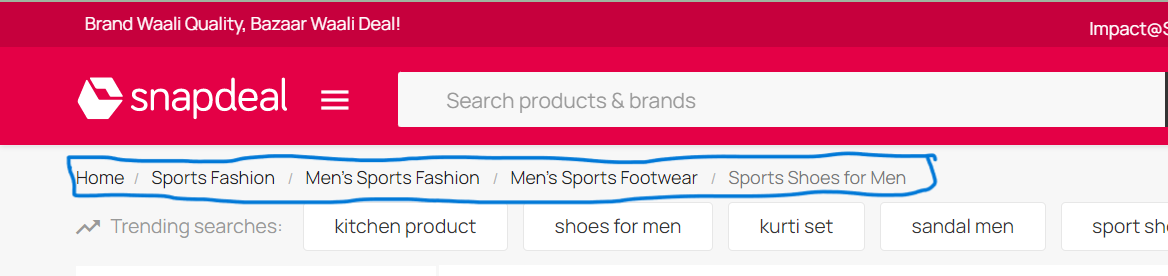
Menu breadcrumbs: A website with a large amount of data would immensely benefit from the menu breadcrumbs module. As this module builds a navigational path for visitors that helps the website track users' exact behavior on the website and enhance user experience.
![Snapshot Breadcrumb]()
-
Easy breadcrumb: Navigational design of a website describes how different pages of a website are organized and connected to each other. When a site is easy to navigate it increases visit duration. The easy breadcrumbs module helps in creating an accessible navigational website structure that is easy to navigate.
-
Link checker: This module is useful to detect broken links from the content. Both internal and external links can be checked via the link checker module. It occasionally removes broken links from your stored content by checking the remote sites and assessing the HTTP response codes. Broken links can easily be checked in the log/report section. In the “my account” section, author-specific broken links are stored.
-
Menu attributes: As the name suggests, this module helps you add extra attributes to your menu section like class, ID, name, style, relationship, and target. A well-organized menu helps users’ website accessibility and experience.
-
Pathauto: User-friendly URLs are extremely vital for boosting your SEO efforts. Pathauto module allows you to generate a URL based on your content. It is a must-have module for any website to make it SEO-friendly.
-
Metatag: Search engines usually prefer websites with optimized content and meta description. The meta tag module creates structured meta tags for your website so that your website ranks higher on SERP. In addition to that this module also provides support to meta tags from other social media sites. You can furthermore control how your content is going to appear on different platforms.
-
Hreflang: Now if are not sure what hreflang is then it is an HTML attribute used to specify the language and geographical targeting of a webpage. When you have different geographies to target then your website should be multilingual. This module is best for websites with multilingual content. The Hreflang module automatically adds tags to your website’s enabled languages.
The multilingual website attracts a larger audience, improves the brand image, and has an edge over competitors. With only 25% native English speakers, it's a great opportunity to reach out to the rest 75%.
-
External Hreflang: This module allows you to add hreflang for external sites to easily detect spammy and faulty websites. External links connecting spammy websites degrade the user experience and can damage your brand presence and online ranking.
-
Redirect: Directing visitors and bots from one URL to another is called redirection. The key benefits of redirection are to improve user experience and help search engines better understand website content. The redirect module helps in merging websites, moving domains, deleting existing pages, and switching from HTTP to HTTPS.
301, 302, and javascript redirects inform the web browser that a page has moved from one URL to another and let visitors and users land on the right page.
-
Domain 301 Redirect: A 301 redirect sends all the requests from the old URL to the new one. Domain 301 redirect help in redirecting users to relevant pages and page relevance congruent with the user’s query help in good ranking. This module allows sites to 301 redirects to a domain that has been selected as the main domain.
- W3C Validator: HTML errors or poorly coded websites can hamper the site quality and bad site quality consequently damages your website’s SEO. W3C validator reduces the code size on your web page and adds value to your content. Small codes help your website loading speed on diverse platforms. It validates your HTML and CSS codes according to international coding standards.
Page level factors
- CKeditor: It is a rich text editor that helps users write or edit the content inside the webpage. It has a nice writing interface where you can easily format and style content like adding a head, sub-heads, and numbering and bullet feature for better readability.
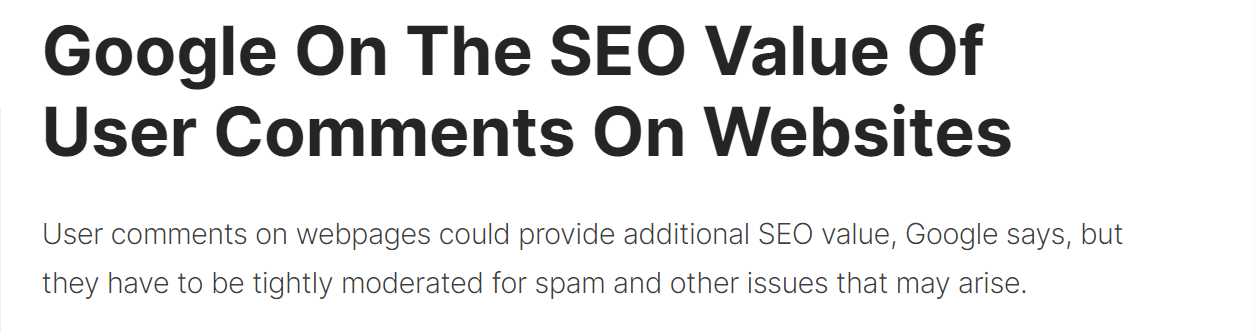
- Disqus: Pages with lots of comments may be a signal of user interaction and quality. In fact, one Googler said comments can help “a lot” with rankings. Enabling comments on a blog has multiple benefits including the possibility. To engage with your readers and grow a strong community. Disqus module helps you integrate a comment feature on your website that helps your readers to better engage with your content.
![Snapshot-Benefits of comments in website]()
- Scheduler: This module can help content writers to plan and publish content as per their requirements. The scheduler module makes your overall publishing experience hassle-free and supports both Drupal 7/9.
Time Scheduling enables achieving your intended interest group in the circumstances they're on the web, regardless of the possibility of what that time is, hence it has a huge benefit in content marketing.
- Automatic Alternative Text: Alt text is basically an alternative text for images. The whole purpose of alt text is to improve accessibility by describing what an image looks like to the user who doesn’t have the ability to see it.
![SEO benefits of Alt-text]()
This module automatically generates an alt text for your images if you missed putting one. Interestingly google prioritize images with meaningful alt text and it can be helpful in ranking higher on google.
- ImageAPI Optimize: A blog with optimized images has always been the prime factor for higher ranking. Search engines prioritize images that have a proper title, description, alt text, file name, and caption. This module allows you to compress images without compromising image quality with flawless image optimization.
- ImageMagick: This is an open-source software suite that helps edit, display, and convert picture elements and vector files. It’s also helpful in creating image thumbnails, color correction, and liquid rescaling which basically means rescaling the image without distortion.
- CKEditor Nofollow: A no follow link doesn’t authorize the website it is linking to. You can make no follow the link by Adding the “re=nofollow” code to your website. This module requires no modules outside of Drupal core and is used to add rel="nofollow" to links using CKEditor widget.
- Linkit: Internal links are the inclusion of web pages connected to each other. It can increase the ranking of the other pages within your website. It helps both readers and crawlers to easily find your site. Linkit gives you a nice interface for searching and links to internal content on your website instead of you trying to look for URLs manually. Within the editor section, you can select which URL you want to interlink and you will get the asked result.
- Editor advance Link: This module helps you convert normal hyperlinks into a styled button. This module allows content creators and editors more control over link appearance or functionality.
- CKEditor Entity Link: Drupal entities (content, tag, files) can be easily linked with the help of CKEditor Entity Link. This module is compatible with Drupal 9 and with all content entity types. It allows you to choose which entity types and bundles to search for and also provides an autocomplete box to make entity selection easier.

Drupal SEO Checklist Modules
- SEO Checklist: This module is compatible with Drupal 8/9. As the name suggests Drupal SEO checklist module creates an automated SEO optimization checklist so that you can optimize your website hassle-free. If you are someone who likes to follow organized checklists for website optimization then this module is a must-have.
- Real-time SEO for Drupal: If you like writing your content according to SEO guidelines then this module is quite helpful. SEO is a great source for organic reach and a higher SERP ranking is the prominent source of it. While writing, real-time SEO for Drupal provides inbuilt SEO-friendly suggestions as per best SEO standards.
- Requires on Publish:This module is required when your content is published or getting published. Requires on publish can be used when you have fields on your pieces of content, such as tags or SEO information, that editors don't need to fill up until the material is published.
Conclusion
Drupal comes with countless SEO benefits and it delivers the best SEO results. All the modules that we discussed encompass all the features that can help you achieve the best quality results in 2023 and beyond.
With changing Google updates and SEO trends, you need a technology partner that makes sure your digital game is top-notch.
Our Drupal expertise ensures that your site measures up to Drupal’s capabilities in SEO and you leverage them for the top-most SERP rankings.
Looking to enhance your website’s visibility on Search Engines? Get the SEO results you want.
Contact us at [email protected] and let our experts help you out with SEO.
This year a significant number of students are working on RTC-related projects as part of Google Summer of Code, under the umbrella of the Debian Project. You may have already encountered some of them blogging on Planet or participating in mailing lists and IRC.
WebRTC plugins for popular CMS and web frameworks
There are already a range of pseudo-WebRTC plugins available for CMS and blogging platforms like WordPress, unfortunately, many of them are either not releasing all their source code, locking users into their own servers or requiring the users to download potentially untrustworthy browser plugins (also without any source code) to use them.
Mesut is making plugins for genuinely free WebRTC with open standards like SIP. He has recently created the WPCall plugin for WordPress, based on the highly successful DruCall plugin for WebRTC in Drupal.
Keerthana has started creating a similar plugin for MediaWiki.
What is great about these plugins is that they don't require any browser plugins and they work with any server-side SIP infrastructure that you choose. Whether you are routing calls into a call center or simply using them on a personal blog, they are quick and convenient to install. Hopefully they will be made available as packages, like the DruCall packages for Debian and Ubuntu, enabling even faster installation with all dependencies.
Would you like to try running these plugins yourself and provide feedback to the students? Would you like to help deploy them for online communities using Drupal, WordPress or MediaWiki to power their web sites? Please come and discuss them with us in the Free-RTC mailing list.
You can read more about how to run your own SIP proxy for WebRTC in the RTC Quick Start Guide.
Finding all the phone numbers and ham radio callsigns in old emails
Do you have phone numbers and other contact details such as ham radio callsigns in old emails? Would you like a quick way to data-mine your inbox to find them and help migrate them to your address book?
Jaminy is working on Python scripts to do just that. Her project takes some inspiration from the Telify plugin for Firefox, which detects phone numbers in web pages and converts them to hyperlinks for click-to-dial. The popular libphonenumber from Google, used to format numbers on Android phones, is being used to help normalize any numbers found. If you would like to test the code against your own mailbox and address book, please make contact in the #debian-data channel on IRC.
A truly peer-to-peer alternative to SIP, XMPP and WebRTC
The team at Savoir Faire Linux has been busy building the Ring softphone, a truly peer-to-peer solution based on the OpenDHT distribution hash table technology.
Several students (Simon, Olivier, Nicolas and Alok) are actively collaborating on this project, some of them have been fortunate enough to participate at SFL's offices in Montreal, Canada. These GSoC projects have also provided a great opportunity to raise Debian's profile in Montreal ahead of DebConf17 next year.
Linux Desktop Telepathy framework and reSIProcate
Another group of students, Mateus, Udit and Balram have been busy working on C++ projects involving the Telepathy framework and the reSIProcate SIP stack. Telepathy is the framework behind popular softphones such as GNOME Empathy that are installed by default on the GNU/Linux desktop.
I previously wrote about starting a new SIP-based connection manager for Telepathy based on reSIProcate. Using reSIProcate means more comprehensive support for all the features of SIP, better NAT traversal, IPv6 support, NAPTR support and TLS support. The combined impact of all these features is much greater connectivity and much greater convenience.
The students are extending that work, completing the buddy list functionality, improving error handling and looking at interaction with XMPP.
Streamlining provisioning of SIP accounts
Currently there is some manual effort for each user to take the SIP account settings from their Internet Telephony Service Provider (ITSP) and transpose these into the account settings required by their softphone.
Pranav has been working to close that gap, creating a JAR that can be embedded in Java softphones such as Jitsi, Lumicall and CSipSimple to automate as much of the provisioning process as possible. ITSPs are encouraged to test this client against their services and will be able to add details specific to their service through Github pull requests.
The project also hopes to provide streamlined provisioning mechanisms for privately operated SIP PBXes, such as the Asterisk and FreeSWITCH servers used in small businesses.
Improving SIP support in Apache Camel and the Jitsi softphone
Apache Camel's SIP component and the widely known Jitsi softphone both use the JAIN SIP library for Java.
Nik has been looking at issues faced by SIP users in both projects, adding support for the MESSAGE method in camel-sip and looking at why users sometimes see multiple password prompts for SIP accounts in Jitsi.
If you are trying either of these projects, you are very welcome to come and discuss them on the mailing lists, Camel users and Jitsi users.
GSoC students at DebConf16 and DebConf17 and other events
Many of us have been lucky to meet GSoC students attending DebConf, FOSDEM and other events in the past. From this year, Google now expects the students to complete GSoC before they become eligible for any travel assistance. Some of the students will still be at DebConf16 next month, assisted by the regular travel budget and the diversity funding initiative. Nik and Mesut were already able to travel to Vienna for the recent MiniDebConf / LinuxWochen.at
As mentioned earlier, several of the students and the mentors at Savoir Faire Linux are based in Montreal, Canada, the destination for DebConf17 next year and it is great to see the momentum already building for an event that promises to be very big.
Explore the world of Free Real-Time Communications (RTC)
If you are interesting in knowing more about the Free RTC topic, you may find the following resources helpful:
RTC mentoring team 2016
We have been very fortunate to build a large team of mentors around the RTC-themed projects for 2016. Many of them are first time GSoC mentors and/or new to the Debian community. Some have successfully completed GSoC as students in the past. Each of them brings unique experience and leadership in their domain.
Helping GSoC projects in 2016 and beyond
Not everybody wants to commit to being a dedicated mentor for a GSoC student. In fact, there are many ways to help without being a mentor and many benefits of doing so.
Simply looking out for potential applicants for future rounds of GSoC and referring them to the debian-outreach mailing list or an existing mentor helps ensure we can identify talented students early and design projects around their capabilities and interests.
Testing the projects on an ad-hoc basis, greeting the students at DebConf and reading over the student wikis to find out where they are and introduce them to other developers in their area are all possible ways to help the projects succeed and foster long term engagement.
Google gives Debian a USD $500 grant for each student who completes a project successfully this year. If all 2016 students pass, that is over $10,000 to support Debian's mission.

Technical debt occurs when you take a shortcut, thinking "this will do for now. I'll sort it out properly later." And then you keep putting off "later", and probably forget about the issue ... until it comes back to bite you.
It's all those tiny things like a misspelled variable, whose misspelling has to be replicated evermore, or making a configuration change on a live site without capturing it in code, so that the live site is now different to the development one.
It's going [copy]-[paste] to a chunk of code when you really should be abstracting it into its own function.
It's neglecting coding standards. Even 'just this once', making your code harder to read and understand.
It's adding a */
About Drupal Sun
Drupal Sun is an Evolving Web project. It allows you to:
- Do full-text search on all the articles in Drupal Planet (thanks to Apache Solr)
- Facet based on tags, author, or feed
- Flip through articles quickly (with j/k or arrow keys) to find what you're interested in
- View the entire article text inline, or in the context of the site where it was created
See the blog post at Evolving Web