

Upgrade Your Drupal Skills
We trained 1,000+ Drupal Developers over the last decade.
See Advanced Courses NAH, I know EnoughAn overview of JSON API: A text-based data exchange format
People develop APIs for a variety of reasons, such as to create a tool to facilitate internal processes or an external product for customers or to build a third party tool. And for such purpose JSON comes to the rescue. The open standard format JSON follows shared conventions that help in increasing productivity, take advantage of generalized tooling, and focus on the web applications.
If you are a developer you must have noticed that there is very little information on the web regarding JSON API when compared to its usability. In this blog post, I will share an overview of JSON API. Let's try and understand what is JSON API? Its advantages over Core REST API, core concepts with working examples.
Note: JSON is an independent component, which can be used by any framework or technology. In our case, Drupal is using its service.
Let’s start with what is JSON API?
JSON or JavaScript Object Notation is an encoding scheme that is designed to eliminate the need for an ad-hoc code for each application to communicate with servers that communicate in a defined way. JSON API module exposes an implementation for data stores and data structures, such as entity types, bundles, and fields.
What are its advantages over Core REST API?
Well, there are lots of advantages, but to mention a few:
- It reduces both the number of requests and the amount of data transmitted between clients and servers.
- Unlike core REST module, JSON API is Zero configuration Drupal module.
- By enabling the JSON API module, you can immediately gain a full REST API for every type in your Drupal application.
- JSON API inspects entity type and bundle to provide URLs to access each one of them using the standard HTTP methods, GET, POST, PATCH, and DELETE (we will discuss more on HTTP methods while talking about Document Structure).
- JSON is not simply a format like JSON or HAL+JSON. The default format appears like:
`/jsonapi/{entity_type}/{bundle}/{uuid}?_format=api_json`
- It also controls which HTTP methods should be used, what HTTP response codes should be returned under specific request, the format of the response body, and the link between resources.
Document Structure:
This section describes the structure of a JSON API document, which is identified by media type. Though the same media type is used for both request and response documents, certain aspects are only applicable to one or the other.
1. Every request/response body must be underneath a single JSON object.
2. data: the information specific to a resource or resources, must live within this top-level object under the data member.
3. type and id: JSON API derives 'type' property from the entity type machine name and bundle machine name.
Note: id in the JSON API are UUID (If we have the same site installed at different places, the nid for the same content mostly be different but UUID remains same on all environments.).
4. attributes and relationship: attributes store values specific to the underlying resource. relationships represent values that are stored by an entity reference.
Request headers:
Accept: application/vnd.api+json
Content-Type: application/vnd.api+json
Response Codes:
The JSON API module can respond with the following codes:
200 OK - All successful GET and PATCH requests
201 Created - All successful POST requests (response includes the newly created
resource).
204 No Content - All successful DELETE requests
HTTP Methods in Drupal:
Hypertext Transfer Protocol (HTTP) enables communication between clients and servers. It also defines a set of request methods to perform a certain action for a given resource. In Drupal 8, JSON API supports GET, POST, PATCH and DELETE HTTP methods.
1. Fetching resources (GET)
A web request using GET method is made only to retrieve data from a given resource. It specifies different parameters in the URL of the request based on requirements. One can make web request either by using the web browser or any other HTTP client (e.g. Postman chrome app).
To fetch all contents of Article content type, URL should be: example.com/jsonapi/node/article
Sort articles (descending): example.com/jsonapi/node/article?sort=-nid
Filter out first five contents:example.com/jsonapi/node/article/?page[limit]=5
Similarly, we can add various filter parameter in the URL based on our requirement.
Note: JSON API lists 50 objects at a time including link to next.
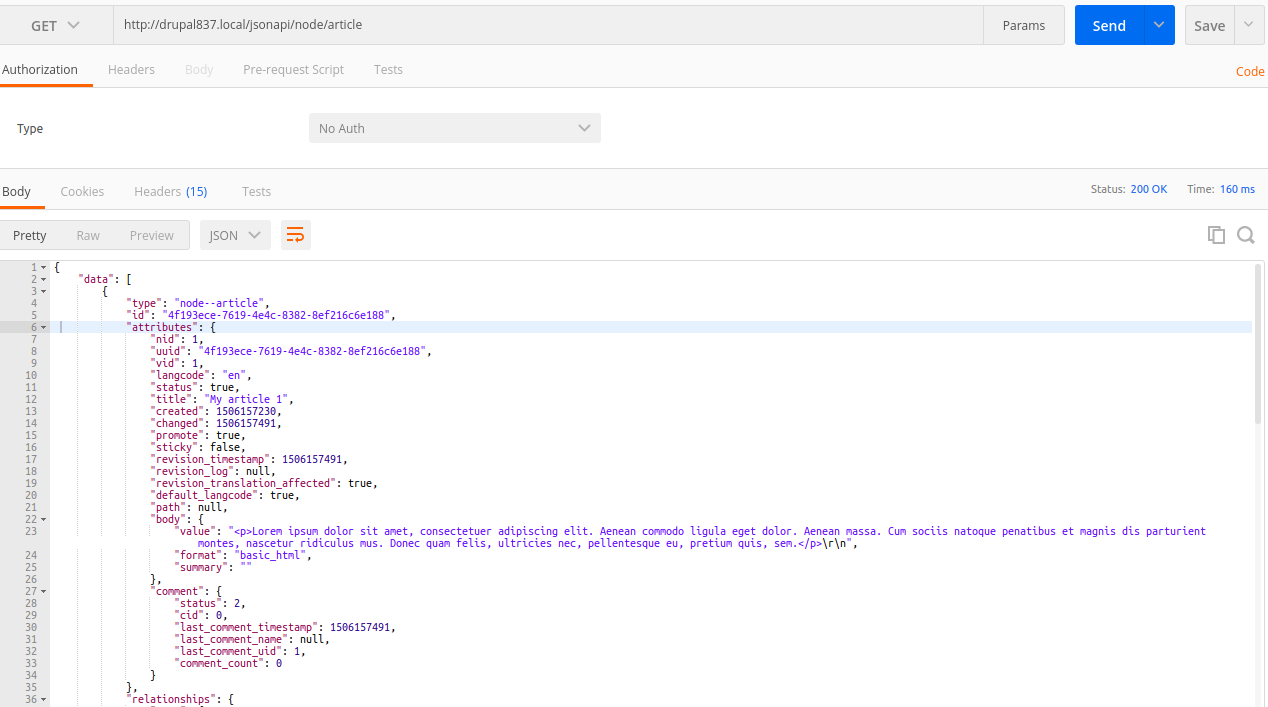
2. Creating new resources (POST)
Submit data to a server to create a new content.
Prerequisites:
- Make sure HTTP Basic Authentication Drupal core module is enabled on your site.
- Following headers are required to get correct response:
Accept: application/vnd.api+json
Content-Type: application/vnd.api+json
- Add basic authentication (credentials to your site)
Authorization: Basic YXBpOmFwaQ==
To create a content named “Hello Article” and body, write the following code in HTTP message body:
URL: example.com/jsonapi/node/article
See the screenshot below for an example
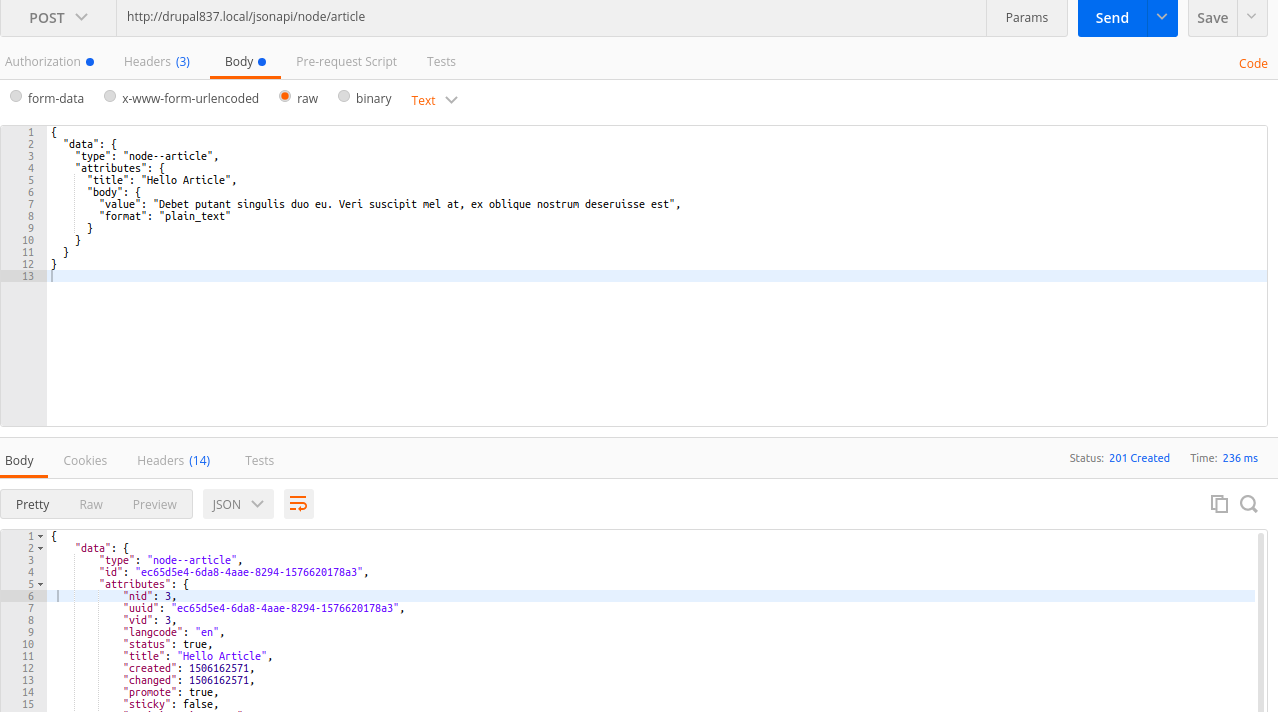
Check if the new content gets created from Drupal site (/admin/content).
3. Updating existing resources (PATCH)
PATCH method submits data to a server to update an existing content.
Prerequisites:
- Make sure HTTP Basic Authentication Drupal core module is enabled on your site.
- Following headers are required to get correct response:
Accept: application/vnd.api+json
Content-Type: application/vnd.api+json
- Add basic authentication (credentials to your site )
Authorization: Basic YXBpOmFwaQ==
To update an article’s title content, write following piece of code in HTTP message body:
URL: example.com/jsonapi/node/article/{{article_uuid}}
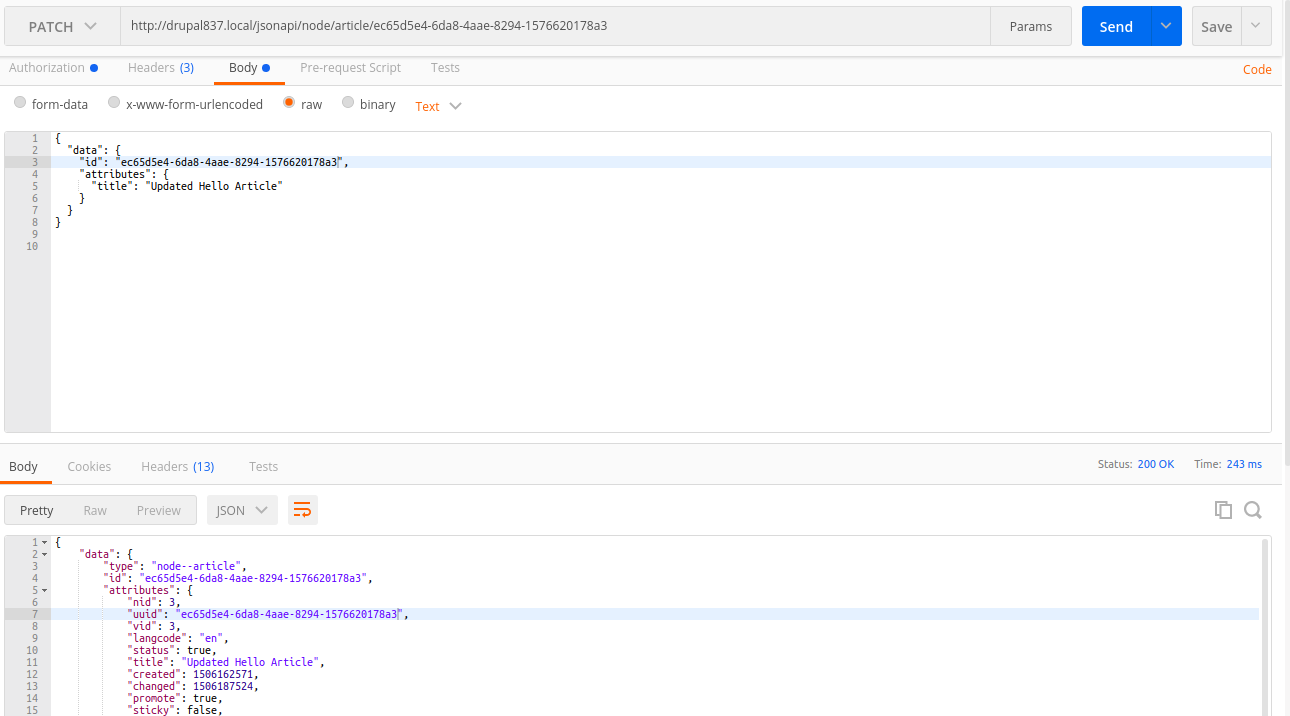
Verify if the content gets updated in Drupal site(/admin/content).
4. Removing existing resources (DELETE)
DELETE method is used to request the server to delete a specific content.Simply run the following URL to delete any specific article content.
URL: example.com/jsonapi/node/article/{{article_uuid}}
Prerequisites:
- Make sure HTTP Basic Authentication Drupal core module is enabled on your site.
- Following headers are required to get a correct response:
Content-Type: application/vnd.api+json
- Add basic authentication (credentials to your site )
Authorization: Basic YXBpOmFwaQ==
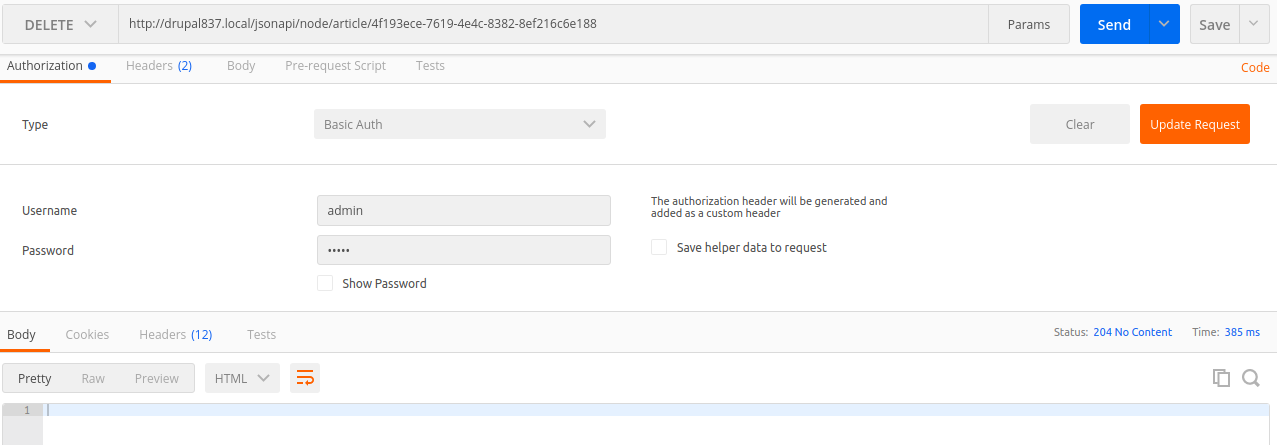
Check if the content gets deleted from the Drupal site (/admin/content).
Well, JSON is a way to store information in an organized, easy-to-access manner as it gives us a human-readable collection of data that we can access in a logical manner. Hope this blog will be helpful for you to understand and use JSON. If there is anything you would like to add or see further clarified, please let me know me in comments.
References
https://www.youtube.com/playlist?list=PLZOQ_ZMpYrZsyO-3IstImK1okrpfAjuMZ
https://www.drupal.org/docs/8/modules/json-api/json-api
https://nordicapis.com/3-methods-for-documenting-json-api-services/
http://www.json.org/
About Drupal Sun
Drupal Sun is an Evolving Web project. It allows you to:
- Do full-text search on all the articles in Drupal Planet (thanks to Apache Solr)
- Facet based on tags, author, or feed
- Flip through articles quickly (with j/k or arrow keys) to find what you're interested in
- View the entire article text inline, or in the context of the site where it was created
See the blog post at Evolving Web
